Category: Internet & Security

We provide internet and security tips to help Africans stay safe online, protect their data, and navigate the digital world securely.

  • Telecel Broadband Coverage, Prices and Packages in Ghana

    Telecel Broadband Coverage, Prices and Packages in Ghana

    Quick Summary

    Plan TypePrice Range (GHS)Data (GB)ValidityBest For
    Flexi Offers100+Depends on inputNo expiry or 30 daysLight/budget users
    One Family Packages180 – 104547 – 103530 daysHouseholds, up to 4 users
    Standard Data Plans120 – 68026 – 62130–45 daysRegular consistent usage
    Add-On Bundles6 – 2601 GB – UnlimitedVariesTopping up or heavy usage

    What Is Telecel Broadband?

    Let’s start simple: Telecel Broadband is like giving your house or office a super-fast internet pipe. Instead of relying on mobile data like your phone does, it uses fibre-optic cables—which are like glass highways for data that travel much faster than regular wires.

    That means smoother streaming, quicker downloads, better video calls, and fewer “ugh, this is taking forever” moments.

    It can reach speeds up to 300 Mbps. Just to compare, MTN’s broadband maxes out at about 60 Mbps. That’s like comparing a motorbike to a sports car.

    Real-Life Speed Example

    At one location in East Legon, a speed test on Wi-Fi showed:

    • Download: 25.72 Mbps
    • Upload: 17.51 Mbps
    • Ping: 6 ms (good for gaming or Zoom calls)

    That’s good, especially over Wi-Fi. If you plug your laptop in with a cable, it can go even faster.

    Is Telecel Broadband Available in My Area?

    Good question! Before you get excited about the plans, you need to check if Telecel covers your location.

    Here’s How:

    1. Go to the Telecel Broadband page
    2. Turn on your phone or computer’s location
    3. Click “Check Availability”

    If that doesn’t work:

    • Click “Click here to find your location” and enter it manually.
    • If it says “Available,” you’re good to go.
    • Hit Proceed, then choose the type of broadband you want:
      • Residential: for homes
      • One Business: for small/medium offices
      • FTTB (Fibre To The Building): for large businesses

    How to Apply for Telecel Broadband

    Once you confirm availability, you have two options:

    Option 1: Online

    1. Choose the plan (residential, business, etc.)
    2. Fill out the online form
    3. Click Next and follow the instructions
    4. Telecel will call you to schedule an installation appointment

    Option 2: Walk-In

    • Visit any Telecel office
    • Take your Ghana Card and GPS address
    • Installation is currently free (as of October 2024)
    Telecel Broadband Coverage, Prices and Packages in Ghana

    Telecel Broadband Packages

    Let’s break them into groups so it’s easier to understand.

    1. Flexi Offers

    Think of this like pay-as-you-go broadband.

    TypeMinimum Price (GHS)Validity
    Non-Expiry100Doesn’t expire
    30-Day Offer10030 days

    You choose how much you want to spend. Great if you’re on a budget or don’t use the internet often.

    2. One Family Packages

    This is for homes where multiple people use the internet. It supports up to 4 mobile devices and includes bonus voice and SMS too.

    PackagePrice (GHS)Data (GB)
    One Family Small18047 GB
    One Family Medium330210 GB
    One Family Large550475 GB
    One Family Extra Large10451035 GB

    If you have Netflix binge-watchers, gamers, or work-from-home folks, this is your best bet.

    3. Standard Data Plans

    These are your regular monthly internet bundles. If you renew before it expires, your unused data rolls over and stays valid for 45 days. Sweet deal!

    PackagePrice (GHS)Data (GB)
    Browser12026 GB
    Streamer22080 GB
    Webmaster270104 GB
    Downloader410290 GB
    Office680621 GB

    Use these if your usage is pretty consistent every month.

    4. Add-On Bundles

    Already used up your main bundle? These are like mini top-ups.

    PackagePrice (GHS)Data
    Mini Basic255 GB
    Mini Pro5011 GB
    Pay As You Go61 GB
    Bolt-on Lite8030 GB
    Bolt-on Extra150135 GB
    Bolt-on Super260300 GB
    Unlimited Weekend30Unlimited (Weekend only)
    Unlimited Daily40Unlimited (1 day)
    Unlimited Holiday20Unlimited (1 holiday)

    Bonus Tip: The Too Moorch deal gives you 100% bonus data when you spend GHS 150/month. That’s double the value.

    How to Buy Telecel Broadband Data

    You have two main options:

    Option 1: Using USSD

    This is super fast and doesn’t need internet.

    1. Dial *900#
    2. Select Broadband Account
    3. Choose Fixed Broadband
    4. Tap Buy Bundle
    5. Select your package and confirm

    You’ll get a message once the data is added.

    Option 2: Using the Telecel Play App

    1. Open the Telecel Play app
    2. Tap on Telecel > Broadband
    3. Pick Fixed Broadband Packages
    4. Choose the one you want (for Flexi, enter the amount)
    5. Follow the steps to pay and confirm

    Easy and convenient if you already use the app for other things.

    How to Check Your Data Balance

    It’s always good to know how much data you’ve got left.

    1. Dial *900#
    2. Select Broadband Account
    3. Tap Check Balance

    Done!

    FAQs

    Q: How do I log into my Telecel router?

    Connect to Wi-Fi, open your browser, and type the IP address (it’s usually on a sticker on the router). Enter the default username and password.

    Q: What’s my broadband Wi-Fi name and password?

    Check the back of your router or the manual.

    Q: Do these bundles expire?

    Yes, most last 30 days. Flexi’s non-expiry ones don’t expire.

    Q: Can I move my broadband to a new house?

    Yes, as long as the new place has Telecel coverage.

    Telecel Broadband gives you solid internet options whether you’re a light user, a big family, or a business. The plans are flexible, the speeds are solid, and the pricing is fair. Just make sure it’s available in your area before you jump in.

    And once you’ve picked your plan, buying data and checking balance is just a few taps or dial codes away. Simple, fast, and reliable—just how internet should be.

  • Telecel Ghana Internet Settings for Android & iOS Devices

    Telecel Ghana Internet Settings for Android & iOS Devices

    If you’ve just switched to Telecel Ghana or are having trouble connecting to the internet on your Android or iOS device, don’t worry! Getting your internet working smoothly is just a few steps away. In this guide, we’ll break down exactly how to set up the internet settings on your device—whether you’re using an Android phone or an iPhone—so you can start browsing, streaming, or chatting without any hiccups.

    What Are APN Settings?

    Before we dive into the setup process, let’s talk about APN settings. APN stands for Access Point Name. It’s basically the way your phone connects to the mobile internet network. Imagine you’re trying to enter a building, and the APN settings are like the security guard at the door. Without the right credentials (the correct APN), you won’t be able to get in and use the internet.
    Each mobile network has its own APN settings, and Telecel Ghana has specific settings that need to be entered for your phone to connect properly to the internet. So, let’s get started!

    Why Are APN Settings Important?

    When you get the APN settings right, your phone can easily access the internet, send and receive MMS (Multimedia Messaging Service) messages (like photos and videos), and stay connected without issues. Without the correct settings, your phone might struggle to connect to mobile data, or you might face slow speeds.

    But don’t worry, it’s easy to get this right, and we’re going to show you how.

    Telecel Ghana Internet Settings for Android & iOS

    How to Get Telecel Ghana Internet Settings

    There are two simple ways to get your internet settings on Telecel Ghana:

    1. Automatic Setup via Customer Care
    2. Manual Setup (for those who prefer to do it themselves)

    Let’s look at both.

    1. Automatic Setup

    This method is super easy and quick. All you have to do is call Telecel’s customer care service. Here’s how:

    1. Dial 100 on your phone (this is the Telecel customer care number).
    2. Choose your preferred language.
    3. Select Option 1 for Mobile Services.
    4. Select Option 4 for Internet Problems.
    5. Then, choose Option 2 for Internet Settings.

    Once you do this, Telecel will send the correct settings to your phone. After you receive the settings, restart your phone, and you should be good to go. However, if your internet still isn’t working, let’s move on to setting things up manually.

    2. Manual Setup

    If you prefer to manually enter the APN settings, follow the steps below based on whether you’re using an Android phone or an iPhone.

    For Android Users

    Let’s go through how to set up the internet for Android devices. We’ll use a Samsung phone as an example, but the steps are similar for other Android devices.

    Steps to Set Up Telecel Internet on Android:

    1. Open Settings: Go to the Settings app on your phone.
    2. Network & Internet: Select Connections or Network & Internet (the exact wording may vary depending on your phone).
    3. Mobile Networks: Tap on Mobile Networks.
    4. Access Point Names: Tap Access Point Names (this is where you enter the APN settings).
    5. Add New APN: Tap on Add to create a new APN profile.

    Now, enter the following details exactly as shown:

    FieldValue
    NameTelecel
    APNinternet
    MCC620
    MNC02
    APN Typedefault,supl,email
    APN ProtocolIPv4
    APN Roaming ProtocolIPv4
    BearerUnspecified
    Mobile Virtual Network TypeNone
    1. Save the Settings: Tap the three dots in the top-right corner and select Save.
    2. Select the New APN: After saving, tap the new APN profile to select it.
    3. Restart Your Device: Restart your phone to apply the settings.

    That’s it! Your Android device should now be able to connect to the internet using Telecel Ghana.

    For iOS Users (iPhone)

    Setting up internet on your iPhone with Telecel Ghana is also easy. Follow these steps:

    Steps to Set Up Telecel Internet on iPhone:

    1. Open Settings: Go to Settings on your iPhone.
    2. Mobile Data: Tap Mobile Data or Cellular (the wording may vary based on your iOS version).
    3. Mobile Data Network: Tap on Mobile Data Network (or Cellular Data Network).
    4. Enter APN Settings: In the APN field, type internet.
    5. Leave Username and Password Blank: Leave the Username and Password fields empty.
    6. Save and Exit: Exit the settings, and your iPhone will save the changes automatically.
    7. Restart Your Device: Restart your iPhone to activate the new settings.

    Once you restart your device, you should have full access to the internet with Telecel.

    How to Set Up Telecel Ghana MMS Settings

    MMS (Multimedia Messaging Service) allows you to send and receive multimedia messages like photos, videos, and audio. If you’re having trouble sending or receiving MMS messages on Telecel, you’ll need to set up the MMS settings on your phone. Here’s how you can do that for both Android and iPhone.

    For Android Users (Samsung Example)

    1. Open Settings: Go to Settings on your phone.
    2. Connections: Select Connections or Network & Internet.
    3. Mobile Networks: Tap Mobile Networks.
    4. Access Point Names: Tap Access Point Names.
    5. Add New MMS APN: Tap Add to create a new MMS profile.

    Now, enter these details:

    FieldValue
    NameTelecel Ghana MMS
    APNmms
    MMSChttp://mms.onetouch.com.gh/mmsc
    MMS Proxy172.24.97.1
    MMS Port8080
    MCC620
    MNC02
    APN Typemms
    APN ProtocolIPv4
    APN Roaming ProtocolIPv4
    BearerUnspecified
    Mobile Virtual Network TypeNone
    1. Save Settings: Tap the three dots in the top-right corner and select Save.
    2. Select the MMS Profile: Select the new MMS APN profile.
    3. Restart Your Device: Restart your phone to apply the MMS settings.

    For iPhone Users

    1. Open Settings: Go to Settings on your iPhone.
    2. Messages: Scroll down and tap Messages.
    3. MMS Messaging: Make sure MMS Messaging is turned on.
    4. Exit Settings: The settings will automatically save, but you may need to restart your device for everything to work perfectly.

    What to Do If Telecel Ghana Internet Isn’t Working

    If you’ve followed the steps, but your internet still isn’t working, don’t panic! Here are a few things you can try to fix the issue:

    1. Double-Check the APN Settings: Make sure you’ve entered the APN settings correctly. A small mistake in one of the fields can stop your internet from working.
    2. Restart Your Device: Sometimes, a simple restart can fix the issue.
    3. Check Your Coverage Area: Make sure you’re in an area with good network coverage. If you’re in a low-coverage area, your internet speed may be slow.
    4. Switch to 4G/LTE: If your phone supports 4G or LTE, make sure it’s enabled in your settings to get the fastest internet speed.
    5. Contact Telecel Support: If all else fails, reach out to Telecel customer care for assistance.

    Now you know exactly how to set up Telecel Ghana internet and MMS settings on both Android and iOS devices! It’s really not that complicated once you understand the steps. If you follow the instructions carefully, you’ll be browsing, messaging, and enjoying your phone in no time.

    If you’re still having issues, don’t hesitate to contact Telecel support—they’ll help get everything working smoothly.

    Happy browsing!

  • How The Point-to-Point Topology Works

    How The Point-to-Point Topology Works

    When you send a text message to your best friend, do you ever think about how it gets from your phone to theirs? The message doesn’t magically appear—it travels through a network, following specific rules. This process is guided by network topologies, which define how devices are arranged and communicate. One of the simplest forms is the point-to-point topology, which acts like a direct bridge between two places, ensuring smooth and private communication.

    What Is Point-to-Point Topology?

    Imagine you have a can-and-string telephone connecting you and a friend. There’s one string, and only you two can talk to each other. No one else can listen in unless they tap into your string. This is a simple example of topologies in networking, where different connection structures determine how devices communicate. The point-to-point topology follows this concept—it’s a direct connection between two devices, with no interference from others.

    In networking, this means two devices are linked directly, either with a physical cable or through a wireless signal. Information moves back and forth in a dedicated path, making communication fast and reliable.

    How Does It Work?

    Let’s break it down step by step:

    1. Two devices are connected – This could be two computers, a computer and a printer, or two routers. There’s no third party involved.
    2. Data travels between them – Just like passing a note to a friend sitting next to you, information moves directly from one device to the other.
    3. It’s a private line – Since no other devices share the connection, the data is secure and moves without congestion.
    4. It can be wired or wireless – Devices can be connected using cables (like Ethernet) or wireless signals (like Bluetooth or infrared).

    Real-Life Examples

    To make things clearer, let’s look at some real-world examples of point-to-point connections:

    ExampleDescription
    Telephone call (landline)When you call someone using an old-fashioned landline, the connection is direct between two phones.
    Bluetooth headphone connectionYour phone connects directly to your wireless headphones without involving other devices.
    Direct printer connectionSome printers connect to a single computer via USB or a dedicated wireless link.
    Two computers with a crossover cableIn older network setups, two computers could be linked directly with an Ethernet crossover cable.
    Point-to-Point Topology (Types of Network Topologies)
    Point-to-Point Topology

    Advantages of Point-to-Point Topology

    1. Simple and easy to set up – With just two devices, there’s no complex setup or extra hardware needed.
    2. Fast communication – Since no other devices share the connection, data moves quickly between the two points.
    3. Secure connection – No other devices are involved, reducing the chances of hacking or data leaks.
    4. No network traffic congestion – Unlike bigger networks where many devices share bandwidth, a point-to-point link stays dedicated.

    Disadvantages of Point-to-Point Topology

    1. Limited scalability – It only connects two devices. If you need more, you’ll have to create multiple links.
    2. More cables (in wired setups) – If you connect many devices this way, you’ll end up with a lot of wires.
    3. Can be expensive – If every device needs its own dedicated link, the cost of wiring or maintaining connections increases.

    Where Is It Used?

    Even though larger networks often use more complex topologies, point-to-point connections still have their place. Here are some common areas where this setup is used:

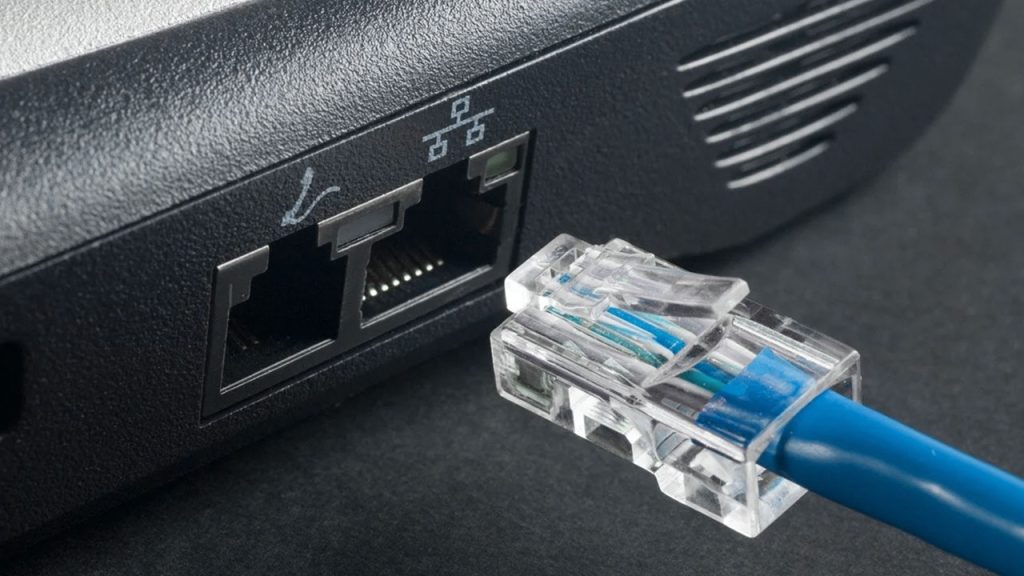
    • In home networks – If you connect your laptop directly to your modem via an Ethernet cable, that’s a point-to-point link.
    • Satellite communication – When a satellite links directly to a ground station, it uses a point-to-point connection.
    • Leased lines for businesses – Companies sometimes pay for dedicated point-to-point connections between offices to ensure reliable communication.
    • Bridges in networking – Sometimes, two distant parts of a network are linked with a dedicated wireless bridge.

    Comparing Point-to-Point With Other Topologies

    To see how point-to-point topology stacks up, let’s compare it to other types:

    Topology TypeConnection StyleProsCons
    Point-to-PointOne-to-one directFast, private, no congestionLimited to two devices
    StarOne central device connects all othersEasy to manage, scalableIf the central device fails, everything stops
    BusAll devices share a single cableSimple setup, cost-effectiveIf the main cable fails, the whole network goes down
    MeshEvery device connects to every other deviceHighly reliable, no single point of failureExpensive and complex to set up

    Point-to-point topology is one of the simplest and most efficient ways for two devices to communicate. Whether it’s a direct cable link between two computers or a Bluetooth connection between your phone and earbuds, this setup ensures fast, reliable, and private communication. While it’s not the best choice for large networks, it’s still widely used where dedicated connections are needed.

    The next time you make a phone call or send a file directly to a friend, take a moment to appreciate the point-to-point connection working behind the scenes. It’s simple, effective, and still an essential part of modern networking.

  • Types of Network Topologies and How They Work

    Types of Network Topologies and How They Work

    Network topologies define how devices connect in a network. This guide explains different types, their structures, and how they function.

    Imagine you’re setting up a town where all the houses need to be connected with roads. The way you design those roads—whether they all lead to a central square, form a circular route, or crisscross everywhere—determines how easily people can travel and communicate.

    Network topology works the same way, but instead of roads and houses, we’re talking about cables and devices in a computer network.

    What is Network Topology?

    Network topology is how computers and devices (like routers, switches, and servers) are connected in a network. It determines how data travels between them and affects the speed, reliability, and efficiency of communication.

    Physical vs. Logical Topology

    • Physical Topology: This is how devices are physically arranged and connected using cables or wireless signals.
    • Logical Topology: This describes how data actually moves through the network, regardless of the physical layout.

    Now, let’s explore different types of network topology with simple explanations and relatable examples.

    1. Point-to-Point Topology

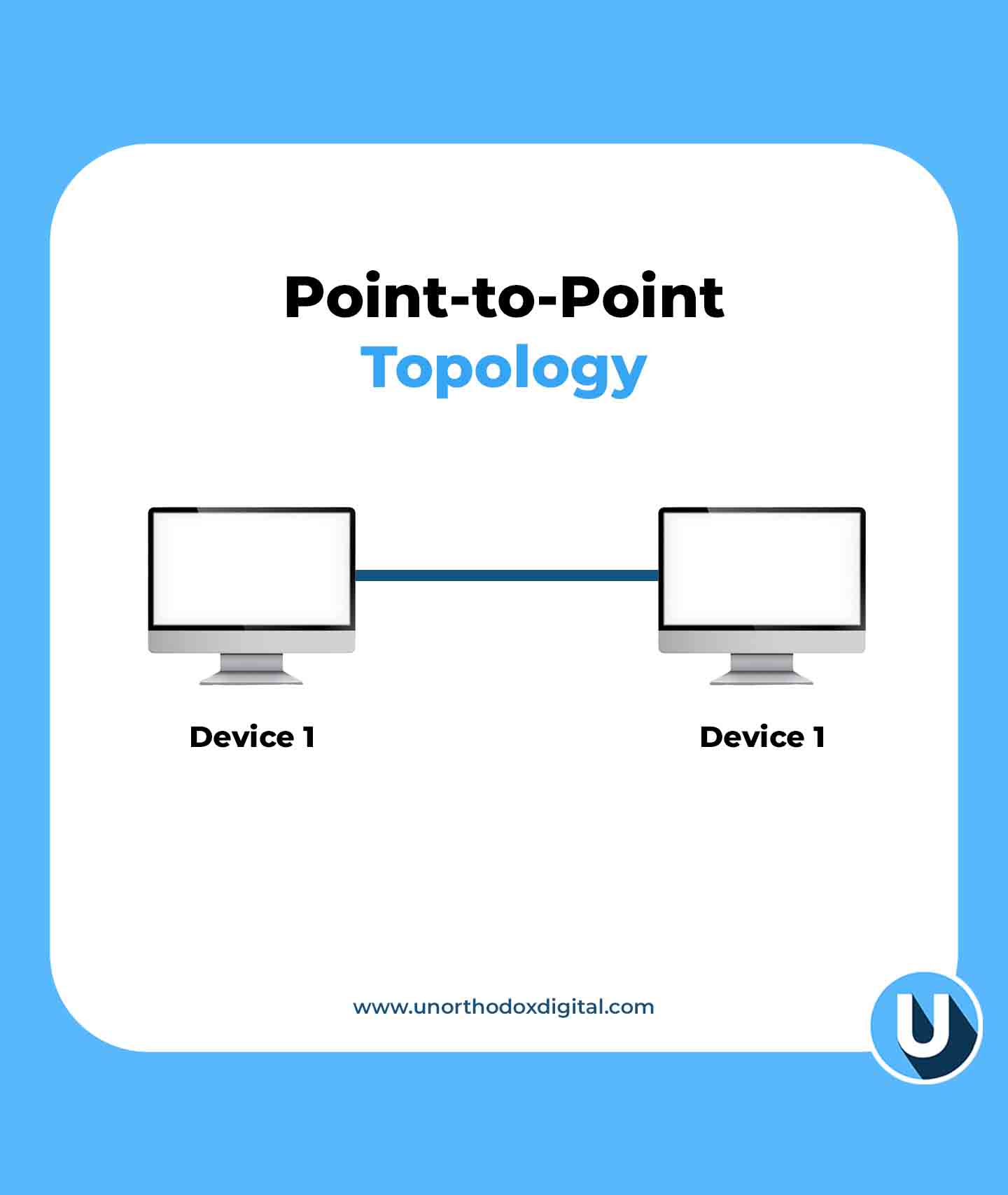
    The Point-to-Point Topology is the simplest form of a network—just two devices directly connected to each other.

    Example: Imagine two people using walkie-talkies. One talks, the other listens, and they take turns. That’s a point-to-point connection.

    AdvantagesDisadvantages
    Simple setupLimited to just two devices
    Fast communicationNo flexibility to add more devices
    Point-to-Point Topology (Types of Network Topologies)
    Point-to-Point Topology

    2. Bus Topology

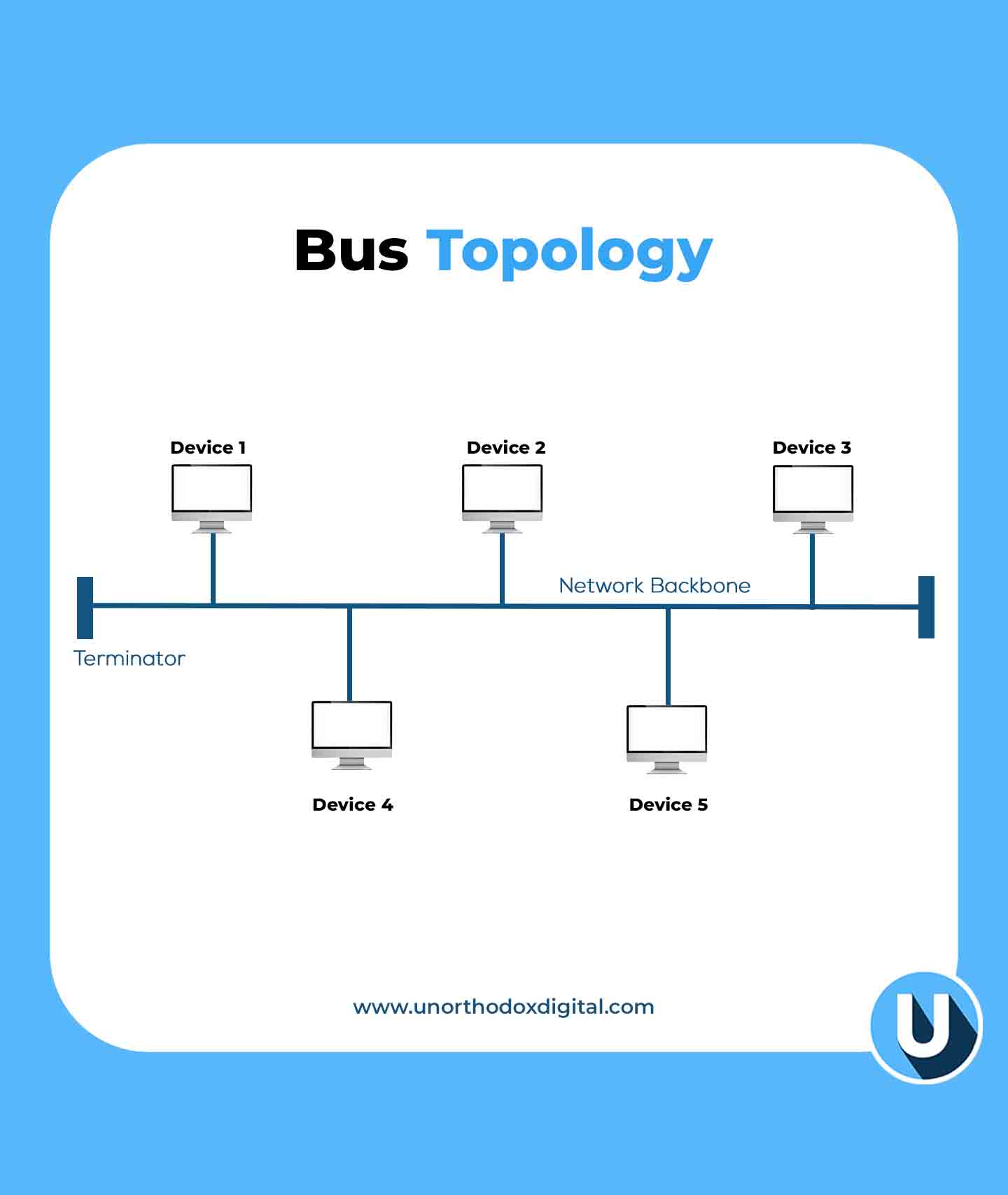
    In the Bus Topology, all devices are connected to a single main cable (called a backbone), and data travels in both directions.

    Example: Think of a public bus route. If one bus stop (device) has a problem, other stops might be affected.

    AdvantagesDisadvantages
    Cost-effective (less cable needed)If the main cable fails, the whole network goes down
    Easy to expandPerformance slows down with more devices
    Bus Topology (Types of Network Topologies)
    Bus Topology

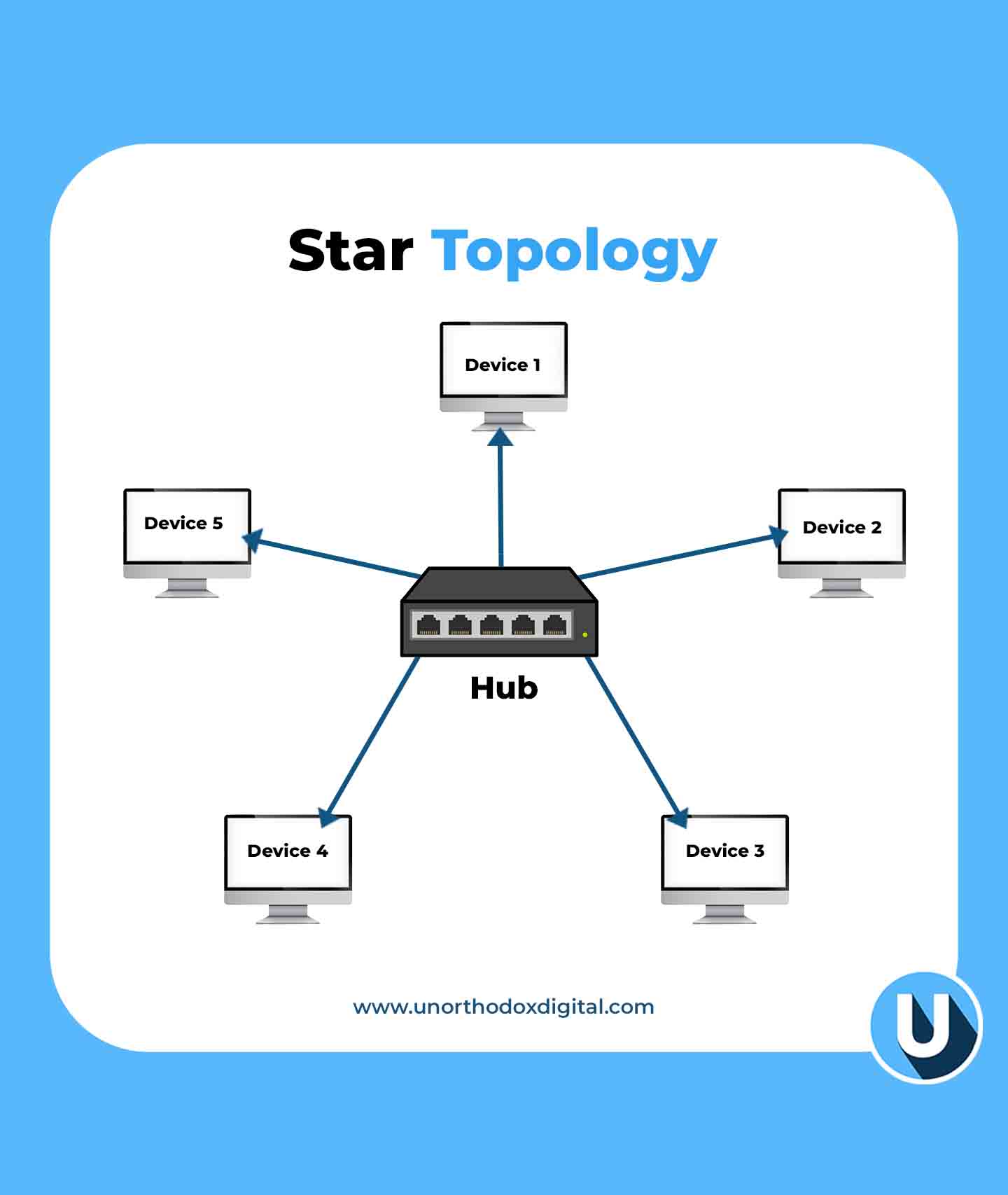
    3. Star Topology

    In the Star Topology, all devices connect to a central hub or switch, which acts like a traffic controller for data.

    Example: Imagine an airport where all flights must go through a central control tower. If the tower is down, flights can’t take off.

    AdvantagesDisadvantages
    Easy to manage and troubleshootIf the central hub fails, the whole network stops working
    Adding or removing devices is simpleMore cabling required
    Star Topology (Types of Network Topologies)
    Star Topology

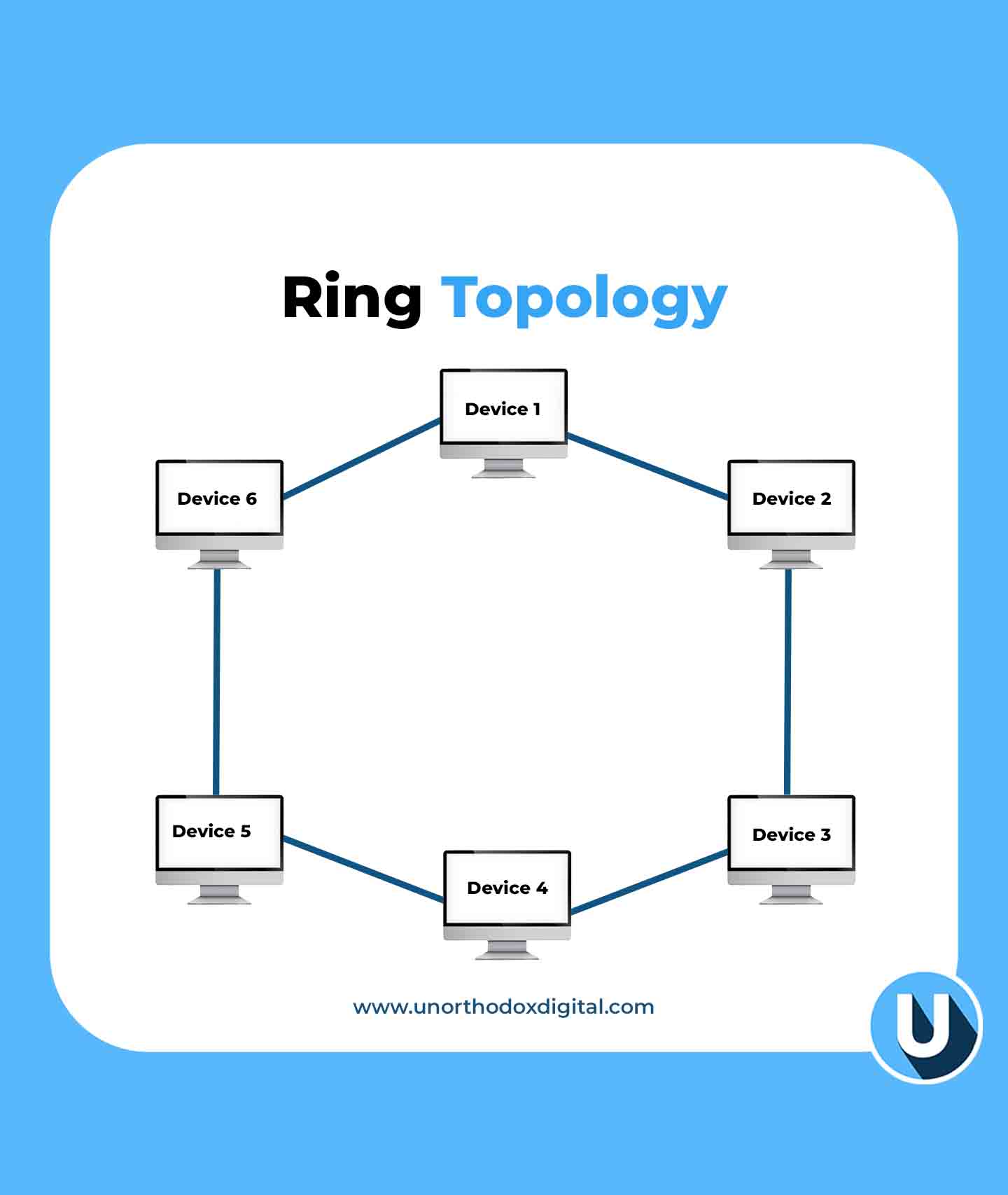
    4. Ring Topology

    This setup, known as a Ring Topology, connects each device to two others, forming a circular data path. Data travels in one direction (or both in a dual-ring setup), ensuring a structured and efficient flow.

    Example: Think of a relay race where a baton (data) is passed from runner to runner (device) until it reaches the destination.

    AdvantagesDisadvantages
    No data collisionsIf one device fails, the entire network can break
    Predictable data flowAdding new devices can disrupt the network
    Ring Topology (Types of Network Topologies)
    Ring Topology

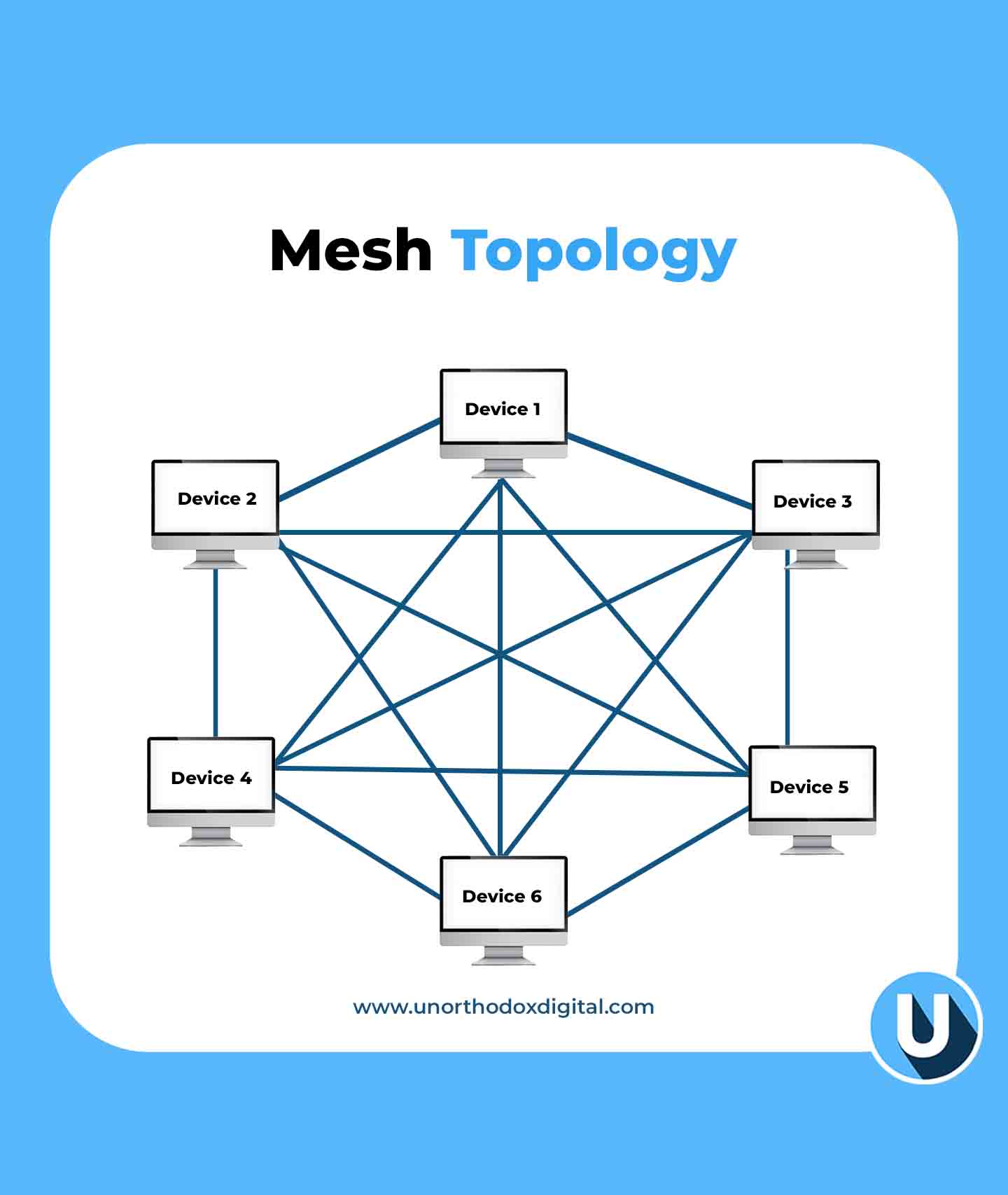
    5. Mesh Topology

    In the Mesh Topology, every device is connected to every other device, creating multiple paths for data.

    Example: Think of a spider web. If one strand breaks, there are still plenty of other ways for the spider to move around.

    AdvantagesDisadvantages
    Very reliable (data can take multiple routes)Expensive and complex to set up
    If one link fails, data can still reach its destinationRequires a lot of cabling
    Mesh Topology (Types of Network Topologies)
    Mesh Topology

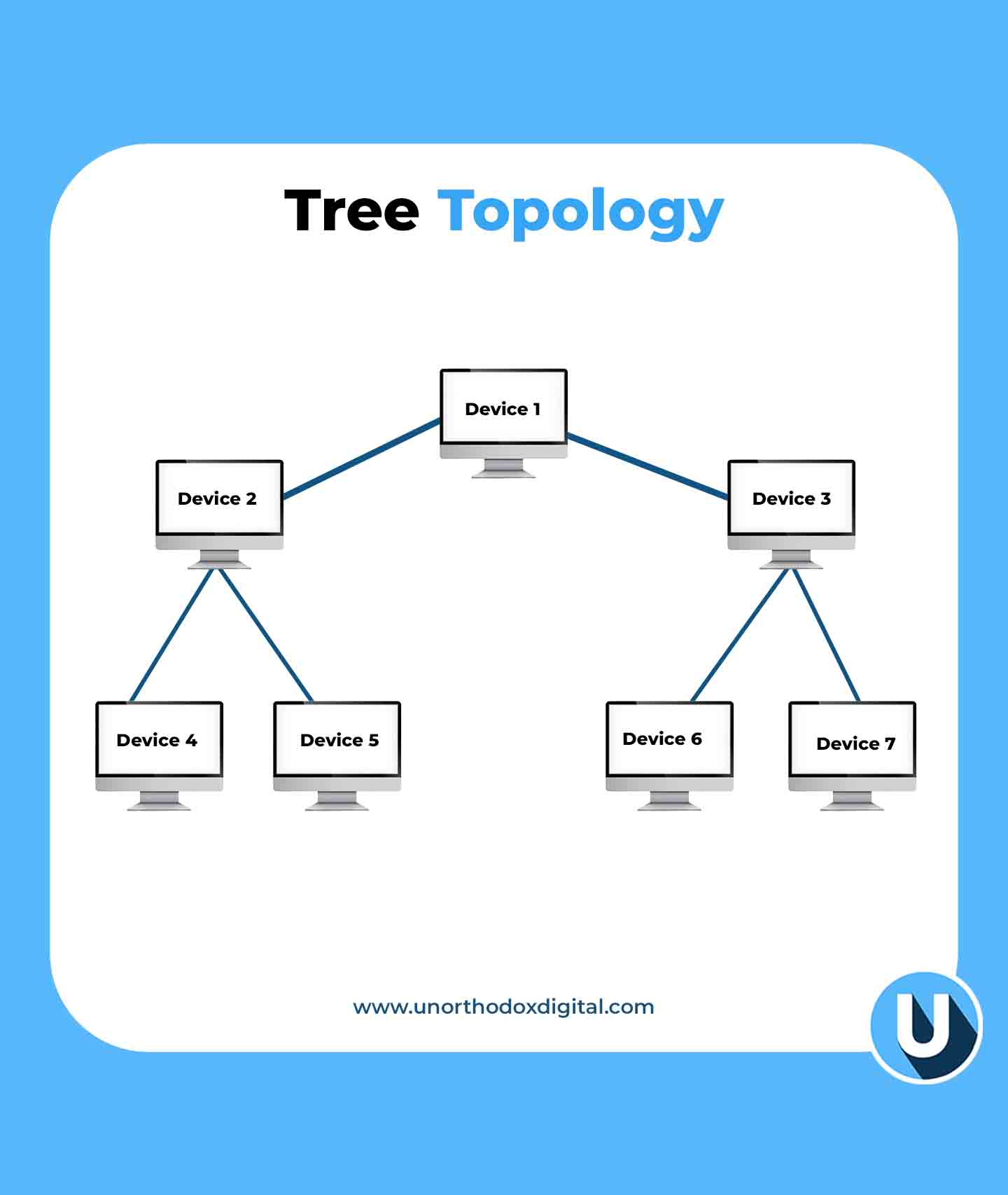
    6. Tree Topology

    The Tree Topology is a mix of star and bus topologies, with multiple branches stemming from a central hub.

    Example: Think of a big family tree. The oldest generation (main hub) connects to multiple generations (sub-hubs and devices).

    AdvantagesDisadvantages
    Easy to expand and manageIf the main hub fails, the entire network can go down
    Well-structured hierarchyRequires more cabling and configuration
    Tree Topology (Types of Network Topologies)
    Tree Topology

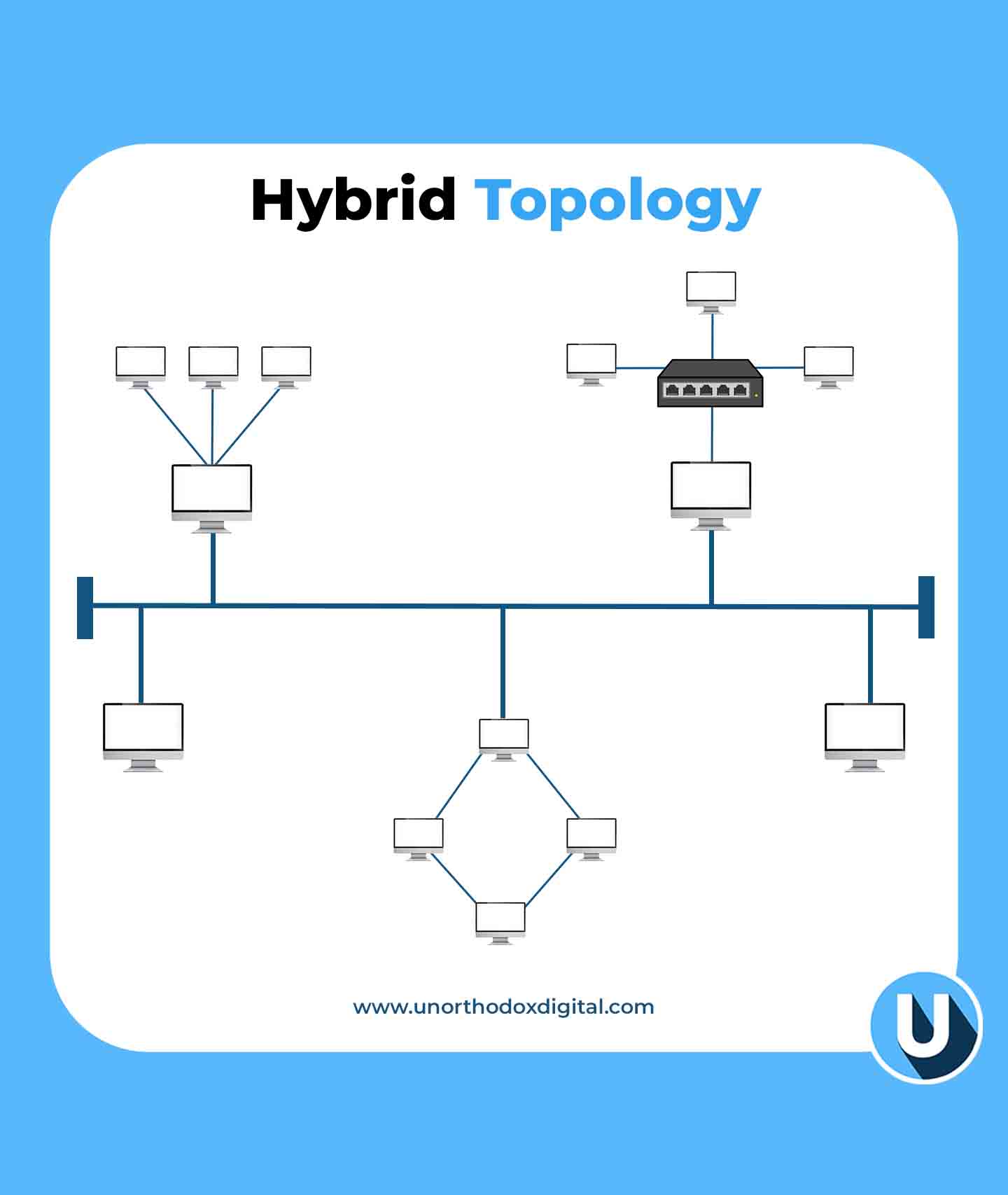
    7. Hybrid Topology

    The Hybrid Topology is a combination of two or more topologies, depending on the needs of the network.

    Example: A university might have a star topology in classrooms, a bus topology in dormitories, and a mesh topology for research labs.

    AdvantagesDisadvantages
    Highly flexible and scalableComplex to design and maintain
    Best for large organizationsExpensive setup
    Hybrid Topology (Types of Network Topologies)
    Hybrid Topology

    Why Does Network Topology Matter?

    Choosing the right network topology is important because it affects:

    • Performance: A good layout ensures fast and efficient communication.
    • Reliability: Some topologies provide backup routes if a connection fails.
    • Cost: More complex topologies need more cables and hardware.
    • Scalability: Some layouts make it easier to add new devices without disrupting the network.

    Network topology might sound technical, but at its core, it’s just about how devices talk to each other. Whether it’s a simple point-to-point connection or a complex hybrid setup, the right choice depends on what you need. Just like choosing the best road layout for a town, picking the right network topology ensures smooth communication and efficiency.

    Frequently Asked Questions (FAQs)

    Is it possible to use multiple network topologies together?

    Yes, a network can combine different topologies in a hybrid setup. This approach enhances flexibility, performance, and reliability by leveraging the strengths of multiple structures.

    What factors should be considered when selecting a network topology?

    The choice of topology depends on factors such as network size, budget, performance requirements, scalability, and reliability. Evaluating these elements helps in selecting the most efficient structure.

    Which network topology is the most cost-effective and easiest to implement?

    Bus topology is the simplest and most affordable to set up, as it connects all devices using a single main cable. However, it is better suited for smaller networks due to its limitations.

    Why do large networks often use hybrid topology?

    Hybrid topology is widely used in large networks because it integrates multiple topologies, allowing for greater flexibility and optimization based on specific networking requirements.

    What is the most suitable topology for large-scale networks?

    For large-scale networks, mesh and tree topologies are commonly used. Mesh topology ensures high reliability through redundant connections, while tree topology supports scalability and efficient data management.

  • SpaceX Working on Faster Starlink Dish That Could Hit Gigabit Speeds

    SpaceX Working on Faster Starlink Dish That Could Hit Gigabit Speeds

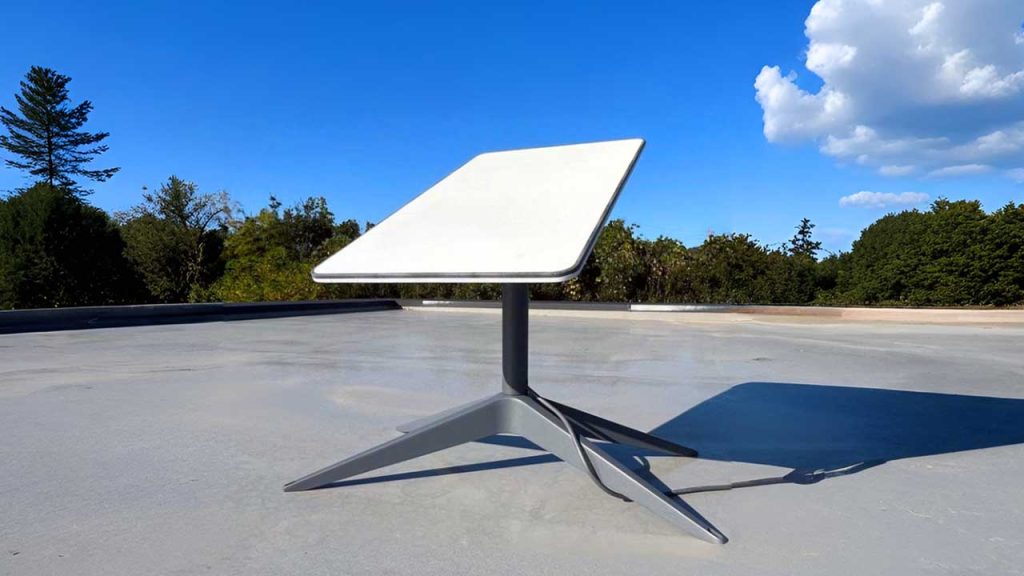
    SpaceX is gearing up to launch a next-generation Starlink dish that promises significantly faster internet speeds, potentially reaching up to 1Gbps—far beyond the current 200Mbps limit. This could be a game-changer for users in rural and underserved areas who rely on satellite internet.

    A new Starlink dish was recently mentioned during a webinar for resellers, according to someone who attended the session. While details remain limited, this confirms that SpaceX is actively working on the technology to boost Starlink’s speed and performance.

    What This Means

    Right now, Starlink offers solid speeds, but it’s not always a true alternative to fiber networks. A jump to gigabit speeds could change that. Imagine having fiber-like internet in places where fiber simply isn’t available—this could make a huge difference for businesses, remote workers, and even households looking for a more reliable connection.

    Of course, there’s a catch. Users will likely need to purchase new hardware to take advantage of the speed upgrade. That means an additional cost on top of the monthly subscription.

    How SpaceX Plans to Do It

    To make gigabit speeds possible, SpaceX is focusing on two key upgrades:

    • Expanding Starlink’s radio spectrum usage – This would allow for greater data transmission capacity.
    • Deploying upgraded Starlink satellites – The upcoming V3 Starlink satellites will be launched using SpaceX’s massive Starship rocket, which is still in development.

    However, all of this depends on regulatory approvals. SpaceX has applied for permission from the U.S. Federal Communications Commission (FCC) to make these upgrades, but it’s still waiting for the green light.

    SpaceX President Gwynne Shotwell hinted at these improvements last year, saying, “Next generation, we’ll have smaller beams, more capacity per beam, lower latency. Starlink speeds will reach as high as 2 gigabits.”

    Satellite industry analyst Tim Farrar also noted that even existing Starlink users may see some speed improvements, thanks to potential changes in power limits and satellite positioning that SpaceX is working on.

    Before rolling out to regular customers, SpaceX may introduce the gigabit-capable dish to business users first. The company is also working on a new high-performance dish for enterprise buyers.

    Additionally, this upgraded model will follow the recently introduced Starlink Mini dish, which currently costs $499 in the U.S.

  • MTN TurboNet: Pricing, Plans, And Coverage Areas in Ghana

    MTN TurboNet: Pricing, Plans, And Coverage Areas in Ghana

    What is MTN TurboNet?

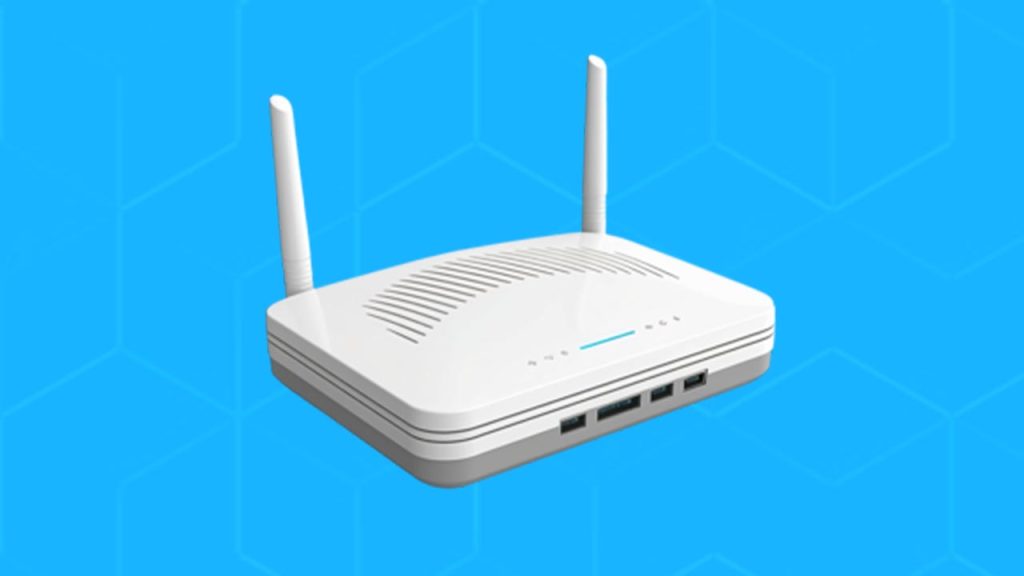
    MTN TurboNet is a high-speed 4G router designed to provide reliable internet access for homes and small businesses. Think of it as a supercharged Wi-Fi box that runs on MTN’s 4G network instead of fiber cables. If you live in an area with strong MTN 4G coverage, this device can give you fast internet without the need for complex installations.

    Unlike regular mobile internet, TurboNet comes with a special MTN data SIM that delivers better speed and stability. In ideal conditions, you can get speeds of up to 150 Mbps, which is fast enough to stream HD movies, play online games, and handle video calls without buffering.

    Why Choose MTN TurboNet?

    • Super Fast Internet – Up to 150 Mbps speeds.
    • Plug-and-Play – No need for complicated setup.
    • Supports Many Devices – Connect up to 32 devices at once.
    • Comes with an External Antenna – Improves signal reception for better speeds.

    MTN TurboNet Pricing and Plans

    MTN offers different data packages for TurboNet users, so you can choose one based on your internet needs. Below is a table showing the current data plans:

    Data BundlePrice (GHS)
    4.30 GB43
    8.69 GB87
    91.82 GB253
    350.54 GB516

    These plans cater to different types of users:

    • Light users – The 4.30 GB or 8.69 GB plans work well if you only browse the web and use social media.
    • Heavy users – If you stream movies, work from home, or play online games, the 91.82 GB or 350.54 GB plans are better options.

    Where to Buy MTN TurboNet

    You can buy the MTN TurboNet router from any MTN Service Centre across Ghana. The device currently costs GHS 1,200, and it comes with a free MTN 4G SIM card and 5GB of data, valid for six months.

    You can also buy the TurboNet from third-party sellers on Jumia, Jiji, and other online marketplaces. However, prices from these sellers can range between GHS 1,500 and GHS 2,500, so be cautious and verify the authenticity before making a purchase.

    How to Set Up Your MTN TurboNet

    Setting up your TurboNet is quick and simple. Here’s what to do:

    1. Insert the SIM Card – Ensure the device is turned off before inserting the special TurboNet SIM.
      • Important: Do not use micro or nano SIM cards as they may damage the device.
    2. Plug It In – Connect the power adapter to the router and switch it on.
    3. Connect Your Device – There are two ways to do this:
      • Wi-Fi: Press the WLAN button to enable wireless connections. The default Wi-Fi name (SSID) and password are printed on the bottom of the router.
      • LAN Cable: Use an Ethernet cable to connect directly to a laptop or desktop for a wired connection.
    4. Improve Signal Strength – Attach the external antennas that come with the router for better signal reception.

    That’s it! Your TurboNet is now ready to use.

    MTN TurboNet- Pricing, Plans, And Coverage Areas

    How to Buy Data for MTN TurboNet

    Before buying data, you need to link your TurboNet SIM to your personal MTN number. This is usually done by the vendor when you purchase the device.

    Buying Data via USSD Code

    1. Dial *5057# on your linked MTN number.
    2. Select “Data Bundle”.
    3. Choose your preferred data package.
    4. Confirm the purchase.
    5. Select your payment method (Mobile Airtime or MoMo).
    6. You’ll receive an SMS confirming your purchase.

    Buying Data via MyMTN App

    1. Open the MyMTN App.
    2. Select “Data Bundle”.
    3. Choose “Fibre & TurboNet Bundles”.
    4. Select your TurboNet account.
    5. Pick a data package and payment method.
    6. Click “Pay” to complete the transaction.

    How to Check Your MTN TurboNet Balance

    To check how much data you have left:

    1. Dial *5057# on your linked MTN number.
    2. Select “Check Balance”.
    3. Choose “Data Balance”.
    4. Your remaining data balance will appear on the screen, and you’ll also receive an SMS notification.

    MTN TurboNet Coverage Areas

    MTN TurboNet works best in areas with strong MTN 4G coverage. The device is currently available in major cities and towns across Ghana, including:

    • Accra – (Osu, Madina, East Legon, Tema, etc.)
    • Kumasi – (Adum, Asokwa, Bantama, etc.)
    • Takoradi – (Market Circle, Anaji, etc.)
    • Tamale – (Sakasaka, Lamashegu, etc.)

    For the best experience, check your 4G signal strength before purchasing TurboNet.

    Frequently Asked Questions (FAQs)

    1. How do I reset my MTN TurboNet password?

    If you forget your Wi-Fi password or want to change it:

    • Open a web browser and enter http://192.168.8.1 (Huawei routers) or http://192.168.0.1 (ZTE routers).
    • Login with “admin” as the default password.
    • Navigate to Settings and update your Wi-Fi password.

    2. Can I use any SIM card in the TurboNet device?

    No. The TurboNet router only works with an MTN TurboNet SIM card, which is specially designed for the service.

    3. Do I need to link my MTN number to my TurboNet?

    Yes. You must link your personal MTN number to your TurboNet SIM at an MTN Service Centre or with a verified vendor before you can buy data.

    MTN TurboNet is a great option for those who need fast, reliable, and easy-to-use internet at home or work. Whether you’re streaming, gaming, or working remotely, it provides a convenient alternative to fiber broadband. Just make sure you check the 4G coverage in your area before getting one!

  • Nigeria’s Top 10 Internet Service Providers for Speed & Coverage

    Nigeria’s Top 10 Internet Service Providers for Speed & Coverage

    In today’s world, having fast and reliable internet is as essential as electricity and water. Whether you’re working, streaming, gaming, or just scrolling through social media, a good internet connection can make all the difference. But with so many options available, how do you know which provider is right for you? This article breaks down Nigeria’s top 10 internet service providers (ISPs) based on speed, coverage, and reliability.

    How We Ranked These ISPs

    We ranked these ISPs based on three key factors:

    • Speed: How fast their internet service is for downloading, streaming, and browsing.
    • Coverage: How widely available their service is across Nigeria.
    • Customer Base: The number of active users, which reflects popularity and reliability.

    Let’s dive into the list.

    RankISP NameActive Customers (Q3 2023)CoverageType of Service
    10Cobranet Limited3,401Lagos, Abuja, Port HarcourtWireless, Fiber
    9Suburban Fiber Company3,627Lagos, AbujaFiber, Wireless
    8Coollink Nigeria3,647Lagos, Abuja, PH, Kano, OnitshaWireless
    7Ngcom Limited3,956Major CitiesFiber, Wireless
    6Cyberspace Network4,130Nationwide4G LTE, Fiber
    5VDT Communications6,611NationwideFiber, Wireless
    4Starlink11,207NationwideSatellite
    3IPNX14,871Major CitiesFiber
    2Tizeti19,126Major CitiesWireless
    1Spectranet113,747Major Cities4G LTE, Fiber

    10. Cobranet Limited

    Cobranet has been around since 2003, offering internet services to businesses and homes. If you’re in Lagos, Abuja, or Port Harcourt, you might have come across their services. Their corporate plans are popular among businesses, but they also have options for residential users.

    9. Suburban Fiber Company

    Suburban Fiber Company is known for its fiber-optic network, which delivers fast internet speeds. They also offer additional services like TV and security solutions, making them a great option for tech-savvy households.

    8. Coollink Nigeria

    Coollink Nigeria has been growing steadily, thanks to its focus on customer service. With offices in Lagos, Abuja, Port Harcourt, Kano, and Onitsha, they provide internet to a diverse range of customers.

    7. Ngcom Limited

    Ngcom stands out because it offers unlimited internet without data caps. If you hate worrying about running out of data, this might be a good choice. They offer both fiber optic and fixed wireless internet, ensuring flexibility for users.

    6. Cyberspace Network Limited

    Cyberspace has been in the game since 1995 and has evolved over the years. They offer 4G LTE services that promise speeds 10 times faster than regular broadband. If you need fast, mobile internet, Cyberspace could be worth considering.

    5. VDT Communications

    VDT Communications focuses on enterprise-level solutions but also serves home users. With fiber-optic infrastructure reaching all 36 states and Abuja, they have one of the most extensive networks in Nigeria.

    Nigeria’s Top 10 Internet Service Providers for Speed & Coverage

    4. Starlink

    Starlink, the satellite internet service by SpaceX, is a game-changer. Unlike other ISPs that rely on cables, Starlink beams the internet from space, making it accessible even in remote areas. The only downside? It’s expensive compared to local alternatives.

    3. IPNX

    IPNX is one of the fastest-growing ISPs in Nigeria, especially in big cities. They specialize in Fiber-To-The-Home (FTTH) technology, ensuring high-speed and stable internet for residential and business users.

    2. Tizeti

    Tizeti, also known as Wifi.com.ng, is disrupting the market with affordable, high-speed broadband. Their strategy of using solar-powered towers allows them to keep costs low while expanding coverage. If you want budget-friendly unlimited internet, Tizeti is a strong contender.

    1. Spectranet

    Spectranet is the biggest ISP in Nigeria by customer base. They were among the first to roll out 4G LTE services, and their coverage in major cities is unmatched. If you need a reliable provider with various affordable plans, Spectranet is a top choice.

    How to Choose the Best ISP for You

    Choosing an internet provider isn’t just about picking the most popular one. Consider the following:

    • Location: Some ISPs don’t cover every area, so check availability in your city.
    • Speed Needs: If you stream or game a lot, go for high-speed options like fiber or 4G LTE.
    • Budget: Starlink might be great, but it’s expensive. If you want a cheaper unlimited plan, Tizeti or Ngcom could be better.
    • Customer Support: Read reviews to see how well each company handles complaints.

    With so many ISPs in Nigeria, finding the right one can feel overwhelming. But if you know what you need—whether it’s speed, affordability, or wide coverage—you can make an informed decision. Hopefully, this guide has made your choice a little easier!

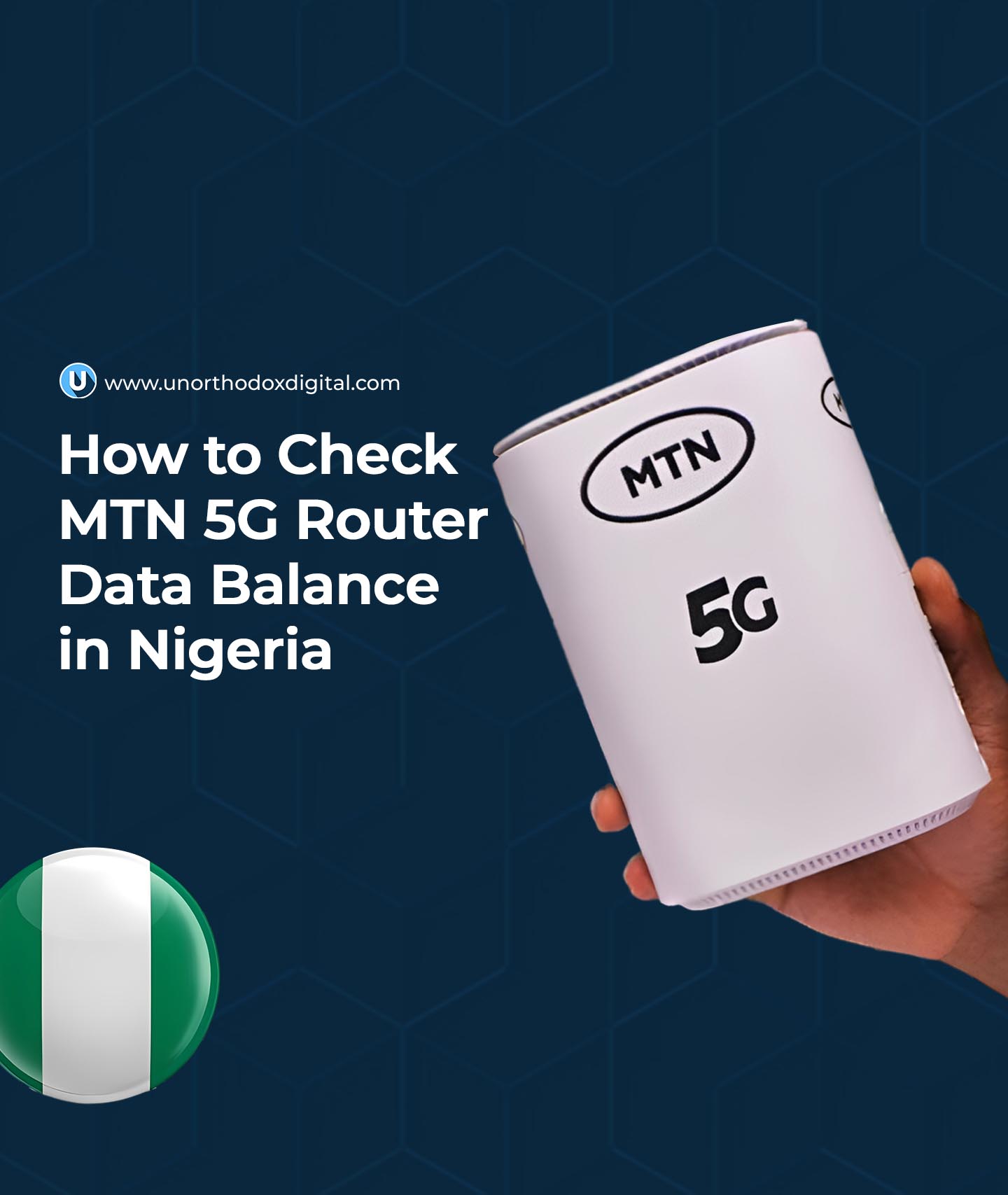
  • How to Check MTN 5G Router Data Balance in Nigeria

    How to Check MTN 5G Router Data Balance in Nigeria

    So, you got yourself an MTN 5G router? That’s great! It’s fast, reliable, and makes streaming, gaming, and working from home a breeze. But like any internet plan, you need to keep an eye on your data balance to avoid running out at the worst possible time (like during a live football match or an important Zoom meeting!).

    If you’re wondering how to check your MTN 5G router data balance in Nigeria, don’t worry—I’ve got you covered. By the time you’re done reading this, you’ll know exactly what to do, and it’ll be as easy as checking the time on your phone.

    Method 1: Using the MTN USSD Code

    This is the easiest way to check your router’s data balance. The good news? You don’t even need to remove the SIM card from your router. You just need a phone linked to the router’s SIM. Here’s how:

    Step-by-Step Guide

    1. Link your phone to your router’s SIM (if you haven’t done so before)
      • Dial *131*500# on your phone.
      • Select Option 1 (Link Device) and send.
      • Enter the phone number of the SIM inside the router (e.g., 080XXXXXXXX).
      • You’ll get a confirmation message saying the linking was successful.
    2. Check your data balance
      • Dial *131*500# again.
      • Select Option 4 (Check Device Balance) or Option 3 (Broadband Balance).
      • Choose your router’s number from the list.
      • Your remaining data balance will be displayed on your screen.

    Quick Summary Table

    ActionUSSD Code & Options
    Link your phone to the router*131*500# > Option 1 > Enter router SIM number
    Check data balance*131*500# > Option 4 (Device Balance) or Option 3 (Broadband Balance)

    Method 2: Using the MyMTN App

    If you love having everything in one place, the MyMTN app is a great option for checking your router’s data balance. Here’s how:

    Step-by-Step Guide

    1. Download and install the MyMTN app from the Google Play Store or Apple App Store.
    2. Log in using the router’s SIM number.
    3. Go to the “Check Data Balance” section, and your remaining data will be displayed.

    Quick Summary Table

    ActionSteps
    Download MyMTN AppFrom Play Store or App Store
    Log inUse router SIM number
    Check Data BalanceGo to “Check Data Balance” section
    How to Check MTN 5G Router Data Balance in Nigeria

    Which Method Should You Use?

    • For quick checks → Use the USSD code.
    • If you want an all-in-one solution → Use the MyMTN app.

    Now you know how to check your MTN 5G router data balance like a pro! No more running out of data unexpectedly. Try one of these methods and keep surfing without interruptions.

  • How to Activate MTN Just4U Bundle in Ghana

    How to Activate MTN Just4U Bundle in Ghana

    Imagine walking into a store where everything on the shelves is customized just for you—your favorite snacks, drinks, and even discounts based on what you love to buy. That’s exactly what MTN’s Just4U bundles do for your mobile data and airtime needs.

    If you’ve ever wondered why some people get cheaper data offers while yours seem different, it’s because MTN Just4U is a personalized service. It gives each user a special set of offers based on their data, call, and airtime usage patterns. In this guide, I’ll show you exactly how to activate your Just4U bundle using simple, clear steps. Let’s dive in!

    What Is MTN Just4U and How Does It Work?

    MTN Just4U is a special offer designed to give you tailored data and airtime packages based on how you use your phone. If you buy data frequently, you might get special discounts on data. If you make lots of calls, you could see better call bundles.

    Think of it like a VIP treatment where MTN studies your habits and rewards you with exclusive deals that fit your needs. The best part? These offers are often cheaper than regular bundles.

    But here’s the catch—Just4U offers change from time to time. What you see today might be different tomorrow, so always check back for new deals.

    How to Activate MTN Just4U Bundle in Ghana

    There are three main ways to activate MTN Just4U bundles:

    1. Using the USSD Code (Quick and easy, no internet needed)
    2. Via the MyMTN App (Best if you prefer a visual experience)
    3. Through MTN MoMo (Convenient if you want to pay directly from your MoMo account)

    Let’s break each method down step by step.

    Method 1: Activating Just4U via USSD Code

    This is the simplest way, and all you need is your phone.

    Steps:

    1. Dial *141# on your MTN number.
    2. A menu will pop up showing your personalized Just4U offers.
    3. Select the package you want.
    4. Confirm your purchase by selecting Option 1.
    5. Wait for an SMS confirming your purchase and enjoy your bundle!

    This method is great because it works on any phone—smartphones and basic feature phones alike. No internet required!

    Method 2: Activating Just4U via the MyMTN App

    If you prefer using apps and want a visual way to select your offers, the MyMTN App is the best option.

    Steps:

    1. Open the MyMTN App (download it from the Play Store or App Store if you don’t have it).
    2. On the home screen, tap on “Just4U” under Quick Access.
    3. You’ll see your personalized Just4U offers.
    4. Select your preferred package.
    5. Scroll down and tap “Pay” to confirm your purchase.
    6. Wait for an SMS confirming your purchase.

    This method is user-friendly and allows you to see multiple offers at once, making it easier to compare options before buying.

    Method 3: Activating Just4U via MTN MoMo

    If you prefer paying directly from your MTN Mobile Money (MoMo) account, this method is perfect.

    Steps:

    1. Dial *170# to access the MoMo menu.
    2. Select Option 3: Airtime & Bundles.
    3. Choose Option 2: Just4U.
    4. Select your preferred Just4U bundle.
    5. Confirm your purchase and wait for a payment prompt.
    6. Enter your MoMo PIN to complete the transaction.
    7. You’ll receive an SMS confirmation with your credited data or airtime.

    If you’re someone who keeps most of your money in MoMo, this method makes purchasing Just4U bundles super convenient.

    How to Activate MTN Just4U Bundle in Ghana

    How Long Do MTN Just4U Bundles Last?

    MTN Just4U bundles have expiration dates, and they vary depending on the type of bundle you choose. Some are valid for a day, while others last a week.

    Bundle TypeValidity Period
    Daily Just4U Offer24 Hours
    Weekly Just4U Offer7 Days
    Special OffersVaries

    One important thing to note is unused data does NOT roll over. If you don’t use your bundle before it expires, it’s gone. So, always check the validity period when purchasing.

    Frequently Asked Questions (FAQs)

    1. Is MTN Just4U Available for Everyone?

    No. Just4U is only available for MTN prepaid users. Also, the offers are different for each user, meaning what you see might not be the same as what your friend gets.

    2. Can I Buy More Than One Just4U Offer at a Time?

    Yes, you can buy multiple Just4U bundles, but each will have its own expiration date. Be mindful of when they expire!

    3. What If I Don’t See Any Just4U Offers?

    If you dial *141# and don’t see any offers, it could mean:

    • You haven’t been using your MTN number actively.
    • Your previous Just4U offers expired, and new ones haven’t been generated yet.
    • MTN hasn’t assigned you a new personalized offer at the moment.

    Try checking back later or using the MyMTN App for updates.

    MTN Just4U is a fantastic way to get personalized, discounted bundles based on your usage. Whether you use USSD, the MyMTN App, or MoMo, activating a Just4U bundle is quick and easy. Just remember:

    • Offers vary from person to person.
    • Bundles expire, so use them before they’re gone.
    • If you don’t see any offers, keep using your MTN number actively and check back later.

    Now that you know how to activate MTN Just4U in Ghana, go ahead and grab the best deal for yourself. Happy browsing!

  • MTN Ghana MiFi: How Much It Costs & Best Data Plans

    MTN Ghana MiFi: How Much It Costs & Best Data Plans

    Imagine carrying your own personal Wi-Fi connection wherever you go. No need to rely on slow public Wi-Fi or burn through your phone’s data. That’s exactly what the MTN Ghana MiFi offers—a portable internet solution that keeps you connected anytime, anywhere. But how much does it cost, and which data plan gives you the best value? Let’s break it all down in a way that’s easy to understand.

    What is the MTN Ghana MiFi?

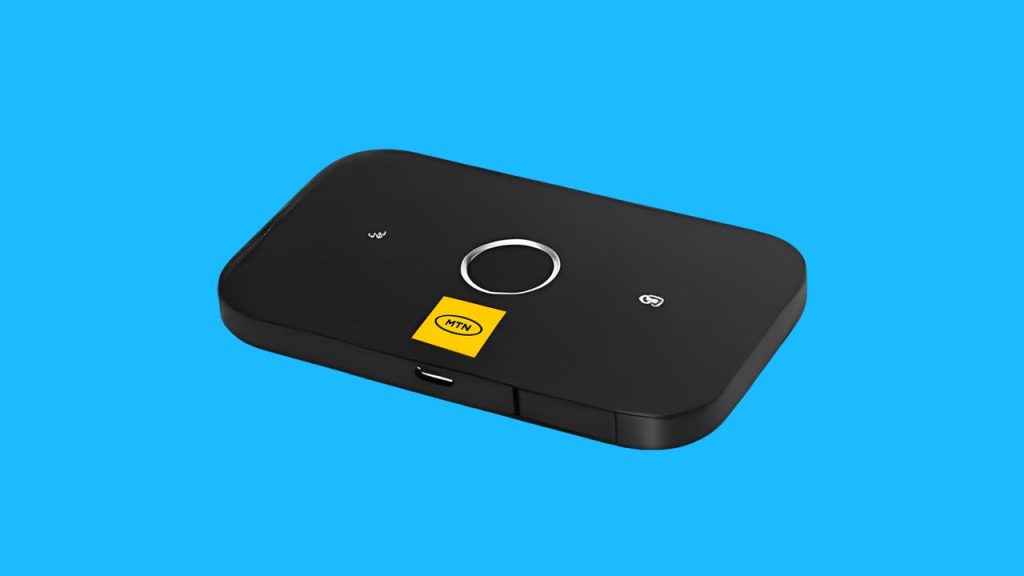
    MTN’s MiFi is a small, battery-powered wireless router that connects to MTN’s mobile network and creates a Wi-Fi hotspot. It allows multiple devices—like your phone, tablet, or laptop—to access the internet at the same time. Unlike home broadband, which stays in one place, a MiFi is portable, so you can take it wherever there’s MTN network coverage.

    Here’s a quick look at what the MTN MiFi offers:

    FeatureDetails
    Device Type3G & 4G MiFi routers
    Number of DevicesSupports up to 10 devices
    SpeedAverages 10-15 Mbps
    Battery Life6-8 hours per charge
    ConnectivityUses an MTN SIM card

    How Much Does MTN Ghana MiFi Cost?

    The price of the MTN MiFi depends on the model you choose. Generally, you can expect to pay between GHS 300 and GHS 650.

    MiFi TypePrice Range (GHS)
    3G MiFi300 – 400
    4G MiFi500 – 650

    These prices can change depending on where you buy it. If you purchase directly from an MTN service center, you’re guaranteed an authentic product. In Ghana, you may also find MiFi devices on Jiji, Jumia, or other online stores, but be sure to verify that they are genuine MTN products before buying.

    Best MTN Ghana MiFi Data Plans

    Once you have your MiFi, the next step is choosing the right data plan. MTN Ghana offers different options depending on how much data you need and how long you want it to last.

    1. Regular Data Bundles

    If you want straightforward, no-expiry data, this is the best option. These bundles don’t expire, so you can use them until they run out.

    Data AmountPrice (GHS)
    1.5GB10
    3GB20
    10GB100
    20GB200

    2. Just4U & Zone Bundles

    These are discounted bundles that offer extra data at lower prices. The catch? They do expire after a set period.

    Data AmountPrice (GHS)Validity
    2GB524 hours
    5GB153 days
    10GB507 days

    3. MTN MashUp

    If you use both calls and data, MashUp bundles give you a mix of both.

    Data & Call CreditPrice (GHS)
    1GB + 25 minutes10
    2GB + 50 minutes20
    5GB + 150 minutes50

    Which Plan is Best for You?

    • Casual users (checking emails, social media) → Regular small bundles (e.g., 3GB for GHS 20).
    • Heavy streamers/gamers → 10GB or 20GB bundle for uninterrupted use.
    • Budget usersJust4U or Zone bundles when available for cheaper rates.
    • Call & data usersMTN MashUp offers a mix of both.

    How to Buy Data for Your MTN MiFi

    There are three easy ways to purchase data for your MiFi:

    1. Using USSD Code

    1. Dial *138# on another MTN number.
    2. Select Buy Data Bundle.
    3. Choose Buy for Others.
    4. Enter your MiFi’s number.
    5. Pick your preferred data package.
    6. Select payment method and confirm.

    2. Using the myMTN App

    1. Open the myMTN app.
    2. Go to Shop > Data.
    3. Select Data Bundles.
    4. Enter your MiFi’s number as the recipient.
    5. Choose a data package and confirm payment.

    3. Using Mobile Money (MoMo)

    1. Dial *170#.
    2. Select Airtime & Bundles > Internet Bundles.
    3. Choose Buy Data Bundle > Buy for Others.
    4. Enter your MiFi’s number.
    5. Select your preferred package and confirm payment.

    How to Check Your MTN MiFi Data Balance

    Keeping track of your data usage helps you avoid running out unexpectedly. Here are three ways to check your balance:

    1. Through the myMTN App

    1. Connect your phone to the MiFi’s Wi-Fi.
    2. Open the myMTN app.
    3. Your balance appears under the DATA section.

    2. Using USSD Code

    1. Remove the SIM from the MiFi and insert it into a phone.
    2. Dial *124#.
    3. Your remaining data balance will be displayed.

    3. Through the MiFi Admin Portal

    1. Open a web browser and type in the MiFi’s IP address.
    2. Log into the admin dashboard.
    3. Enter *124# in the USSD section.
    4. Your data balance will be displayed.

    Is the MTN MiFi Fast Enough?

    The MiFi’s speed depends on where you are and how strong MTN’s network is in that area. On average, you can expect 10-15 Mbps speeds, which is enough for:

    • Browsing and emails ✔
    • Streaming YouTube & Netflix (standard quality) ✔
    • Online meetings & video calls ✔
    • Ultra HD video streaming ❌
    • Large downloads at high speed ❌

    Frequently Asked Questions (FAQs)

    1. Does MTN MiFi Data Expire?

    Yes, but only certain bundles expire. Just4U and Zone bundles have expiration dates, but regular data bundles do not.

    2. Where Can I Find My MiFi’s Username & Password?

    Check under the battery cover of your MiFi device. It’s printed on a sticker.

    3. Is MTN MiFi Faster Than a Phone Hotspot?

    Yes! MiFi devices are designed for better internet sharing, while phone hotspots can drain battery life quickly and may not be as stable.

    MTN Ghana’s MiFi is a fantastic option if you need portable internet that supports multiple devices. Whether you need it for work, entertainment, or everyday browsing, knowing the costs and best data plans helps you make the right choice. If you’re looking for reliable, on-the-go internet, the MTN MiFi is worth considering!

  • How To Unlock Unlimited Data on MTN Ghana

    How To Unlock Unlimited Data on MTN Ghana

    Imagine never having to worry about running out of data. No more surprise messages saying, “You have 10MB left!” or scrambling to buy a new bundle in the middle of an important Zoom call or Netflix binge. Sounds like a dream, right? Well, if you’re an MTN user, you might just be in luck! MTN offers an unlimited data plan—but it’s not as straightforward as you might think. Let’s break it all down in the simplest way possible.

    What Is MTN’s Unlimited Data Plan?

    MTN’s unlimited data plan is exactly what it sounds like: a plan that gives you internet access without any data caps for a whole month. However, before you get too excited, there’s one important catch—you can only get it through MTN Fibre Broadband. That means it’s not available for regular prepaid or pay-as-you-go users. Instead, it’s meant for people who have installed MTN’s Fibre Broadband at home or work.

    Why Would You Want Unlimited Data?

    Think about how much data you use in a month. Between YouTube videos, Instagram scrolling, work meetings, and downloading your favorite shows, it adds up quickly. Instead of buying multiple data bundles and running out at the worst times, an unlimited plan gives you peace of mind. No limits, no surprises—just endless browsing, streaming, and downloading.

    How to Get MTN’s Unlimited Data Plan

    Alright, so you’re interested. How do you actually get this magical, never-ending data? Here’s the step-by-step process:

    Step 1: Get MTN Fibre Broadband Installed

    First things first, you must have MTN Fibre Broadband. If you don’t already have it, you’ll need to check if MTN offers Fibre Broadband in your area and get it installed at your home or workplace. You can visit an MTN office or check their website to apply.

    Step 2: Choose How You Want to Buy the Plan

    Once you have Fibre Broadband set up, you can purchase an unlimited data plan in three ways:

    1. Through the myMTN App
    2. Using MTN Mobile Money (MoMo)
    3. Via a USSD shortcode

    Let’s go through each method so you can pick the easiest one for you.

    Option 1: Buy Unlimited Data via the myMTN App

    1. Open the myMTN app on your phone. If you don’t have it, download it from the App Store or Google Play.
    2. Tap on Data Bundle.
    3. Select Fibre and Turbonet Bundles.
    4. Choose the Fibre account you want to buy data for.
    5. Select Unlimited Fibre and pick your preferred package.
    6. Choose your payment method: MoMo, airtime, or broadband airtime.
    7. If you’re paying with MoMo, you’ll get a prompt to enter your PIN and confirm the payment.

    That’s it! Once the payment is done, you have unlimited data for the next 30 days.

    Option 2: Buy Unlimited Data via MTN Mobile Money (MoMo)

    If you prefer using MoMo, follow these steps:

    1. Dial *170# on your MTN line.
    2. Select Airtime and Bundles.
    3. Choose Fixed Broadband.
    4. Pick the Fibre Broadband account you want to buy data for.
    5. Select Data Bundles.
    6. Choose UNLIMITED and pick your package.
    7. Confirm your purchase and enter your MoMo PIN to complete the payment.

    Once confirmed, you’re all set with unlimited data!

    Option 3: Buy Unlimited Data Using the Shortcode

    If you don’t want to use an app or MoMo menu, there’s a quicker way:

    1. Dial *5057#.
    2. Select Data Bundles.
    3. Choose UNLIMITED and pick your preferred package.
    4. Select your payment method.
    5. Follow the prompt to complete the payment.

    Easy, right?

    How To Unlock Unlimited Data on MTN Ghana

    How Much Does MTN’s Unlimited Data Cost?

    Now, let’s talk prices. The cost of your unlimited data plan depends on the speed you choose. Here’s a breakdown:

    Speed (Mbps)Price (GHS)
    10 Mbps754.4
    20 Mbps1104
    30 Mbps1972.25
    45 Mbps4059.5
    60 Mbps4634.5

    What Speed Should You Pick?

    • 10 Mbps: Great for light browsing and social media.
    • 20 Mbps: Perfect for HD streaming and video calls.
    • 30 Mbps: Best for multiple users at home using Wi-Fi.
    • 45 Mbps & 60 Mbps: Super-fast speeds for gaming, 4K streaming, and work-from-home setups with heavy usage.

    FAQs:

    1. What’s the code for the MTN Unlimited Data Bundle?

    The USSD code to buy unlimited data is *5057#.

    2. Does the MTN Unlimited Data Plan Expire?

    Yes, the plan lasts 30 days. You’ll need to renew it every month.

    3. Can I Get Unlimited Data on My Phone?

    No, this plan is only for MTN Fibre Broadband users. If you’re using a regular prepaid or pay-as-you-go plan, this won’t work.

    4. How Do I Pay for MTN Unlimited Data?

    You can pay through:

    • The myMTN App
    • MTN Mobile Money (MoMo)
    • USSD code *5057#

    If you’re tired of running out of data and want a hassle-free, unlimited internet experience, MTN’s unlimited Fibre Broadband plan is a solid choice. Just make sure you have Fibre Broadband installed first. Once you do, buying unlimited data is as easy as dialing a code or using the myMTN app.

    So, what are you waiting for? If MTN Fibre is available in your area, unlock unlimited data today and browse without limits!

  • MTN Turbonet vs MTN Fibre Broadband: Which One Is Right for You?

    MTN Turbonet vs MTN Fibre Broadband: Which One Is Right for You?

    If you’re looking for fast and reliable internet in Ghana, you’ve probably come across two major options from MTN: MTN Turbonet and MTN Fibre Broadband. But which one should you go for? Well, it depends on what you need!

    Think of it like this: One is like a fast, portable Wi-Fi hotspot (Turbonet), while the other is like a powerful underground internet pipeline connected directly to your home or office (Fibre Broadband). Still confused? Don’t worry! We’ll break it all down in a simple, friendly way so you can make the best choice.

    What’s the Difference Between MTN Turbonet and MTN Fibre Broadband?

    At their core, both options provide internet, but they work in very different ways:

    FeatureMTN TurbonetMTN Fibre Broadband
    How it WorksUses a 4G or 5G router to connect wirelesslyUses underground fibre optic cables
    PortabilityPortable – you can take it anywhere with MTN coverageFixed – installed in one location
    SpeedUp to 150Mbps (depends on 4G/5G signal strength)Up to 60Mbps (but more stable)
    PriceGH₵1,500 – GH₵2,500 (router cost)GH₵150 (installation fee)
    Best ForPeople who move around or don’t have fibre accessHomes and offices that need stable internet

    Now, let’s dive deeper into each category so you can decide which one is best for you.

    MTN Turbonet vs MTN Fibre Broadband

    Speed & Reliability: Which One is Faster?

    If all you care about is speed, Turbonet seems like the winner with its potential to hit 150Mbps. But here’s the catch:

    • MTN Turbonet speeds depend on your location. If you’re in an area with weak 4G or 5G coverage, you might get speeds as low as 30Mbps.
    • MTN Fibre Broadband has lower max speeds (60Mbps), but it’s stable. Because fibre cables are not affected by things like bad weather or network congestion, you’ll get consistent speeds no matter what.

    So, if you live in a place with strong 4G/5G signals, Turbonet can be super fast. But if you prefer a steady, no-surprises connection, Fibre Broadband is the way to go.

    Portability: Can You Take It Anywhere?

    This one is easy!

    • MTN Turbonet is portable. It’s like a Wi-Fi box that you can move around, as long as you stay within MTN’s network.
    • MTN Fibre Broadband is fixed. Once installed, it stays in one place—just like your water or electricity connection.

    If you need internet in different locations (e.g., home and office), Turbonet is your best bet.

    Cost: Which One is More Affordable?

    Let’s talk money.

    • MTN Turbonet costs between GH₵1,500 and GH₵2,500 (depending on the model you choose). You only pay this once, but then you’ll need to buy data regularly.
    • MTN Fibre Broadband has a low installation fee of GH₵150. After that, you just pay for your data, which is generally cheaper per GB than Turbonet.

    If you don’t want to spend too much upfront, Fibre Broadband is more affordable. But if you want flexibility, Turbonet is worth the higher initial cost.

    Data Packages: Which One Gives You More for Less?

    Let’s compare the data plans:

    Price (GHS)MTN Turbonet (GB)MTN Fibre Broadband (GB)
    252.41GB4.17GB
    878.69GB14.54GB
    25391.82GB158.02GB
    516350.54GB522.74GB

    Fibre Broadband clearly gives you more data for your money. It also has unlimited data plans, which Turbonet doesn’t offer. So, if you download a lot of movies, work from home, or run a business, Fibre Broadband is the better deal.

    Power Supply: Will It Work During a Blackout?

    Ghana’s power supply can be unpredictable, so what happens when the lights go out?

    • MTN Turbonet comes with a backup battery that lasts about 10-12 hours.
    • MTN Fibre Broadband needs a direct power source—so when there’s no electricity, there’s no internet.

    If power cuts are common in your area and you need internet at all times, Turbonet is the safer option.

    MTN Turbonet vs MTN Fibre Broadband

    Which One Should You Choose?

    Still unsure? Here’s a simple way to decide:

    • Choose MTN Turbonet if:
      • You move around a lot or need internet in multiple places.
      • You live in an area with strong 4G/5G coverage.
      • You want a backup internet option in case of power outages.
    • Choose MTN Fibre Broadband if:
      • You need a stable, reliable connection with unlimited data options.
      • You don’t plan on moving the connection around.
      • You want cheaper data packages in the long run.

    FAQs

    1. Can I use MTN Turbonet anywhere in Ghana?

    Yes! As long as you are within MTN’s 4G/5G coverage area, Turbonet will work.

    2. How do I check if MTN Fibre Broadband is available in my area?

    You can check on the MTN Ghana website or visit an MTN store near you.

    3. Can I use normal MTN data bundles on Turbonet?

    No, Turbonet requires special Turbonet data bundles.

    4. What happens if I move houses with Fibre Broadband?

    Since Fibre Broadband is fixed, you’ll need to check if your new home has fibre coverage. If not, you might have to switch to Turbonet or a different internet service provider.

    At the end of the day, both MTN Turbonet and MTN Fibre Broadband are great internet options—it just depends on what you need.

    • If you want portability and potential high speeds, go for Turbonet.
    • If you want stable, reliable internet with cheaper data, pick Fibre Broadband.

  • How to Borrow Airtime or Data on MTN in Ghana

    How to Borrow Airtime or Data on MTN in Ghana

    Learn how to borrow airtime or data from MTN Ghana using *506# and stay connected with minimal fees.

    Have you ever been in a situation where you’re trying to make an urgent call or stream your favorite music, but your airtime or data runs out? It can be super frustrating, especially when you don’t have any credit left and you need to stay connected. But don’t worry! MTN Ghana has got you covered with a service called XtraTime, which lets you borrow both airtime and data. That means, even if you’re out of credit, you can still make calls, send texts, or browse the web until you top up your balance.

    Let’s walk through how you can easily borrow airtime and data from MTN. Trust me, it’s way simpler than you think!

    What is MTN XtraTime?

    MTN XtraTime is a super helpful service that allows you to borrow airtime or data when you’re running low. Whether you’re making an important call or need to finish that last bit of browsing, XtraTime has your back. However, there are a few things to know before you can start using this service.

    Who Can Borrow Airtime or Data on MTN?

    Before you start borrowing, make sure you meet the following criteria:

    • Registered MTN SIM: You need to be using an MTN SIM that’s properly registered.
    • Prepaid Customer: The service is available to prepaid or pay-as-you-go customers.
    • On the MTN Network for 3 Months: You should have been using MTN for at least three months.
    • Low Balance: If you have less than GHS 4 worth of airtime or data, you’re eligible to borrow.
    • No Unpaid Loans: If you have an outstanding loan from a previous XtraTime borrowing, you need to clear that first.

    How to Borrow Airtime on MTN?

    Imagine you’ve run out of airtime and need to make a quick call. Here’s what you need to do:

    1. Dial the Code: On your phone, dial *506#. This is the magic number that gets you into the MTN XtraTime service.
    2. Select Airtime Option: After dialing, you’ll see a menu with different options. Choose the one that says “Borrow Airtime” or, if you’re unsure, select Option 3 to see more choices.
    3. Pick the Amount: You’ll be shown different amounts of airtime that you can borrow. Select the one that suits your needs. Don’t worry; there’s something for everyone!
    4. Confirm Your Borrowing: Once you’ve selected your amount, MTN will ask you to confirm. Just press 1 to confirm your choice.
    5. Get Your Airtime: Within a few seconds, you’ll get a message confirming the airtime has been added to your balance. You’re all set!
    How to Borrow Airtime or Data on MTN in Ghana

    How to Borrow Data on MTN?

    Now, let’s say you need some extra data to finish browsing or watching a video. Borrowing data from MTN is just as simple as borrowing airtime. Here’s how:

    1. Dial the Code: Dial *506# to access the XtraTime service.
    2. Select Data Option: Choose “Request Data Advance” from the menu.
    3. Pick Your Data Bundle: You’ll see a list of data bundles you can borrow. Pick the one that fits your needs. Whether it’s a small amount for checking social media or a bigger bundle for streaming, MTN has you covered.
    4. Confirm the Data Borrowing: After choosing your preferred bundle, you’ll need to confirm by pressing 1.
    5. Receive Your Data: Just like with airtime, MTN will send you a message confirming that your data has been added to your account. Now you can browse to your heart’s content!

    How Much Can You Borrow?

    The amount of airtime or data you can borrow depends on a few things:

    • How Much You Use: If you often buy a lot of airtime or data, you’ll have a higher limit to borrow.
    • Your Repayment History: If you’ve been quick to repay your previous loans, MTN will trust you more and give you the option to borrow more in the future.
    • Your Limit: Everyone has a specific borrowing limit, which can grow over time if you’re a loyal MTN customer.

    So, while you might not be able to borrow a huge amount at first, the more you use and repay XtraTime, the more you can borrow in the future.

    How Much Does Borrowing Cost?

    While XtraTime is super helpful, it’s not entirely free. MTN charges a small 10% service fee on everything you borrow.

    For example, if you borrow GHS 1 worth of airtime, you’ll need to pay back GHS 1.10 when you recharge. If you borrow GHS 10 worth of data, the total cost will be GHS 11.

    Here’s a quick tip: When you select the amount to borrow, always double-check the total cost before confirming your transaction. MTN will show you how much you’ll need to repay, so you can decide if it’s okay with you.

    How Do You Pay Back the Borrowed Airtime or Data?

    You don’t have to worry about remembering to repay your loan. MTN makes it easy by automatically deducting what you owe from your next airtime or data recharge. So, when you top up your balance, the borrowed amount will be deducted first. If you borrow data, the equivalent airtime will be deducted from your next recharge.

    For example, if you borrow 500MB of data for GHS 3, plus a service fee of GHS 0.30, you’ll repay the total of GHS 3.30 the next time you top up.

    Can You Borrow 1GB of Data?

    Yes, but there’s a catch! Borrowing 1GB or more of data is usually reserved for long-time, loyal customers who frequently use the service. Your limit depends on how active you are on MTN’s network and your borrowing history. The more you use XtraTime and pay back on time, the higher your limit will get.

    Borrowing airtime or data on MTN in Ghana is a quick and easy way to stay connected when you need it most. With just a few simple steps, you can borrow airtime for calls or get some extra data for browsing, all without having to wait for a top-up.

    So next time you’re caught without airtime or data, just dial *506#, follow the simple prompts, and you’re good to go! Don’t forget to repay your loan the next time you recharge to keep your borrowing limit growing.

  • How to Activate the AirtelTigo 30 GB Data Bundle

    How to Activate the AirtelTigo 30 GB Data Bundle

    So, you’re looking to grab the AirtelTigo 30 GB data bundle, right? You’ve heard that it’s a fantastic deal, and you want to know exactly how to get it. Well, here’s the thing: the 30 GB bundle is no longer available, but don’t worry—there’s still a way to get lots of data with AirtelTigo. In this article, I’ll walk you through the details of how you can check if you’re eligible for AirtelTigo’s exclusive offers, how to buy the best available data bundles, and how to make sure you’re getting the most out of your internet.

    Understanding the AirtelTigo Data Bundles

    Before we dive into the steps for getting your data, let’s quickly go over the data packages AirtelTigo currently offers. That way, you’ll know exactly what’s available.

    AirtelTigo Data Packages Available Right Now

    • 15 GB for GHS 30 – Valid for 10 days
    • 10 GB for GHS 20 – Valid for 5 days
    • 5 GB for GHS 10 – Valid for 3 days

    These options are perfect if you’re someone who loves to stream, game, or simply browse the internet. And while the 30 GB bundle isn’t available anymore, these packages still offer great value for your money.

    Is the 30 GB Bundle Gone Forever?

    Yep, the AirtelTigo 30 GB data offer is no longer available. But don’t panic! The good news is that you can still get a 15 GB bundle, which can be purchased twice if you want a total of 30 GB (though the 30 GB won’t be valid for 30 days like before). So, if you’re someone who loves streaming or downloading, these new packages should have you covered.

    Step-by-Step: How to Check Your Eligibility for the 15 GB Data Bundle

    Now, let’s talk about how to get started. The first thing you’ll need to do is check if you’re eligible for the 15 GB data bundle. AirtelTigo offers this bundle to selected customers, so it’s not available to everyone—yet! Here’s how you can check:

    1. Dial *499#

    This is the magic number. Dial it, and the system will tell you if you’re eligible for the bundle. Don’t worry, you won’t be charged for dialing this number.

    2. Wait for a Text Message

    Once you’ve dialed *499#, you’ll receive a text message. This text will confirm whether you’re eligible to get the bundle. If you’re eligible, you’ll be good to go. If not, don’t stress—it might just be a matter of time until you become eligible.

    3. What if You’re Not Eligible?

    If you’re not eligible for the bundle yet, don’t give up! The eligibility is decided randomly by AirtelTigo’s system. To increase your chances, just keep using your AirtelTigo number regularly, and stay connected. Over time, you may get selected for the bundle.

    4. Check for Other Offers

    If you’re not eligible for the 15 GB bundle, there might be other offers available to you. AirtelTigo sometimes has different promotions running, so it’s a good idea to keep an eye on their website or dial *499# from time to time to see if something new pops up.

    AirtelTigo 30 GB Data Bundle

    How to Buy the AirtelTigo 15 GB Data Bundle

    If you get that “You’re eligible!” message, congratulations! You can now go ahead and purchase the 15 GB bundle. Here’s how to do it:

    1. Dial *499# Again

    Dial *499# once more, and this time, you’ll see options on your screen. It’s as simple as following the prompts to get your data.

    2. Select Option 1 for the 15 GB Data Bundle

    Once you’ve dialed *499# and seen the options, choose Option 1 to select the 15 GB data bundle.

    3. Choose Your Payment Method

    AirtelTigo gives you a couple of ways to pay for your data bundle. You can either use your airtime balance or pay through AirtelTigo Money (if you have an account set up). Pick whichever option is easiest for you.

    4. Confirm Your Purchase

    Once you’ve selected your payment method, you’ll be asked to confirm your purchase. Double-check everything, and once you confirm, the data will be added to your account.

    5. Start Enjoying Your Data!

    That’s it! You’ll receive a confirmation SMS saying your data is ready to use. Enjoy surfing the web, streaming videos, or whatever else you do with your data.

    What if You Want More Than 15 GB?

    So, let’s say you’re really craving 30 GB of data. If you’re eligible for the 15 GB offer, you can actually purchase it twice! By doing so, you’ll have 30 GB of data, though the validity period won’t extend. It’s still a pretty good option if you really need a lot of data.

    However, if you don’t want to deal with buying multiple bundles, there’s an alternative. AirtelTigo offers a 30 GB BigTime bundle for GHS 200. This bundle lasts for 30 days, so it might be the perfect option if you need lots of data without the worry of buying smaller bundles.

    Keep an Eye on Your AirtelTigo Offers

    The AirtelTigo 30 GB data bundle is no longer available, but don’t worry! There are still great options out there for getting plenty of data, like the 15 GB bundle. Whether you’re eligible or not, the most important thing is to stay connected, keep using your AirtelTigo number, and check for offers regularly.

    Remember, these bundles are perfect for people who need a lot of data for things like streaming movies, playing games, or working from home. By following the steps above, you’ll be able to get the best AirtelTigo data package that suits your needs.

    So, go ahead and dial *499# to see what’s available to you today. And hey, if you’re not eligible yet, don’t worry—your time will come! Keep enjoying your AirtelTigo services, and soon, you’ll be surfing the web with ease.

  • How to Activate the MTN Hourly Bundle in Ghana

    How to Activate the MTN Hourly Bundle in Ghana

    Are you looking to grab an hourly data bundle from MTN Ghana? If so, you might have already realized that MTN doesn’t actually offer an hourly data bundle. But don’t worry—there are still plenty of affordable data bundles MTN offers that work for all kinds of internet needs, and in this article, I’m going to tell you all about them!

    In this easy-to-follow guide, I’ll explain some of the best alternatives to an hourly bundle, like the Midnight bundle, Kokrokoo, and Social Media bundles. I’ll also show you exactly how to activate these packages, step-by-step, so you can be surfing the web in no time. Let’s dive in!

    Why Doesn’t MTN Ghana Have an Hourly Bundle?

    You may be wondering, “Why doesn’t MTN Ghana offer an hourly data bundle?” The truth is, MTN doesn’t have a specific package that’s priced just for each hour. But here’s the cool part: They still have bundles that are really affordable and give you plenty of data for your browsing, even though they’re not structured by the hour.

    Instead of an hourly bundle, MTN offers data packages that last for different periods of time, with some bundles designed for specific hours of the day. These bundles are super flexible and can be activated whenever you need them.

    Let’s Explore the MTN Data Bundles You Can Activate

    Since there isn’t an hourly bundle, let’s look at the great alternatives you can use throughout the day to stay connected. I’m going to break down these bundles, so you can pick the one that fits your needs best.

    1. Midnight Bundle (12 AM – 5 AM)

    One of the most popular bundles MTN Ghana offers is the Midnight Bundle. This special package gives you access to internet data from 12 AM to 5 AM. It’s perfect for night owls who love browsing the web late into the night or for those who want to do some serious downloading while they sleep.

    Here’s how it works:

    • Flexi Option: You choose how much data you want! For example:
      • GHS 0.01 = 17.67 MB
      • GHS 2.99 = 5.16 GB
    • Standard Option: Fixed price for 7.27 MB at GHS 3.

    How to Activate the Midnight Bundle:

    • Dial *138#
    • Choose the Midnight bundle option.
    • Pick the plan that works best for you (either the Flexi or Standard package).
    • You can use this bundle until 5 AM, and if you don’t use up all your data, you can save it for the next night!

    This bundle is really great if you want to get things done during the quiet hours, like binge-watching your favorite shows, downloading files, or browsing social media without using up all your daytime data.

    2. Kokrokoo Bundle (5 AM – 8 AM)

    If you’re an early bird and need some data to kick-start your day, the Kokrokoo Bundle is for you! This package is available between 5 AM and 8 AM, so it’s perfect for checking emails, scrolling through your social media feed, or catching up on the news in the morning.

    Here’s what you get with the Kokrokoo Bundle:

    • GHS 1.24 gets you 400 MB of data and 30 minutes of free on-net calls. How cool is that?

    How to Activate the Kokrokoo Bundle:

    • Dial *138#
    • Select the Kokrokoo option.
    • Once activated, you’ll have 400 MB of data and 30 minutes of talk time to use between 5 AM and 8 AM.

    This is a perfect choice if you don’t want to burn through your daytime data first thing in the morning. It’s also a good option if you’re someone who loves to make early morning calls or video chats with friends and family.

    MTN Hourly Bundle in Ghana

    3. Social Media Bundles (Unlimited Social Media Browsing)

    We all know how much time we spend scrolling through social media these days—whether it’s Facebook, Instagram, WhatsApp, Twitter, or TikTok. MTN Ghana has got you covered with Social Media Bundles that allow you to stay connected without worrying about your regular data usage.

    Here’s what MTN offers:

    • Flexi option: You can choose your own data amount, and the bundle can be customized based on your needs.
    • Standard options: These are affordable, set-priced bundles:
      • GHS 1 = 70.87 MB
      • GHS 5 = 354.36 MB
      • GHS 10 = 708.72 MB

    How to Activate the Social Media Bundles:

    • Dial *138#
    • Enter 99 for More options.
    • Select Social Media bundles from the list and choose the one that fits your social browsing habits.

    Whether you want to post an update on Facebook, reply to messages on WhatsApp, or scroll through TikTok videos, these bundles give you plenty of data for just social media usage. Perfect for when you’re just interested in catching up on your feeds without burning through your main data.

    How to Check Your Data Balance

    It’s always good to keep an eye on how much data you have left, especially if you’re using one of these bundles. To check how much data you have remaining, you can do the following:

    This way, you’ll always know when to top-up or when you can switch to a different bundle.

    A Quick Recap: MTN’s Best Data Alternatives to the Hourly Bundle

    Even though MTN Ghana doesn’t offer a specific hourly data bundle, they’ve got some awesome alternatives that will still keep you connected at all hours of the day.

    • Midnight Bundle: Data from 12 AM – 5 AM. Ideal for late-night browsing or downloading.
    • Kokrokoo Bundle: Data from 5 AM – 8 AM. Perfect for early morning browsing and calling.
    • Social Media Bundles: Keep your social feeds updated without using up your regular data.

    Stay Connected with MTN’s Affordable Bundles

    While MTN Ghana doesn’t have an hourly bundle per se, their other bundles are an excellent way to get affordable, flexible data throughout the day. Whether you’re an early riser, a night owl, or a social media enthusiast, MTN has a data package that will suit your needs.

    Just follow the steps I’ve shared to activate the bundles, and you’ll be browsing, chatting, and streaming with ease. Don’t forget to check your data balance often, and you’ll always know exactly when it’s time to grab another bundle. So go ahead, pick the bundle that fits your lifestyle, and enjoy the internet with MTN Ghana!

  • How to Buy MTN’s Midnight Bundle in Ghana

    How to Buy MTN’s Midnight Bundle in Ghana

    If you’re a night owl who loves streaming, downloading, or browsing when the world is quiet, MTN’s Midnight Bundle is a game-changer.

    This affordable data plan gives you more for less between 12 a.m. and 5 a.m., making it perfect for students, remote workers, and anyone who enjoys uninterrupted late-night internet access. The best part? You can buy it in seconds using *138# or the MyMTN app. Here’s everything you need to know.

    MTN Midnight Bundle Options

    MTN Ghana offers two types of Midnight Bundles:

    1. Flexi Bundle – This lets you choose how much data to buy, starting from as little as GHS 0.01 for 17.67 MB, up to GHS 2.99 for 5.16 GB.
    2. Standard Bundle – This is a fixed package priced at GHS 3, giving you 7.27 GB of data.

    You can buy as many as you need in a single night, and any unused data rolls over to the next day. Pretty cool, right?

    How to Buy MTN Midnight Bundle

    You have two simple ways to purchase the Midnight Bundle: via USSD code or the MyMTN app.

    Option 1: Using USSD Code (*138#)

    This is the best method if you don’t have internet access. Follow these steps:

    1. Dial *138# on your phone.
    2. Select 1 to proceed with buying a bundle.
    3. Choose Midnight Bundles from the menu.
    4. Press 1 to agree to the terms.
    5. Select Buy for Self (or choose another option if buying for someone else).
    6. Pick your preferred bundle option:
      • Flexi – Enter the amount you want to spend.
      • Standard – Select the GHS 3 package.
    7. Confirm your purchase.
    8. Select your payment method (MoMo, airtime, etc.).
    9. Complete the payment, and you’ll receive a confirmation message.

    Quick and easy!

    How to Buy MTN’s Midnight Bundle in Ghana

    Option 2: Using the MyMTN App

    If you have internet access, this method gives you a smoother experience with a visual interface.

    1. Open the MyMTN app on your phone.
    2. Tap Shop at the bottom menu.
    3. Select Data.
    4. Scroll down and choose Others.
    5. Tap Midnight Bundle and select either Flexi or Standard.
    6. If choosing Flexi, enter the amount you want to buy and press Continue.
    7. Choose Me (your number) and tap Next.
    8. Select your payment method and complete the purchase.

    Boom! Your Midnight Bundle is ready to use.

    How to Check Your Midnight Data Balance

    Keeping track of your data usage is just as easy. You can check your balance using either USSD or the MyMTN app.

    Option 1: USSD Code

    1. Dial *138#.
    2. Select 1 to proceed.
    3. Choose 99 for more options.
    4. Select 7 for additional options.
    5. Choose Check Bundle Balance.
    6. A pop-up will display your data balance, including the Midnight Bundle.

    Option 2: MyMTN App

    1. Open the MyMTN app.
    2. Tap on Data under the Balances section.
    3. Your Midnight Bundle balance will be displayed along with your other data balances.

    Easy, right?

    Frequently Asked Questions (FAQs)

    1. When can I use the Midnight Bundle?

    The MTN Midnight bundle is only valid between 12 a.m. and 5 a.m.

    2. Can I buy multiple Midnight Bundles in one night?

    Yes, you can purchase multiple bundles if you need more data.

    3. Does the MTN Midnight Bundle expire?

    No, unused data rolls over to the next day.

    4. Can I use the Midnight Bundle during the day?

    No, the data can only be used between 12 a.m. and 5 a.m.

    MTN’s Midnight Bundle is a fantastic way to enjoy affordable, high-speed data when the network is less congested. Whether you’re downloading movies, attending late-night Zoom calls, or simply scrolling through social media, this bundle has you covered. Just dial *138# or use the MyMTN app to get started!

    Now go ahead and grab your Midnight Bundle—happy browsing!

  • MTN Fibre Broadband: Pricing, Plans, and Coverage Areas

    MTN Fibre Broadband: Pricing, Plans, and Coverage Areas

    MTN Fibre Broadband is one of the most popular internet options in Ghana. If you’re looking for a fast and reliable internet connection, this might be the solution you’ve been searching for. But what exactly is MTN Fibre Broadband, how much does it cost, and where can you use it? Let’s break it all down in a way that’s easy to understand!

    What is MTN Fibre Broadband?

    Imagine that the internet is like a big highway for data to travel. MTN Fibre Broadband uses something called fibre optic cables—thin strands of glass or plastic—to send this data super fast. These cables work by using light signals to carry data, which makes them incredibly fast and reliable. Unlike other types of internet, fibre optic cables are great at keeping the speed high, even if you’re far away from the source.

    How is it Different from Other Internet Options?

    You may have heard of MTN’s Turbonet router or pocket MiFi, which also give you internet access. But they’re a bit different from MTN Fibre Broadband. Here’s a quick comparison to help you understand:

    FeatureMTN Fibre BroadbandMTN TurbonetMTN MiFi
    TechnologyFibre optic cable (requires installation)Wireless, no cables neededWireless, uses a SIM card
    SpeedVery fast, most reliableFast but not as fast as FibreSlower than both Fibre and Turbonet
    MobilityNot portable, fixed locationPortable, can move with youMost portable, fits in your pocket
    Best forHome or office use with stable internetFlexible use, higher speeds than MiFiEasy, on-the-go internet access

    Where is MTN Fibre Broadband Available?

    MTN is constantly expanding the areas where Fibre Broadband is available. It’s a great option if you live in cities, but if you’re outside of the big cities, it might not be available just yet. Here are some of the areas where you can get MTN Fibre Broadband:

    • Greater Accra: Adenta, East Legon, Labone, Cantonments, and more
    • Kumasi: Atasomanso
    • Other Locations: Check the MTN website for updates and new areas!

    Before you commit, it’s always a good idea to check availability in your area on the MTN website or through their myMTN app.

    MTN Fibre Broadband Pricing and Plans

    MTN offers several Fibre Broadband packages to suit different needs. Whether you’re a casual user who just needs to check emails or a heavy user who streams videos all day, there’s a plan for you. Let’s dive into the main options.

    1. Akwaaba Offer (For New Users)

    This is a special deal for people who are new to MTN Fibre Broadband. You get installation and a data bundle, and there are a few options to choose from:

    • Installation + 225.36GB for GHS 345
    • Installation + Unlimited Data for 30 days for GHS 690
    • Installation + 45.21GB for GHS 258.75

    2. Standard Bundles

    This plan offers specific amounts of data at fixed prices. Choose the one that fits your usage needs:

    • 5.24GB for GHS 30
    • 8.75GB for GHS 48
    • 9.31GB for GHS 150
    • 195.97GB for GHS 300

    3. Unlimited Bundles

    If you don’t want to worry about running out of data, this plan gives you unlimited access, though your speed will depend on the package you choose:

    • 10Mbps for GHS 754.40
    • 20Mbps for GHS 1,104
    • 30Mbps for GHS 1,972.25
    • 45Mbps for GHS 4,059.50
    • 60Mbps for GHS 4,634.50

    4. Flexi Bundle

    The Flexi Bundle is super flexible. You can buy any amount of data you want, starting from GHS 25 to GHS 5,000. It’s a great option if you have unique needs or want to customize your plan.

    How Fast is MTN Fibre Broadband?

    MTN Fibre Broadband gives you a super fast internet connection. With speeds up to 60 Mbps, it’s perfect for things like streaming movies, playing games online, and working from home. In fact, tests have shown download speeds of around 55.05 Mbps and upload speeds of 62.21 Mbps—that’s pretty fast!

    If you go for the Unlimited Bundle, you’ll get speeds that vary depending on which plan you choose. The slowest speed is 10Mbps, which is still pretty good for browsing and video calls. The fastest is 60Mbps, which is great for heavy usage.

    How to Get MTN Fibre Broadband

    Getting MTN Fibre Broadband is easy—here’s how to do it:

    1. Visit the MTN Broadband Website: Check if Fibre Broadband is available in your area.
    2. Use the myMTN App: You can also request broadband through the app. Just launch it, go to More, then select Request Broadband and follow the steps.
    3. Call MTN: You can also call MTN customer service to find out more and get started.

    Once you’re ready to go, installation costs GHS 150, but there are often promotions where this fee is bundled into the cost of the plan, so you might not have to pay it separately.

    MTN Fibre Broadband Ghana

    How to Buy Data on MTN Fibre Broadband

    There are a few ways to buy data for your Fibre Broadband:

    1. Through the myMTN App:
      • Open the app, select Data Bundles, then choose Fibre and Turbonet Bundles.
      • Pick your plan, choose your payment method, and you’re all set!
    2. Through Mobile Money:
      • Dial *170# to access the Mobile Money menu.
      • Choose Airtime and Bundles, then select Fixed Broadband and follow the prompts.
    3. Through USSD Code:
      • Dial *5057#, select Data Bundle, and choose your preferred plan.
      • You can pay via Airtime or Mobile Money.

    How to Check Your MTN Fibre Broadband Balance

    Checking your data balance is simple! You can either:

    • Open the myMTN app and look for your balance under Balances.
    • Dial *5057#, then select Check Balance.

    Troubleshooting: How to Connect to MTN Fibre Broadband

    Connecting to MTN Fibre Broadband is pretty easy. Just follow these steps:

    1. Turn on the WiFi on your device (like your phone or laptop).
    2. Find the name of your Broadband or Router in the WiFi options.
    3. Select it and enter the password to connect.

    And that’s it—you’re online and ready to browse!

    MTN Fibre Broadband is a great choice for anyone looking for fast, reliable internet in Ghana. With flexible pricing, fast speeds, and the convenience of multiple ways to buy data, it’s a top contender for your home or office internet. Whether you’re just browsing, streaming movies, or working from home, MTN Fibre Broadband has a plan that’s right for you.

    So, check if it’s available in your area, choose the right package for you, and enjoy fast, seamless internet!

  • How to Transfer MTN to MTN Data in Ghana

    How to Transfer MTN to MTN Data in Ghana

    Have you ever wanted to send some of your mobile data to a friend or family member on MTN? Maybe your sibling ran out of data while streaming their favorite show, or your best friend just needs a little extra for WhatsApp. If you’re wondering how to transfer data from MTN to MTN in Ghana, here’s the deal—you can’t. But don’t worry, there’s still a way to help!

    Wait… MTN Data Transfer Isn’t Available?

    That’s right. MTN Ghana no longer allows direct data transfers between users. It might sound disappointing, especially if you’ve done it in the past, but MTN has made sure there’s still a simple way to share data with others. Instead of transferring, you can buy data bundles directly for someone else. It works just as well, and the best part? It’s super easy.

    How to Buy Data for Another MTN User in Ghana

    Think of it as buying airtime for someone, but instead, you’re sending them data. Whether your friend needs a small bundle for a quick internet check or a big package for heavy browsing, here’s how you can do it:

    Method 1: Using USSD Code (138#)

    This is the fastest way to send data. Just follow these steps:

    1. Dial *138# on your phone.
    2. Select “Proceed to Buy Bundle.”
    3. Choose “Buy Data Bundle.”
    4. Select option 2 to buy for someone else.
    5. Enter the recipient’s phone number and confirm it.
    6. Pick the data bundle you want to buy.
    7. Confirm your selection.
    8. Choose your payment method (MoMo or airtime balance).
    9. If you’re using MoMo, enter your PIN when prompted.
    10. You’ll receive a confirmation message once the purchase is successful.

    Easy, right? Now, your friend has data, and they can keep browsing without interruption!

    Method 2: Using the MyMTN App

    If you prefer using an app instead of dialing codes, MTN has got you covered.

    1. Open the MyMTN App (Download it from the Google Play Store or App Store if you don’t have it yet).
    2. Log in with your MTN number.
    3. Navigate to the “Buy Data” section.
    4. Choose “Buy for Others.”
    5. Enter the recipient’s phone number.
    6. Select the data bundle you want to purchase.
    7. Choose your payment method and confirm.
    8. That’s it! The data will be sent instantly.
    How to Transfer MTN to MTN Data in Ghana

    Method 3: Using MoMo USSD Code (170#)

    If you have MTN Mobile Money, you can also buy data for someone using this method:

    1. Dial *170# on your phone.
    2. Select “Buy Airtime & Bundles.”
    3. Choose “Data Bundles.”
    4. Select “Buy for Others.”
    5. Enter the recipient’s MTN number.
    6. Pick a data package.
    7. Confirm your selection and enter your MoMo PIN.
    8. You’ll get a confirmation message once the transaction is successful.

    MTN Data Bundles You Can Buy for Others

    MTN Ghana offers different types of data packages you can gift to friends and family:

    • Standard Data Bundles – These are your regular data packages that work for browsing, social media, and streaming.
    • MTN Mashup – The MTN Mashup bundle is a combination of data and voice minutes. Perfect if the person needs both internet and call time.
    • AFA Bundle – The AFA Bundle is a combination of data, voice minutes, and SMS. Ideal for people who love texting and calling as much as they browse.

    FAQs About MTN Data Transfers

    1. Can I transfer my MTN data bonus to another user?

    No, MTN doesn’t allow you to share bonus data with others.

    2. Can I share my MTN data with someone on another network?

    No, data sharing only works within MTN. You can’t send data to AirtelTigo or Vodafone users.

    3. What if I send data to the wrong number?

    Unfortunately, data purchases are non-refundable. Double-check the recipient’s number before confirming the transaction.

    Even though MTN Ghana no longer offers direct data transfers, you can still help your loved ones stay connected by buying data for them. It’s quick, easy, and just as effective. Next time a friend runs out of data, you’ll know exactly what to do!

    So, go ahead—be the hero your friends and family need. Happy browsing!

  • Top 10 African Countries With Affordable High-Speed Internet

    Top 10 African Countries With Affordable High-Speed Internet

    In an era where the internet is as crucial as any other utility service, finding affordable and reliable high-speed internet is a priority for many.

    Across Africa, several countries are making remarkable strides in improving not just the availability but also the affordability of internet access. Let’s dive into the most affordable African countries for high-speed internet, exploring how they’re achieving this and what it means for their citizens and economies.

    1. Egypt

    Egypt tops the list with some of the lowest broadband costs in Africa, thanks to significant investments in telecommunications infrastructure and a competitive market that drives prices down. The government’s initiatives to expand digital access have made high-speed internet widely available at costs that are manageable for a large segment of the population.

    2. Nigeria

    Africa’s largest economy is also one of the leaders in affordable internet access. With a vibrant tech scene and multiple internet service providers (ISPs), competition is fierce, which benefits the consumer. Nigeria’s expansive fiber-optic network has also contributed to lowering prices while increasing internet speed.

    3. Kenya

    Kenya is renowned for its mobile money revolution and its internet services are no less revolutionary in terms of pricing and speed. The widespread adoption of mobile internet services has driven costs down, making Kenya one of the most affordable countries for internet access on the continent.

    4. Ghana

    Ghana’s government has been proactive in its efforts to increase internet penetration, which has involved partnerships with major ISPs to reduce costs and improve service quality. These initiatives have positioned Ghana as a country with both affordable and reliable internet access.

    5. Morocco

    Morocco boasts a highly competitive ISP market, with numerous providers pushing down prices. The Moroccan government’s commitment to boosting IT as a cornerstone of economic development has led to improved internet infrastructure, making high-speed internet both accessible and affordable.

    6. Uganda

    In Uganda, government policies aimed at digital inclusion have seen the cost of internet services decrease significantly. With the rise of ISPs that focus on affordable broadband, Ugandans are enjoying faster internet speeds at lower prices.

    7. Rwanda

    Rwanda’s vision to become a tech hub in Africa includes ambitious plans for broadband penetration. The government’s investment in ICT has paid dividends, resulting in lower costs for high-speed internet that support its burgeoning tech ecosystem.

    8. South Africa

    While traditionally more expensive, recent years have seen South Africa make strides in reducing internet costs. Increased competition among broadband providers and regulatory efforts to ensure fair pricing have made high-speed internet more affordable for more South Africans.

    9. Tanzania

    Tanzania’s focus on enhancing digital infrastructure has led to a significant reduction in internet costs. With strategic investments in internet technologies, Tanzanians are increasingly accessing high-speed internet at competitive prices.

    10. Senegal

    Senegal rounds out the list with its strong commitment to enhancing internet accessibility. The introduction of newer technologies and government-led initiatives aimed at digital education and infrastructure has helped lower the cost of internet services across the country.

    What Drives Affordability?

    Several factors contribute to the affordability of high-speed internet in these countries, including government policies, competition among ISPs, investments in infrastructure, and partnerships with global tech companies. These elements not only drive down prices but also improve the quality of service, creating a healthy cycle of growth and accessibility.

    Frequently Asked Questions (FAQs)

    Q: What makes internet access affordable in these African countries?

    Affordability is driven by competitive ISP markets, government investments in digital infrastructure, and regulatory policies that encourage lower prices and improved service quality.

    Q: How do lower internet costs impact these African countries?

    Lower internet costs boost economic growth by enabling businesses to operate more efficiently and by increasing the number of digital services available to consumers.

    Q: Can I expect internet prices in these African countries to decrease further?

    Yes, as these countries continue to invest in technology and infrastructure and as competition among ISPs intensifies, prices are likely to decrease even further.

    Q: What role do African governments play in reducing internet costs?

    Governments play a crucial role through regulatory frameworks that encourage competition and fair pricing, as well as through direct investments in technology infrastructure.

    Q: How does high-speed internet contribute to a country’s development?

    High-speed internet is vital for education, healthcare, business, and communication, contributing significantly to the overall development and global competitiveness of a country.

    These top ten African countries are setting examples of how strategic measures can significantly enhance internet affordability. This not only empowers their citizens but also catalyzes growth across various sectors, showcasing the transformative power of accessible technology.