Author: Abena Antwi

  • Types of Network Topologies and How They Work

    Types of Network Topologies and How They Work

    Network topologies define how devices connect in a network. This guide explains different types, their structures, and how they function.

    Imagine you’re setting up a town where all the houses need to be connected with roads. The way you design those roads—whether they all lead to a central square, form a circular route, or crisscross everywhere—determines how easily people can travel and communicate.

    Network topology works the same way, but instead of roads and houses, we’re talking about cables and devices in a computer network.

    What is Network Topology?

    Network topology is how computers and devices (like routers, switches, and servers) are connected in a network. It determines how data travels between them and affects the speed, reliability, and efficiency of communication.

    Physical vs. Logical Topology

    • Physical Topology: This is how devices are physically arranged and connected using cables or wireless signals.
    • Logical Topology: This describes how data actually moves through the network, regardless of the physical layout.

    Now, let’s explore different types of network topology with simple explanations and relatable examples.

    1. Point-to-Point Topology

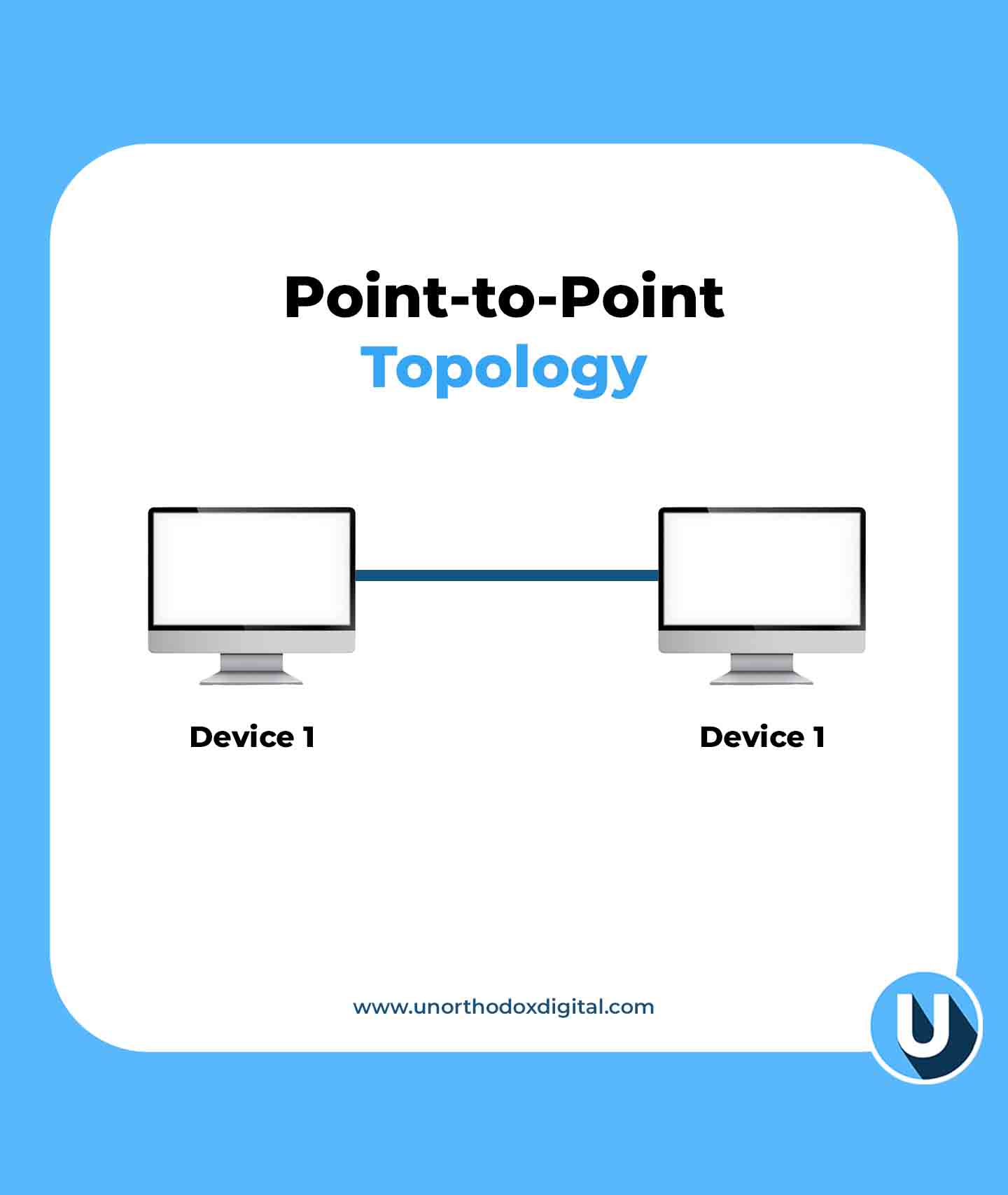
    The Point-to-Point Topology is the simplest form of a network—just two devices directly connected to each other.

    Example: Imagine two people using walkie-talkies. One talks, the other listens, and they take turns. That’s a point-to-point connection.

    AdvantagesDisadvantages
    Simple setupLimited to just two devices
    Fast communicationNo flexibility to add more devices
    Point-to-Point Topology (Types of Network Topologies)
    Point-to-Point Topology

    2. Bus Topology

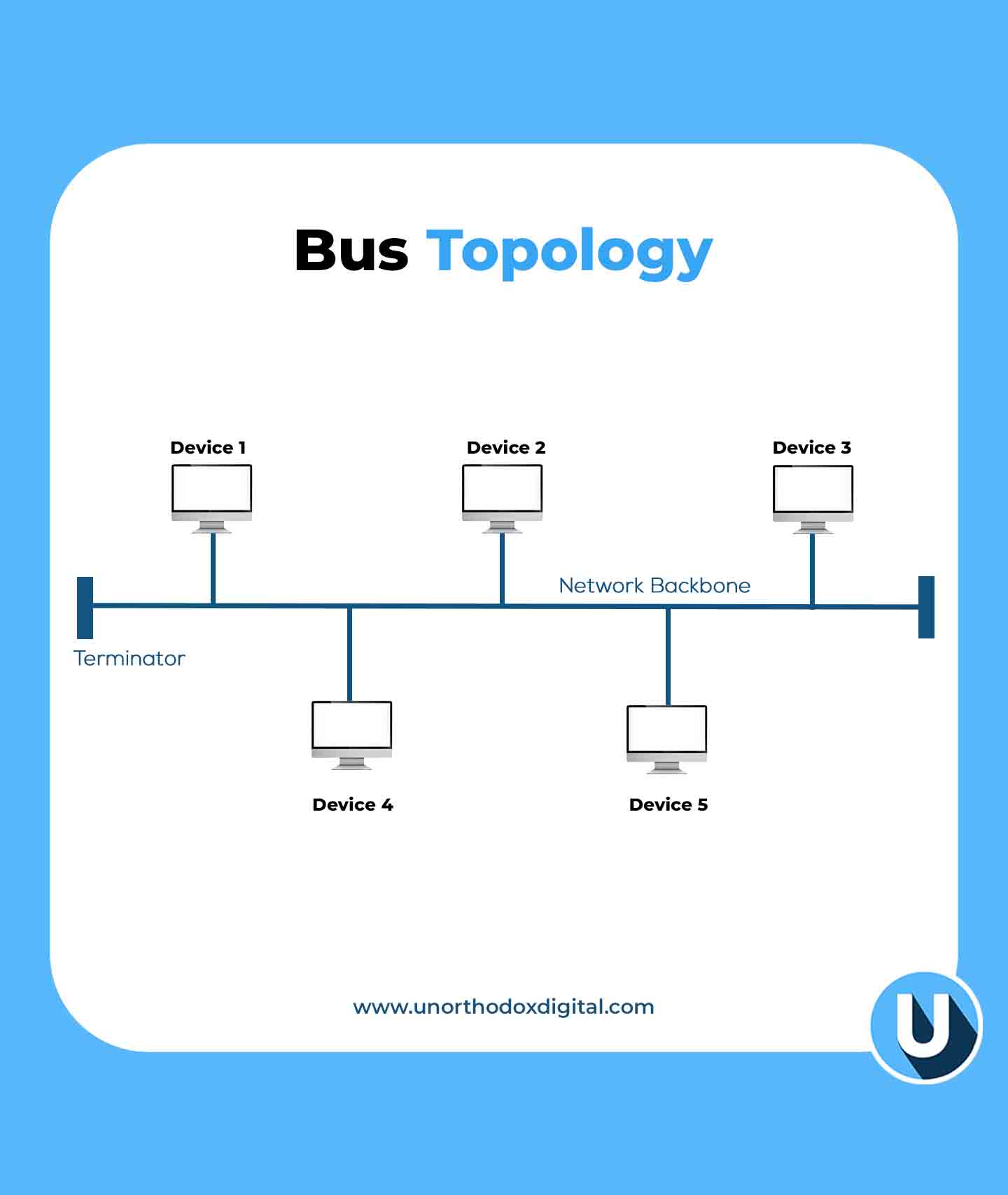
    In the Bus Topology, all devices are connected to a single main cable (called a backbone), and data travels in both directions.

    Example: Think of a public bus route. If one bus stop (device) has a problem, other stops might be affected.

    AdvantagesDisadvantages
    Cost-effective (less cable needed)If the main cable fails, the whole network goes down
    Easy to expandPerformance slows down with more devices
    Bus Topology (Types of Network Topologies)
    Bus Topology

    3. Star Topology

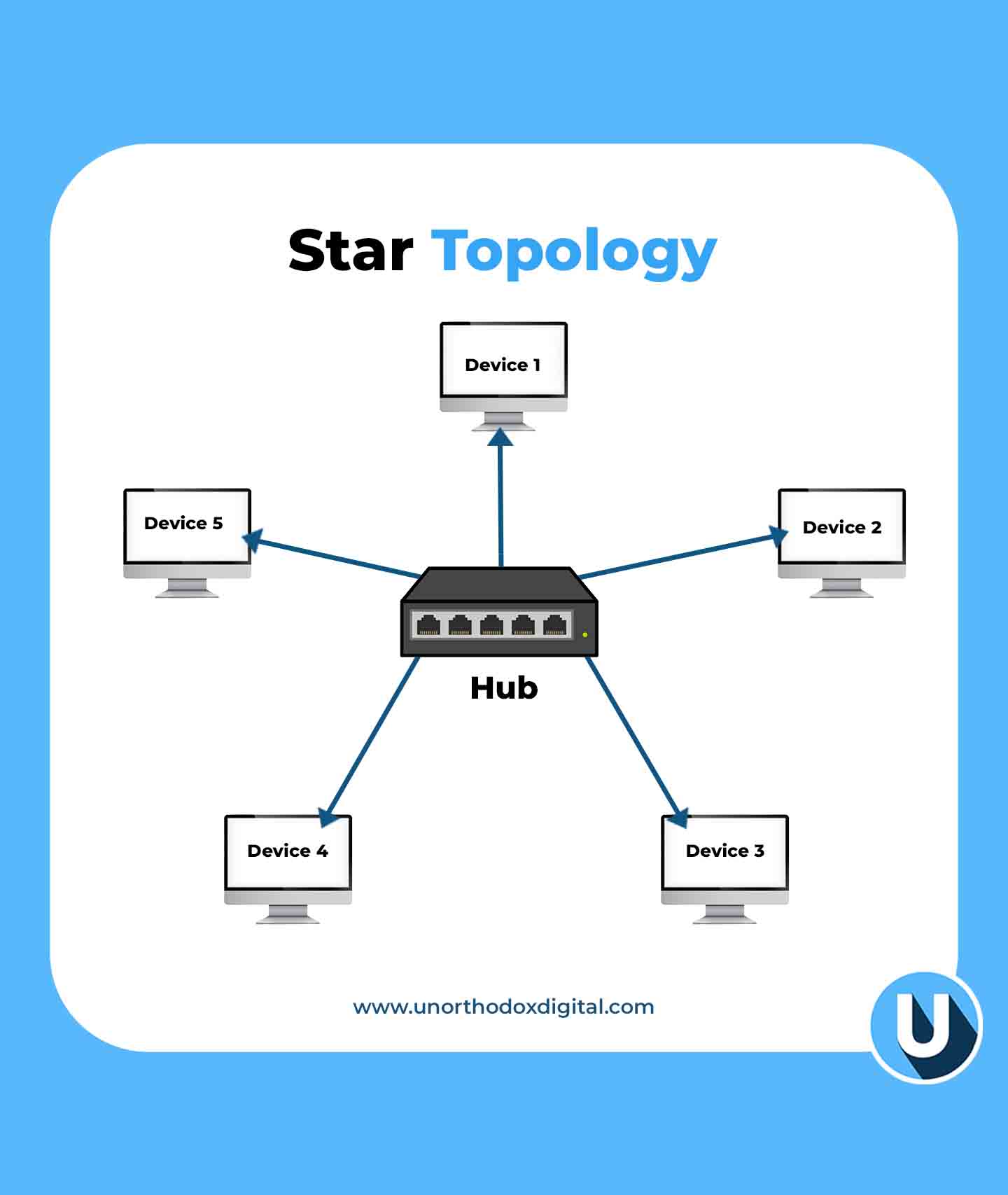
    In the Star Topology, all devices connect to a central hub or switch, which acts like a traffic controller for data.

    Example: Imagine an airport where all flights must go through a central control tower. If the tower is down, flights can’t take off.

    AdvantagesDisadvantages
    Easy to manage and troubleshootIf the central hub fails, the whole network stops working
    Adding or removing devices is simpleMore cabling required
    Star Topology (Types of Network Topologies)
    Star Topology

    4. Ring Topology

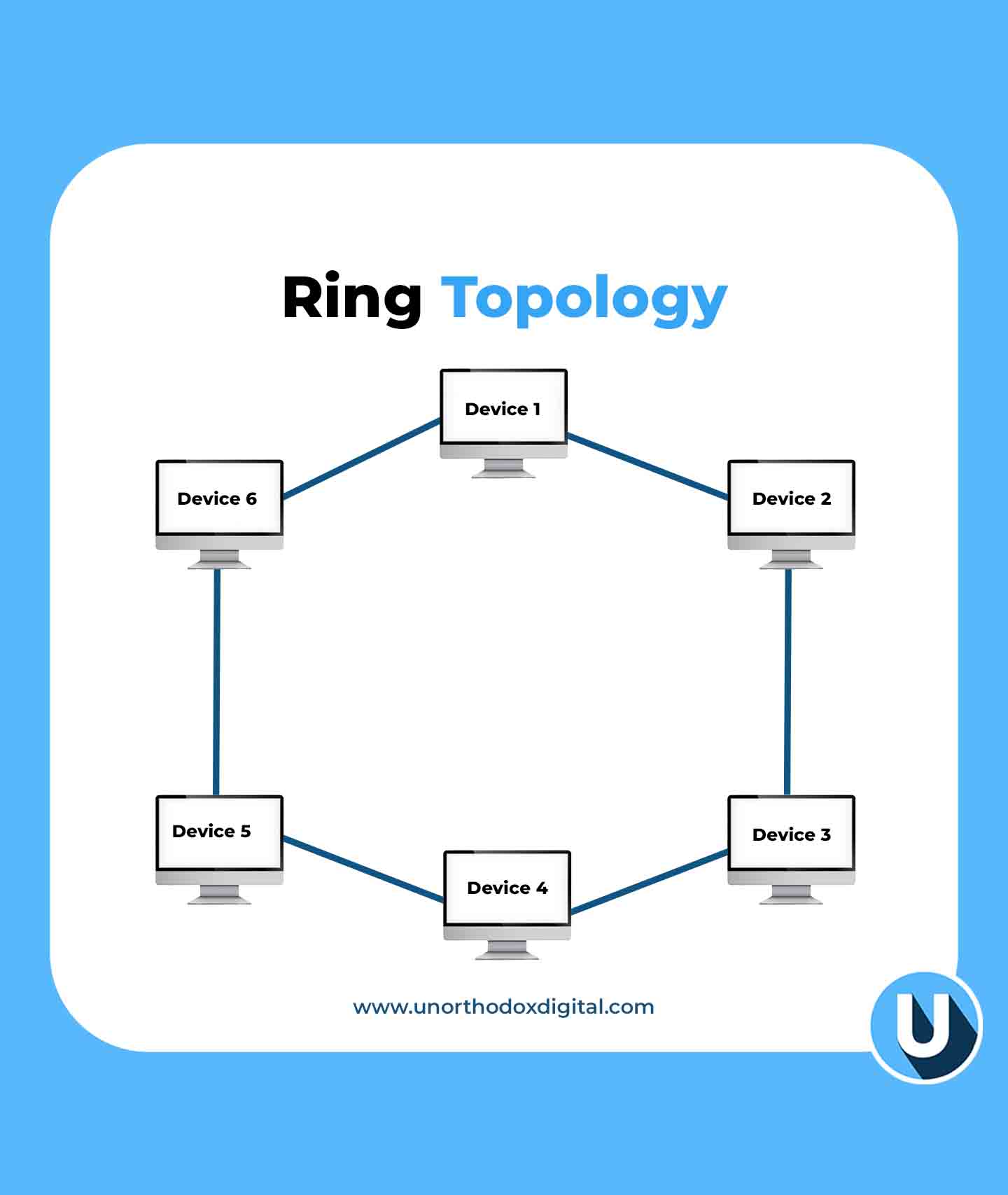
    This setup, known as a Ring Topology, connects each device to two others, forming a circular data path. Data travels in one direction (or both in a dual-ring setup), ensuring a structured and efficient flow.

    Example: Think of a relay race where a baton (data) is passed from runner to runner (device) until it reaches the destination.

    AdvantagesDisadvantages
    No data collisionsIf one device fails, the entire network can break
    Predictable data flowAdding new devices can disrupt the network
    Ring Topology (Types of Network Topologies)
    Ring Topology

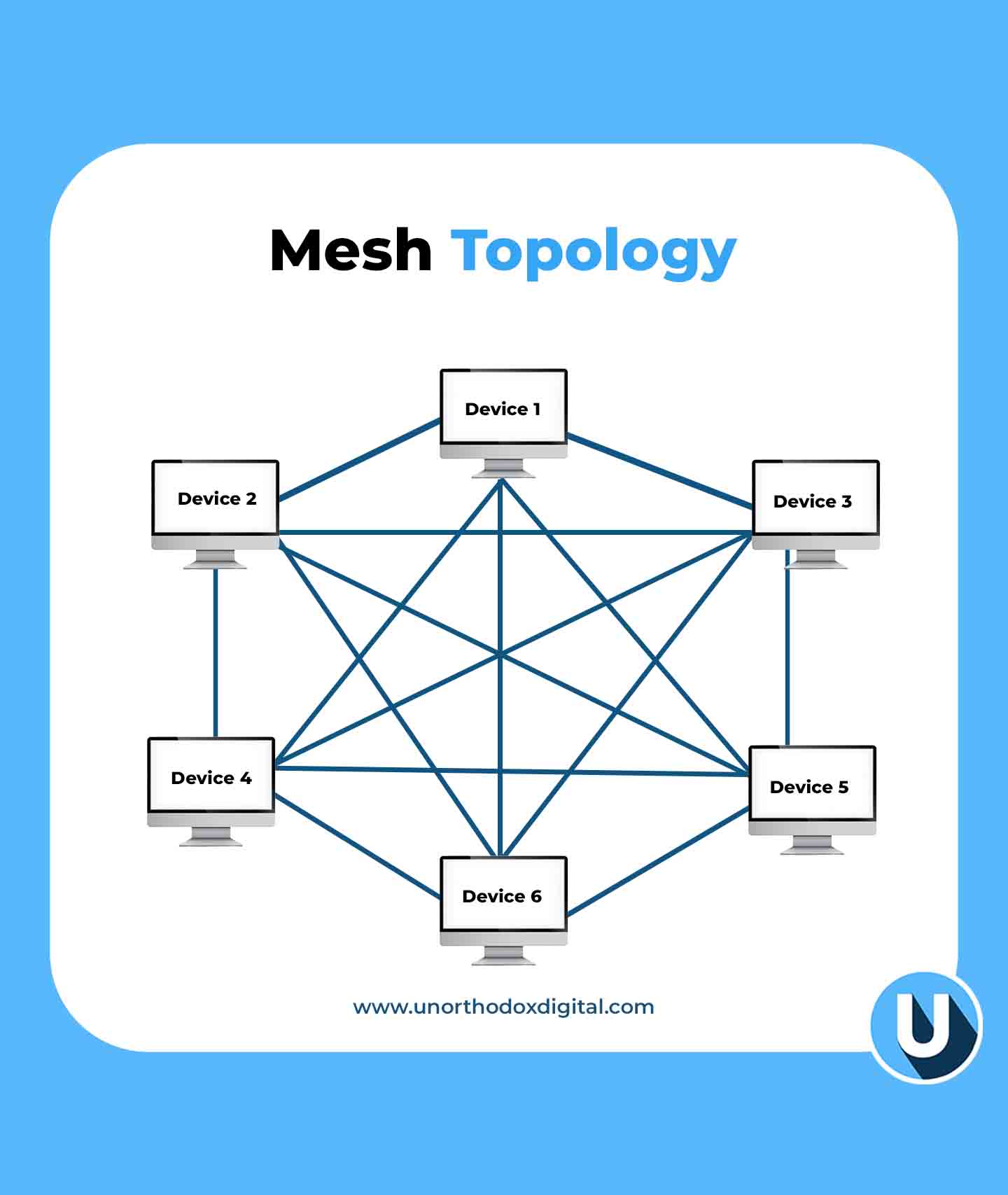
    5. Mesh Topology

    In the Mesh Topology, every device is connected to every other device, creating multiple paths for data.

    Example: Think of a spider web. If one strand breaks, there are still plenty of other ways for the spider to move around.

    AdvantagesDisadvantages
    Very reliable (data can take multiple routes)Expensive and complex to set up
    If one link fails, data can still reach its destinationRequires a lot of cabling
    Mesh Topology (Types of Network Topologies)
    Mesh Topology

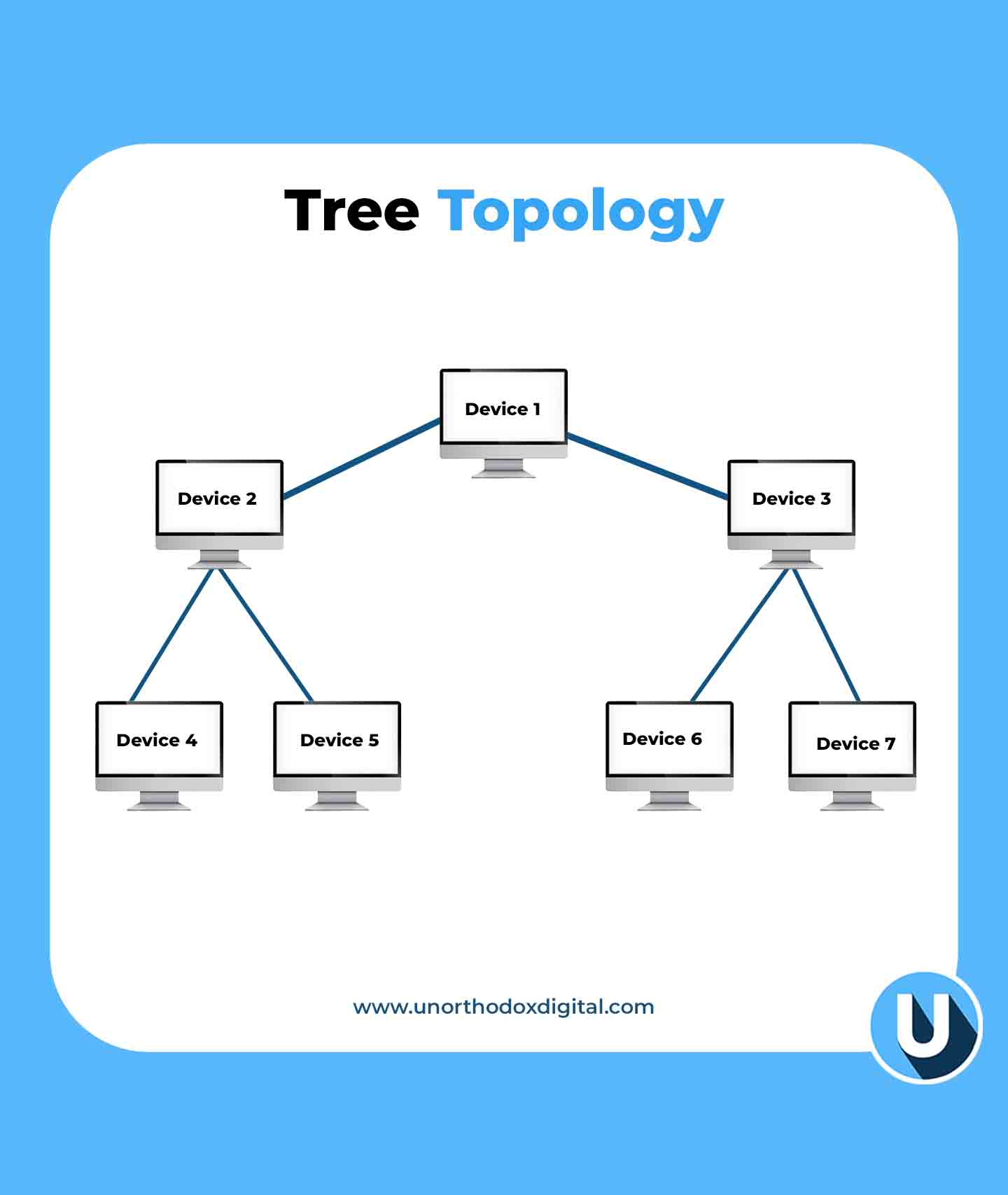
    6. Tree Topology

    The Tree Topology is a mix of star and bus topologies, with multiple branches stemming from a central hub.

    Example: Think of a big family tree. The oldest generation (main hub) connects to multiple generations (sub-hubs and devices).

    AdvantagesDisadvantages
    Easy to expand and manageIf the main hub fails, the entire network can go down
    Well-structured hierarchyRequires more cabling and configuration
    Tree Topology (Types of Network Topologies)
    Tree Topology

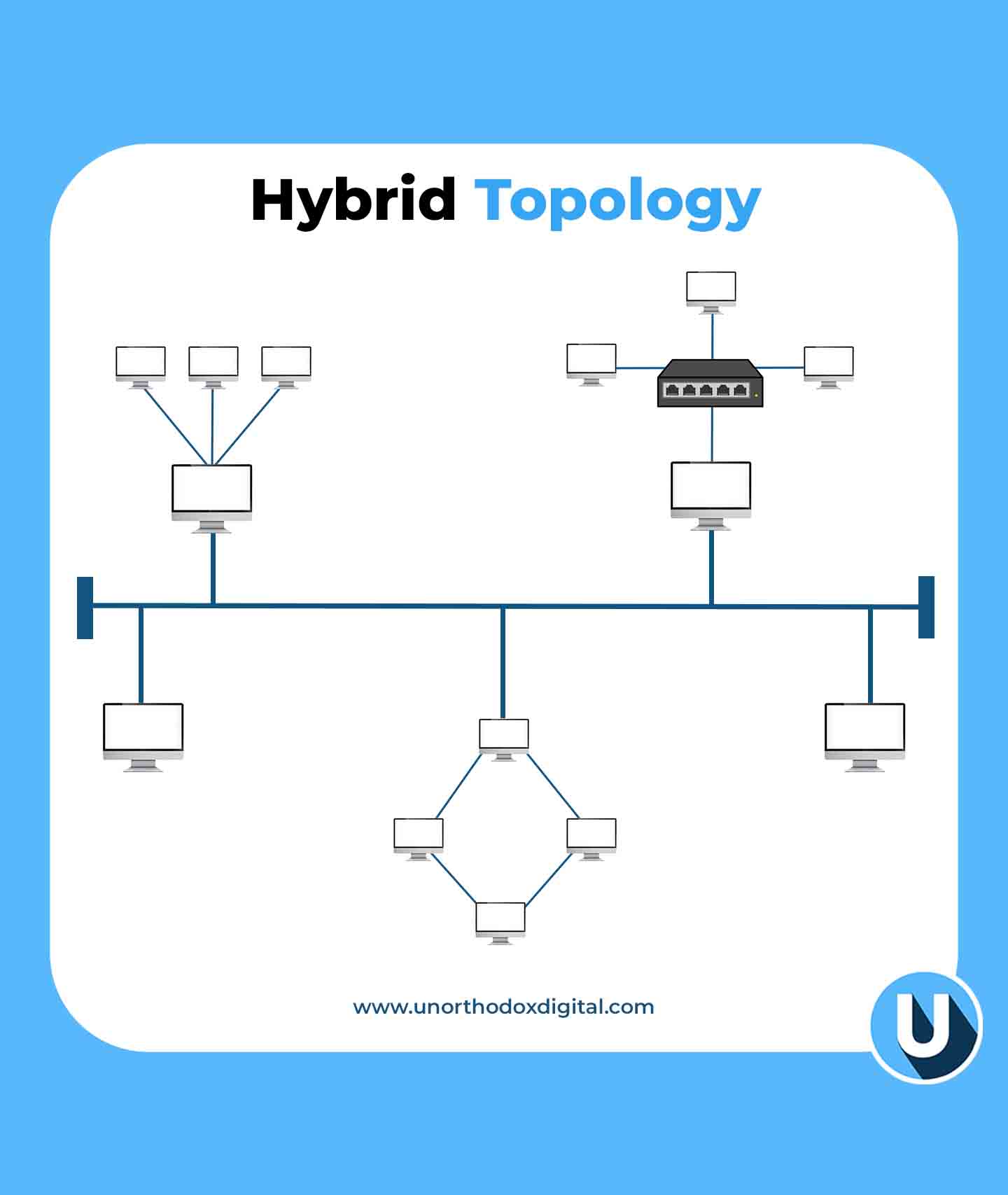
    7. Hybrid Topology

    The Hybrid Topology is a combination of two or more topologies, depending on the needs of the network.

    Example: A university might have a star topology in classrooms, a bus topology in dormitories, and a mesh topology for research labs.

    AdvantagesDisadvantages
    Highly flexible and scalableComplex to design and maintain
    Best for large organizationsExpensive setup
    Hybrid Topology (Types of Network Topologies)
    Hybrid Topology

    Why Does Network Topology Matter?

    Choosing the right network topology is important because it affects:

    • Performance: A good layout ensures fast and efficient communication.
    • Reliability: Some topologies provide backup routes if a connection fails.
    • Cost: More complex topologies need more cables and hardware.
    • Scalability: Some layouts make it easier to add new devices without disrupting the network.

    Network topology might sound technical, but at its core, it’s just about how devices talk to each other. Whether it’s a simple point-to-point connection or a complex hybrid setup, the right choice depends on what you need. Just like choosing the best road layout for a town, picking the right network topology ensures smooth communication and efficiency.

    Frequently Asked Questions (FAQs)

    Is it possible to use multiple network topologies together?

    Yes, a network can combine different topologies in a hybrid setup. This approach enhances flexibility, performance, and reliability by leveraging the strengths of multiple structures.

    What factors should be considered when selecting a network topology?

    The choice of topology depends on factors such as network size, budget, performance requirements, scalability, and reliability. Evaluating these elements helps in selecting the most efficient structure.

    Which network topology is the most cost-effective and easiest to implement?

    Bus topology is the simplest and most affordable to set up, as it connects all devices using a single main cable. However, it is better suited for smaller networks due to its limitations.

    Why do large networks often use hybrid topology?

    Hybrid topology is widely used in large networks because it integrates multiple topologies, allowing for greater flexibility and optimization based on specific networking requirements.

    What is the most suitable topology for large-scale networks?

    For large-scale networks, mesh and tree topologies are commonly used. Mesh topology ensures high reliability through redundant connections, while tree topology supports scalability and efficient data management.
  • Why Paystack Sent a Legal Warning to Zap Africa

    Why Paystack Sent a Legal Warning to Zap Africa

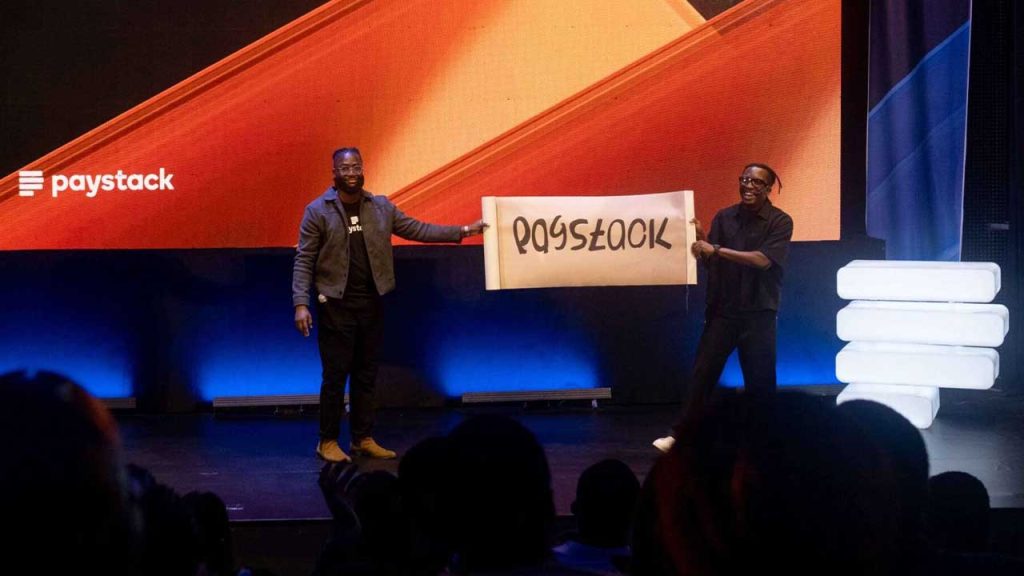
    Paystack, the African payments company owned by Stripe, has sent a cease and desist notice to crypto startup Zap Africa after launching its new consumer product, Zap by Paystack.

    This legal move comes in response to Zap Africa’s claims that Paystack failed to check whether “Zap” was already in use before branding their product.

    The announcement of Paystack’s new offering stirred up a debate online, with Zap Africa accusing the payments giant of neglecting due diligence. But according to a source within Paystack, the company did its homework before moving forward with the name.

    “We’re confident that we filed for trademark and that we filed in the right category,” the source told Condia. “We registered the [Zap] trademark across multiple classes, including financial services — a class where Zap Africa has no filing registration.”

    Documents reviewed by Condia confirm that Paystack applied for a trademark on December 4, 2023, covering six different categories, including financial affairs, monetary services, insurance, and estate affairs. Meanwhile, a search of Nigeria’s Corporate Affairs Commission (CAC) registry shows that many businesses already use “Zap” in their names.

    Zap Africa has also raised concerns that Paystack’s use of “Zap” is confusing its customers. However, the Paystack source dismissed this argument, pointing out that “Zap” is a common word used by multiple businesses in different industries.

    “Zap” is a common term widely used in everyday language, making it difficult to associate exclusively with a single brand,” the source explained. “Over 40 companies listed on the CAC website include ‘Zap’ in their business names. Records from the Trademarks, Patents, and Designs Registry in Nigeria also show that the word ‘Zap’ has been in use for well over a decade. In fact, a trademark containing ‘Zap’ was filed as early as 2008 by an entirely different entity. So, the name is not exclusive to Zap Africa.”

    It’s clear that this dispute is far from over, and how it unfolds could set a precedent for naming rights in Nigeria’s business landscape.

  • MTN and Airtel Join Forces to Cut Costs and Expand Coverage in Nigeria and Uganda

    MTN and Airtel Join Forces to Cut Costs and Expand Coverage in Nigeria and Uganda

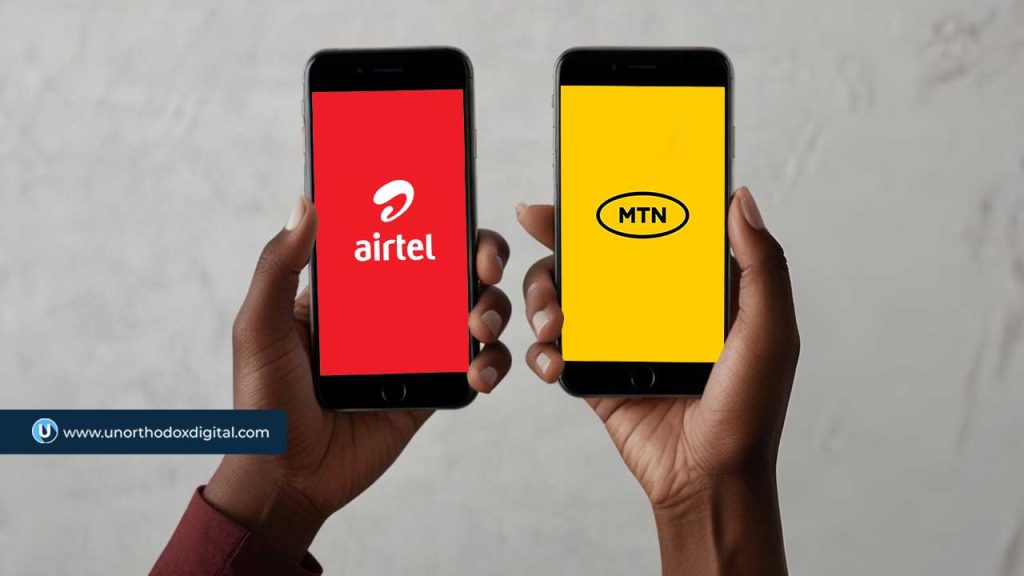
    MTN Group and Airtel Africa are teaming up to share network infrastructure in Nigeria and Uganda.

    This move is all about cutting costs and expanding coverage, especially in areas that don’t yet have strong mobile networks. It’s not every day you see two big competitors working together like this, but with economic challenges and currency devaluation hitting profits, telecom giants are rethinking how they operate.

    Nigeria is the biggest market for both companies, but it hasn’t been smooth sailing. MTN Group makes 40% of its revenue there, while Airtel Africa pulls in 34.4% from the country. The problem? The naira’s devaluation has made everything more expensive, from setting up towers to maintaining fiber networks. Instead of each company building its own infrastructure, they’re now looking to share resources—towers, base stations, and fiber-optic networks—to keep costs under control while improving service quality.

    MTN Group CEO Ralph Mupita pointed out that demand for data and digital financial services keeps growing across Africa. In Nigeria, MTN’s market share hit 51% in January, with over 3 million new subscribers bringing its total to 87.5 million. Airtel Nigeria also saw an increase, going from 56.6 million subscribers in December 2024 to 57.6 million by January 2025.

    “We continue to see strong structural demand for digital and financial services across our markets,” Mupita said. “To meet this demand, we continue to invest in coverage and capacity to ensure high-quality connectivity for our customers.”

    Before signing this deal with Airtel, MTN Nigeria had been in talks with 9mobile, a struggling telecom operator that has been losing customers. That potential agreement, which is still under discussion, would allow 9mobile to use MTN’s network in certain areas while MTN would gain access to 9mobile’s spectrum.

    This new partnership fits right in with regulatory requirements. When the Nigerian Communications Commission (NCC) approved telecom tariff hikes in January, it told operators they had to roll out additional infrastructure within three months to improve service. Since the new tariffs kicked in this February, that means telecoms have just two months left to meet the deadline.

    MTN and Airtel aren’t stopping at Nigeria and Uganda. They’re looking at other African markets too—places like Congo-Brazzaville, Rwanda, and Zambia—where they could also share networks. The companies are considering different approaches, from radio access network (RAN) sharing to joint investments in fiber infrastructure.

    “As we compete fiercely in the market on the strength of our brand, services, and offerings, we are building common infrastructure within the permissible regulatory framework,” Airtel Africa CEO Sunil Taldar said. “This allows us to provide a more robust and extensive digital highway while avoiding the costly duplication of infrastructure.”

    If this collaboration works well, it could pave the way for more network-sharing deals across Africa, helping telecom operators manage costs while expanding their reach.

  • Vendease Tweaks Salaries and Seeks Fresh Funding Amid Financial Challenges

    Vendease Tweaks Salaries and Seeks Fresh Funding Amid Financial Challenges

    Vendease, the Nigerian foodtech startup, is shaking things up in a big way.

    In a bid to cut costs and boost profitability, the company has switched to a performance-based salary system while also looking for fresh investment. If you’ve been following the African tech space, you’ll know that times have been tough for many startups, and Vendease is no exception.

    What’s Changing with Salaries?

    Earlier this year, Vendease laid off nearly half of its workforce—about 120 employees. Now, for those who remain, the company has introduced a phased salary recovery plan. According to internal documents obtained by TechCrunch, here’s how the new system works:

    PeriodSalary Payout (as a % of previous salary)
    February 2024Flat ₦140,000 (~$90) for all employees
    March – May 202430% of former salary
    June – August 202460% of former salary
    September – November 202490% of former salary
    December 2024Full salary (if targets are met)

    On top of that, any unpaid salary portions will be converted into share options under Vendease’s Equity Share Option Plan (ESOP). Half of these shares will vest over ten months, while the rest will take three years. But here’s the catch—employees can only cash out based on the fair market value set by the board.

    A Shift in Strategy

    Vendease isn’t just changing how it pays employees; it’s also adjusting its business model. The startup, which raised $30 million in its Series A funding round from investors like Partech Africa and TLcom Capital, is moving away from directly managing logistics and warehousing. Instead, it’s doubling down on software, AI-driven efficiencies, and financial discipline.

    According to the company, these changes have already helped it break even. But it still needs fresh capital to keep going. With about 150 employees left, Vendease is betting big on internal restructuring and technology to sustain operations. A major focus is its payments and credit marketplace, which could prove more profitable than its traditional procurement services.

    Currency Struggles and BNPL Expansion

    Since launching in 2019, Vendease has helped over 2,000 customers move around 400,000 metric tonnes of food, saving them significant procurement costs. But despite tripling its naira revenue since 2022, the company has been hit hard by currency devaluation. Inflation and rising costs have made profitability an even bigger challenge.

    One of its lifelines has been its buy now, pay later (BNPL) offering, which provides short-term credit to food businesses. Over the past two years, Vendease has issued more than $70 million in credit, boasting a default rate of under 1%—a rare feat in Nigeria’s lending space.

    Vendease’s CFO, Mohamed Chaudry, who came on board in January 2024, has been championing BNPL as a key path to profitability. But even with this focus, the company still needs more cash to fund its next growth phase.

    Fundraising and Potential Acquisition Talks

    Right now, Vendease is talking to both existing and new investors to raise a bridge round. According to TechCrunch, this money won’t go toward daily operations but rather to support technology growth and expansion.

    The big question remains: will these changes be enough? With its restructuring efforts in full swing, the next few months will be crucial in determining whether Vendease’s strategy can secure its long-term future. If it plays its cards right, it might just navigate these financial headwinds and come out stronger.

  • How to Book an STC Bus Ticket Online in Ghana

    How to Book an STC Bus Ticket Online in Ghana

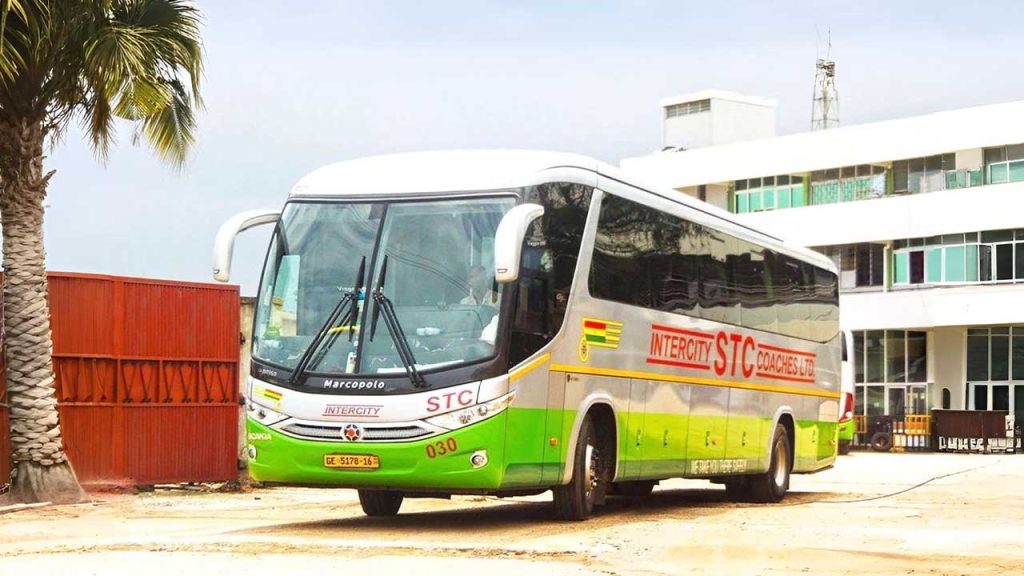
    Traveling by bus in Ghana can be an easy and enjoyable experience, especially with the State Transport Corporation (STC).

    STC buses are known for their comfort, reliability, and excellent customer service. The best part? You don’t have to stand in long queues at the bus terminal to buy your ticket. Instead, you can book it online from your phone or computer in just a few minutes.

    In this guide, we’ll walk you through the simple steps to book an STC bus ticket online, answer common questions, and give you some extra tips to make your trip smoother.

    Why Book Your STC Bus Ticket Online?

    Before we dive into the steps, let’s look at why online booking is a great option:

    • No Long Queues: You don’t have to waste time standing in line at the station.
    • Convenience: Book your ticket from anywhere—home, office, or even while on the go.
    • Secure Payments: Pay safely using mobile money or bank card.
    • Choose Your Seat: Some STC buses allow you to select your preferred seat.

    Now, let’s get into how you can book your ticket online.

    How to Book an STC Bus Ticket Online in Ghana

    Step-by-Step Guide to Booking Your STC Bus Ticket Online

    1. Visit the STC Ticketing Website

    Open your web browser and go to stcticketing.gov.gh. This is the official website for booking STC tickets online.

    2. Enter Your Travel Details

    On the homepage, you’ll see fields where you need to enter:

    • Traveling From: Type in your current location (e.g., Accra, Kumasi, Takoradi).
    • Traveling To: Enter your destination.
    • Departure Date: Select the date you want to travel.

    3. Search for Available Buses

    After entering your details, click the Search button. The system will show you a list of available buses for your chosen date, along with the departure times and ticket prices.

    Bus TypeDeparture TimeFare (GHS)
    Express6:00 AM100
    Standard9:00 AM80
    VIP12:00 PM150

    If there are no buses available for your selected date, the system will notify you.

    4. Choose Your Bus and Seat

    Select the bus that suits your schedule and budget. Some buses allow you to pick your seat from a seating chart.

    5. Make Payment

    To confirm your booking, you’ll need to pay for your ticket. STC accepts payments through:

    • Mobile Money (MTN, Vodafone, AirtelTigo)
    • Debit/Credit Card

    Follow the on-screen instructions to complete your payment.

    6. Receive Your Ticket

    Once payment is successful, STC will send your ticket receipt to the email or mobile number you provided. Your ticket will contain important details like:

    • Booking reference number
    • Bus departure time
    • Seat number (if applicable)
    • Bus terminal location

    Make sure to save this ticket or print it out for your trip.

    What to Do If You Encounter Issues

    Sometimes, things don’t go as planned. If you have trouble booking your ticket online or have any questions, you can visit an STC office or call customer support.

    STC Physical Offices & Contact Information

    Here are some key STC offices where you can get assistance:

    STC Main Office (Accra)

    STC Kumasi Branch

    • Location: Adum Oforikrom Terminal, Workshop and Administration
    • Phone: 0557943607 / 0573100383 / 0573100390

    Tudu Station (Accra)

    • Location: Opposite Kimbu Senior High School, Central Business District
    • Phone: 0573100340

    Tips for a Smooth Travel Experience

    • Arrive Early: Even with an online ticket, it’s best to get to the terminal at least 30 minutes before departure.
    • Carry a Valid ID: Some trips may require identification for verification.
    • Keep Your Phone Charged: You might need to show your e-ticket on your phone.
    • Double-Check Your Travel Date & Time: Mistakes can happen, so always confirm your details before making payment.
    How to Book an STC Bus Ticket Online in Ghana

    Booking an STC bus ticket online in Ghana is fast, easy, and convenient. With just a few clicks, you can secure your seat and avoid the hassle of long queues at the terminal. Whether you’re traveling for business, school, or leisure, this online system makes planning your trip stress-free.

    Now that you know how to book your ticket, go ahead and give it a try for your next journey. Safe travels!

  • How to Use Airtime to Buy a Voucher in South Africa

    How to Use Airtime to Buy a Voucher in South Africa

    Buying a voucher using airtime in South Africa is like using pocket money to get what you need—except in this case, your mobile phone balance does the job.

    Whether you’re topping up data, paying for services, or even buying prepaid electricity, this method is simple, quick, and convenient. If you’ve ever wondered how it works, this guide will break it down in a way that makes complete sense. By the end, you’ll be able to do it confidently, just like sending a text message.

    Why Buy Vouchers with Airtime?

    Before we get into the steps, let’s quickly talk about why using airtime to buy vouchers is a smart option:

    BenefitWhy It Matters
    ConvenienceNo need for a bank card or cash. Just use your airtime balance.
    Instant AccessBuy vouchers anytime, anywhere, even without internet access.
    No Extra FeesAvoid transaction fees that often come with other payment methods.
    Works in Rural AreasEven in places with no banking services, you can still buy vouchers easily.

    This method is perfect for people who don’t have access to bank accounts, don’t want to deal with extra charges, or just prefer a simpler way to make payments.

    Step-by-Step Guide to Buying a Voucher with Airtime

    Step 1: Check Your Airtime Balance

    Before you start, make sure you have enough airtime to cover the cost of the voucher. To check your balance, dial the USSD code for your mobile network:

    NetworkUSSD Code to Check Balance
    Vodacom*100#
    MTN*136#
    Cell C*101#
    Telkom*188#

    If you don’t have enough airtime, you’ll need to top up before continuing.

    Step 2: Choose a Voucher Provider

    Different providers sell vouchers for various services. Decide what kind of voucher you need—mobile data, airtime, prepaid electricity, or even gaming credits. Some common providers include:

    • Vodacom
    • MTN
    • Cell C
    • Telkom
    • Electricity providers (like Eskom)

    Each provider has its own way of selling vouchers, but the process is quite similar.

    Step 3: Dial the USSD Code for Purchasing Vouchers

    Once you know which voucher you want, dial the right USSD code to start the process:

    ProviderUSSD Code for Voucher Purchase
    Vodacom*135#
    MTN*136#
    Cell C*147#
    Telkom*180#

    After dialing, a menu will appear on your screen with different voucher options.

    Step 4: Select Your Voucher

    Using the on-screen menu, navigate to the voucher you need. Most USSD menus work by responding with a number to choose an option. For example, you might see something like this:

    1. R5 Airtime Voucher
    2. R10 Airtime Voucher
    3. R20 Data Voucher
    4. Prepaid Electricity
    5. More Options

    Simply enter the number that matches the voucher you want.

    Step 5: Confirm the Purchase

    Before finalizing the transaction, double-check the details:

    • Is the voucher amount correct?
    • Are you using the right airtime balance?
    • Do you understand any terms or expiry dates?

    If everything looks good, confirm the purchase by following the prompts.

    Step 6: Receive Your Voucher Code

    Once the transaction is complete, you’ll get a confirmation SMS with your voucher details. This message will include:

    • The voucher code
    • How to redeem the voucher
    • Expiry date (if applicable)

    Make sure to save this SMS or write down the code somewhere safe.

    How to Use Airtime to Buy a Voucher in South Africa

    FAQs

    1. What if I don’t receive my voucher SMS?

    Sometimes there’s a short delay. Wait a few minutes and check your messages again. If it doesn’t arrive, try these steps:

    • Restart your phone.
    • Check if your airtime was deducted.
    • Contact your mobile network’s customer service.

    2. Can I buy a voucher if I’m out of airtime?

    No, you must have enough airtime before you start the process. If you’re out of airtime, borrow some using these codes:

    NetworkAirtime Advance Code
    Vodacom*135#
    MTN*136#
    Cell C*147#
    Telkom*180#

    You’ll need to repay the borrowed airtime when you next recharge.

    3. Can I use airtime to buy other things online?

    Yes! Some platforms let you pay for digital services using airtime. Look out for services like:

    • Google Play Store purchases (on some networks)
    • Streaming services (if they allow airtime billing)
    • Online gaming vouchers

    4. Are there limits to how much airtime I can use for vouchers?

    Yes, different networks have daily or monthly limits on airtime transactions. If you hit a limit, you’ll need to wait or use another payment method.

    Using airtime to buy vouchers in South Africa is an easy and hassle-free way to pay for services without needing cash or a bank card. Whether you’re getting a data top-up, paying for electricity, or buying a gaming voucher, the process is straightforward and quick. Now that you know exactly how to do it, try it out the next time you need a voucher—you might be surprised at how simple it is!

  • How to Share Airtime on AirtelTigo Ghana Easily

    How to Share Airtime on AirtelTigo Ghana Easily

    The short code for transferring airtime on AirtelTigo is *100*2#. Easily send airtime to friends and family in seconds.

    Sharing airtime on AirtelTigo Ghana is quick and simple. Whether you’re helping a friend in need or just spreading some extra credit, you have two easy methods to transfer airtime: using the AirtelTigo mobile app or the USSD code. This guide will walk you through both options step by step.

    How to Transfer Airtime Using the AirtelTigo Mobile App

    If you prefer a smooth and interactive experience, the AirtelTigo (AT) mobile app is the way to go. Here’s how to use it to send airtime:

    Step-by-Step Guide:

    1. Open the AirtelTigo app on your phone. If you don’t have it, download it from the Google Play Store or Apple App Store.
    2. Log in with your AirtelTigo number.
    3. Select “Airtime – Topup.”
    4. Swipe through the options and choose “Transfer to a Friend.”
    5. Enter the recipient’s number and the amount you want to send.
    6. Tap “Transfer” and confirm the transaction.
    7. Wait for a confirmation SMS from AirtelTigo.

    That’s it! Your friend or family member will receive the airtime instantly.

    Why Use the AirtelTigo App?

    FeatureBenefit
    User-friendly interfaceMakes transfers quick and easy
    No need to memorize codesEverything is right on your screen
    Secure transactionsReduces the risk of errors

    How to Transfer Airtime Using the USSD Code

    For those who prefer a more traditional method, USSD codes are the perfect alternative. They work on any phone, even if you don’t have internet access.

    Step-by-Step Guide:

    1. Dial *100# on your AirtelTigo line.
    2. Select “Transfer Airtime.”
    3. Enter the recipient’s number.
    4. Enter the amount you want to transfer.
    5. Confirm the transaction by entering ‘1’ when prompted.
    6. Receive an SMS confirmation that the transfer was successful.

    This method is fast, reliable, and works on all types of mobile phones.

    Why Use the USSD Method?

    FeatureBenefit
    Works on all phonesNo smartphone required
    No internet neededGreat for areas with poor connectivity
    Quick and easyJust a few steps to complete the transfer

    Can You Transfer Airtime to Other Networks?

    Unfortunately, AirtelTigo does not allow direct airtime transfers to other networks. However, you can still buy airtime for someone using your ATMoney account.

    How to Buy Airtime for Other Networks Using ATMoney

    Via the AirtelTigo App:

    1. Open the AirtelTigo app and log in.
    2. Select “Airtime – Topup.”
    3. Choose “ATMoney” as your payment method.
    4. Enter the amount you want to buy.
    5. Enable “Topup for another number” and enter the recipient’s phone number.
    6. Tap “Recharge” and enter your ATMoney PIN to confirm.

    Via USSD Code:

    1. Dial *110# on your AirtelTigo line.
    2. Select “Buy Airtime/Data.”
    3. Choose “Airtime.”
    4. Select “Other Networks.”
    5. Choose the recipient’s network.
    6. Enter the recipient’s phone number and amount.
    7. Enter your ATMoney PIN to complete the transaction.

    Now, your recipient will receive the airtime, even if they’re on a different network.

    How to Transfer Airtime on AirtelTigo Ghana Easily

    FAQs About AirtelTigo Airtime Transfers

    1. What is the shortcode for transferring airtime on AirtelTigo?

    The shortcode to transfer airtime on AirtelTigo is *100*2#.

    2. Can you transfer data on AirtelTigo?

    Yes! You can share data by dialing *585# or *111*1# and selecting Option 13 for Data Sharing. Then, follow the prompts to share your data.

    3. Are there charges for airtime transfers?

    Yes, AirtelTigo charges GHS 0.05 for each airtime transfer to another AirtelTigo number.

    Sharing airtime on AirtelTigo Ghana is super easy, whether you use the mobile app or the USSD code. If you’re sending airtime to another AirtelTigo number, just choose the method that works best for you. And if your recipient is on a different network, use ATMoney to buy them airtime instead. Now you’re all set to help friends and family stay connected!

  • How to Quickly Get an AirtelTigo eSIM in Ghana

    How to Quickly Get an AirtelTigo eSIM in Ghana

    If you’ve ever wished you could get a new SIM card without having to fumble with tiny plastic chips, you’re in luck. AirtelTigo (AT) was the first mobile network provider to bring eSIM technology to Ghana in November 2022, making life easier for smartphone users. Instead of using a physical SIM card, an eSIM (embedded SIM) is built right into your phone and can be activated digitally.

    In this guide, I’ll walk you through everything you need to know about getting an AirtelTigo eSIM in Ghana—step by step, in plain English.

    What is an eSIM, and Why Should You Care?

    An eSIM is a digital SIM that lets you activate a mobile network on your phone without inserting a physical SIM card. Think of it like a built-in SIM card that you can switch on and off as needed.

    Why You’ll Love an eSIM:

    • No more lost or damaged SIM cards – It’s permanently inside your phone.
    • Switch networks easily – If you travel often or need multiple numbers, switching between networks is simple.
    • Better security – Since there’s no physical SIM to remove, thieves can’t swap out your SIM if your phone is stolen.

    Who Can Get an AirtelTigo eSIM?

    Good news: AirtelTigo eSIMs are available for both new and existing customers. But before you rush to get one, check if your phone supports eSIM technology.

    How to Check if Your Phone Supports eSIM

    Follow these steps to confirm if your phone can use an AirtelTigo eSIM:

    Method 1: Dial a Code

    1. Open your phone’s dialer.
    2. Dial *#06# and hit call.
    3. A screen will pop up showing different codes.
    4. Look for a code labeled “EID” followed by a long number. If you see this, your phone supports eSIM.

    Method 2: Check Your Phone Settings

    • On iPhone: Go to Settings > Cellular > Add Cellular Plan. If you see an option to add an eSIM, your phone supports it.
    • On Android: Navigate to Settings > About Phone > Status or SIM status and check if there’s an eSIM option.

    How to Get an AirtelTigo eSIM

    Unfortunately, AirtelTigo doesn’t offer online registration for eSIMs just yet. You’ll need to visit an AirtelTigo customer service center in person. Here’s how:

    Step-by-Step Process to Get an AirtelTigo eSIM

    1. Find the Nearest AirtelTigo Service Center
      • Visit any AirtelTigo shop across Ghana.
    2. Carry the Required Documents
      • A valid Ghana Card (for ID verification).
      • Your AirtelTigo mobile number.
      • A valid email address (for eSIM activation instructions).
    3. Request for an eSIM
      • Ask an agent to switch your number to an eSIM.
      • You may need to fill out a registration form.
    4. Receive Your QR Code
      • The agent will give you a unique QR code (printed or sent via email) for activating your eSIM.

    How to Activate Your AirtelTigo eSIM

    Once you have your QR code, follow these steps to activate the eSIM on your phone.

    For Android Devices

    1. Ensure your phone is connected to Wi-Fi.
    2. Go to Settings.
    3. Select Connections.
    4. Tap SIM Manager.
    5. Choose Add eSIM.
    6. Select Add Using QR Code.
    7. Scan the QR code given to you.
    8. Follow the prompts to complete setup.

    For iPhones

    1. Ensure your phone is connected to Wi-Fi.
    2. Open Settings.
    3. Select Mobile Service.
    4. Tap Add eSIM.
    5. Choose Use QR Code.
    6. Scan the QR code.
    7. Tap Continue and follow the instructions.

    After activation, set your eSIM as the primary SIM for calls, messages, and data.

    What’s Included in the AirtelTigo eSIM Starter Pack?

    AirtelTigo offers a welcome bonus for new eSIM users.

    BonusEligibilityValidity
    5GB Data BonusSpend GH₵100+ on voice & data per month7 days, renewable for up to 6 months

    This means if you’re a frequent AirtelTigo user, you’ll enjoy extra data just for switching to an eSIM.

    How to Quickly Get an AirtelTigo eSIM in Ghana

    List of Phones That Support AirtelTigo eSIM

    Not all phones support eSIMs. Here’s a quick list of compatible devices:

    BrandSupported Models
    AppleiPhone XR to iPhone 16 Pro Max
    SamsungGalaxy Fold, Z Fold 3 5G, Z Flip, S20 to S22 Ultra, Note 20, Note 20 Ultra 5G
    HuaweiP40, P40 Pro, Mate 40 Pro
    GooglePixel 3a to Pixel 6 Pro

    Frequently Asked Questions (FAQs)

    1. Can I switch back to a physical SIM if I change my mind?

    Yes! AirtelTigo allows customers to switch back to a physical SIM using their SIM Swap service.

    2. Can my AirtelTigo eSIM work on multiple devices?

    No, your eSIM is tied to one device at a time. To switch to another device, you’ll need to remove it from the current phone and re-install it on the new one.

    3. Can I use both an eSIM and a physical SIM on the same phone?

    Yes, if your phone supports Dual SIM functionality, you can use both an AirtelTigo eSIM and a physical SIM (from the same or a different network).

    Getting an AirtelTigo eSIM in Ghana is a quick and straightforward process. If your phone supports eSIM technology, making the switch means no more worrying about lost SIM cards or running to a shop to get a new one. Just visit an AirtelTigo center, follow the activation steps, and enjoy seamless connectivity!

    So, ready to ditch the plastic SIM? Head to an AirtelTigo shop today and go digital with an eSIM!

  • How to Buy AirtelTigo’s Fuse Bundle in Ghana

    How to Buy AirtelTigo’s Fuse Bundle in Ghana

    Use *567# or *111*2# to buy the affordable AirtelTigo Fuse bundle in Ghana through the AirtelTigo mobile app or USSD.

    If you’re looking for an affordable way to stay connected in Ghana, AirtelTigo’s Fuse bundle is a great option. Whether you love chatting with friends, browsing the internet, or both, this bundle gives you flexibility without an expiration date. Let’s break down everything you need to know about AirtelTigo’s Fuse bundle—step by step, in plain language.

    What is AirtelTigo’s Fuse Bundle?

    AirtelTigo’s Fuse bundle is a special offer that combines voice minutes and data at different price points. Unlike other bundles, this one does not expire—so you can use your minutes and data until they run out. There are two main types of Fuse bundles:

    1. Fuse Voice and Data – This gives you both call minutes and mobile data.
    2. Fuse Voice Only – This is for people who only need call minutes.

    Available Fuse Bundles

    The table below shows the available packages and what you get for each one:

    Price (GHS)Voice Minutes (Fuse Voice & Data)Data (MB)Voice Minutes (Fuse Voice Only)
    2254050
    565120110
    10135260235
    15205400300

    As you can see, the Fuse Voice & Data bundle gives you both call time and internet, while the Fuse Voice Only bundle focuses purely on calls. Pick the one that works best for you!

    How to Buy the AirtelTigo Fuse Bundle

    There are two simple ways to buy the Fuse bundle:

    1. Using a shortcode (quick and easy!)
    2. Via the AirtelTigo Mobile App (great if you prefer apps)

    Method 1: Buying Through Shortcode

    Follow these steps to buy the Fuse bundle using a simple USSD code:

    1. Dial *567# on your phone.
    2. Choose your preferred option:
      • Fuse Voice Only (for calls)
      • Fuse Voice & Data (for calls + internet)
    3. Select the package you want (GHS 2, 5, 10, or 15).
    4. Choose “Buy for Self” (or “Gift” if buying for someone else).
    5. Pick a payment method:
      • Airtime (if you have credit)
      • AirtelTigo Money (if you prefer mobile money)
    6. Confirm your purchase.

    Alternative USSD Code: You can also dial *111#, then select “Fuse Bundle” to access the offer.

    Method 2: Buying Through the AirtelTigo Mobile App

    If you love using apps, here’s how to buy your bundle from the AirtelTigo Mobile App:

    1. Open the AirtelTigo App on your phone.
    2. Tap “Products” at the bottom-left corner.
    3. Select “Voice & Combo”.
    4. Scroll through and choose your preferred bundle (Fuse Voice & Data or Fuse Voice Only).
    5. Pick the package that suits you (GHS 2, 5, 10, or 15).
    6. Select a payment method (Airtime or AT Money).
    7. Tap “Buy Combo” to confirm your purchase.

    That’s it! Your bundle will be activated immediately.

    How to Check Your Fuse Bundle Balance

    Want to know how much data or call time you have left? It’s super easy:

    1. Dial *504# on your phone.
    2. You’ll receive an SMS showing your remaining balance for both minutes and data.
    How to Buy AirtelTigo’s Fuse Bundle in Ghana

    Frequently Asked Questions (FAQs)

    1. Does the AirtelTigo Fuse Bundle Expire?

    No! The Fuse bundle does not expire. You can use it until your voice minutes or data run out.

    2. Can I Gift a Fuse Bundle to Someone Else?

    Yes! When buying the bundle, simply select “Gift” instead of “Buy for Self” and enter the recipient’s number.

    3. What Happens if I Run Out of Data or Minutes?

    If you use up your bundle, you can always buy another one by following the same steps.

    4. Can I Buy Multiple Fuse Bundles at Once?

    Yes, you can buy multiple bundles, and they will all add up.

    AirtelTigo’s Fuse bundle is a great way to stay connected without worrying about expiration dates. Whether you need just call minutes or a mix of calls and internet, this bundle gives you flexibility at affordable prices. Now that you know how to buy and check your balance, you’re all set!

    If you found this guide helpful, go ahead and dial *567# to get your Fuse bundle today!

  • How to Share or Transfer Airtime on Telecel Ghana

    How to Share or Transfer Airtime on Telecel Ghana

    Easily transfer airtime on Telecel Ghana by dialing *516# and following the prompts or using *516recipient’s numberamount*PIN# for instant credit.

    Ever needed to send airtime to a friend or family member in Ghana using Telecel? Maybe someone ran out of credit at the worst possible moment, and you’re their only hope. Good news—Telecel makes it easy to transfer airtime from one Telecel number to another! Whether you prefer using USSD codes or T-CASH, this guide will walk you through every step.

    What You Need to Know Before Transferring Airtime

    Before jumping in, here are a few things to keep in mind:

    • Transfers only work between Telecel numbers – You can’t send airtime to MTN, Vodafone, or other networks directly.
    • You need enough balance – Make sure you have enough airtime before attempting a transfer.
    • There’s a small fee – Each airtime transfer costs GHS 0.05.
    • You need a PIN – Telecel requires a transfer PIN for security. If you’ve never changed it, the default PIN is 1234.

    Now, let’s dive into the step-by-step process!

    Method 1: Using USSD Code to Transfer Airtime

    This is the quickest way to send airtime to another Telecel number. Just follow these simple steps:

    1. Dial *516# on your Telecel phone.
    2. Select Option 1: Transfer Credit.
    3. Enter the recipient’s Telecel number. (Example: 0201234567)
    4. Enter the amount you want to send. (Must be in Ghana cedis, no decimal values.)
    5. Enter your transfer PIN. (If you haven’t changed it, use the default: 1234)
    6. Confirm the transfer by selecting ‘1’.

    Once you complete these steps, you’ll receive a confirmation message, and the recipient will get their airtime instantly!

    Alternative USSD Code for Faster Transfers

    If you prefer a shortcut, you can transfer airtime in one step by dialing:

    *516*recipient’s number*amount*PIN#

    Example: To send GHS 2 to 0201234567, you would dial:

    *516*0201234567*2*1234#

    Press the call button, confirm the transaction, and you’re done!

    Method 2: Buying Airtime for Another Network Using T-CASH

    Even though Telecel doesn’t allow direct transfers to MTN, Vodafone, or AirtelTigo, you can still buy airtime for other networks using T-CASH. Here’s how:

    1. Dial *110# to access T-CASH.
    2. Select “Airtime and Bundles.”
    3. Choose “Buy Airtime.”
    4. Select “Other Networks.”
    5. Accept the terms by entering ‘1’.
    6. Enter the recipient’s phone number.
    7. Confirm the number.
    8. Enter the amount you want to buy.
    9. Enter your T-CASH PIN to complete the purchase.

    The recipient will receive the airtime within seconds!

    Changing Your Transfer PIN

    For security reasons, it’s a good idea to change the default 1234 PIN. To do this:

    1. Dial *516# and select “Change PIN” (Option 3).
    2. Enter your current PIN (1234 if unchanged).
    3. Enter a new 4-digit PIN.
    4. Confirm the new PIN.

    Once successful, your new PIN will be required for all future transfers.

    Quick Reference Table for Telecel Airtime Transfers

    ActionUSSD CodeSteps
    Transfer to another Telecel numberDial *516#Follow prompts to enter recipient, amount, and PIN
    Fast transfer (no menus)*516*recipient’s number*amount*PIN#Enter the command directly and confirm
    Change transfer PINDial *516#Select “Change PIN” and follow instructions
    Buy airtime for another networkDial *110#Use T-CASH to buy for any network
    How to Share or Transfer Airtime on Telecel Ghana

    Frequently Asked Questions (FAQs)

    1. Can I transfer airtime to a different network?

    No, Telecel does not allow direct transfers to other networks. However, you can buy airtime for other networks using T-CASH.

    2. What happens if I enter the wrong number?

    Airtime transfers are instant and cannot be reversed. Always double-check the recipient’s number before confirming the transfer.

    3. What is the minimum and maximum amount I can transfer?

    Telecel does not specify a minimum, but transfers must be in whole Ghana cedis (e.g., GHS 1, GHS 2, etc.). Check with Telecel for daily transfer limits.

    4. I forgot my transfer PIN. How do I reset it?

    If you forget your PIN, contact Telecel customer support by dialing 100 for assistance.

    Now you know everything about transferring airtime on Telecel Ghana! Whether you’re helping a friend in need or buying airtime for another network using T-CASH, the process is simple and quick.

    Next time someone asks, “Hey, how do I send airtime on Telecel?”—you’ll be the expert with all the answers!

    If you found this guide helpful, share it with friends who might need it!

  • How to Check GOG Payslip, ePayslip in Ghana

    How to Check GOG Payslip, ePayslip in Ghana

    Understanding GOG Payslip

    If you’re a government employee in Ghana, your payslip—now called the GOG Payslip—contains everything you need to know about your salary. Instead of waiting for a paper copy, you can now access it online using the ePayslip system. But how do you check it? If you’ve ever struggled to log in or wondered how to print your payslip, this guide will walk you through the process in simple, easy-to-follow steps.

    What is the GOG Payslip?

    The GOG Payslip, also known as the ePayslip, is an electronic version of the traditional paper payslip. It is managed by the Controller and Accountant General’s Department (CAGD) and allows government workers to access their salary details online.

    Why Use the GOG ePayslip?

    The ePayslip system comes with several benefits:

    BenefitExplanation
    ConvenienceCheck your payslip from anywhere with internet access.
    SecurityOnly you can access your account with your unique login details.
    Eco-FriendlyReduces paper use and supports a greener environment.
    Faster AccessNo need to wait for a printed payslip—you can view it as soon as it’s available.
    Easier Record-KeepingAll previous payslips are stored and can be accessed anytime.

    How to Register for a GOG Payslip Account

    Before you can check your payslip, you need to register on the GOG Payslip portal.

    Steps to Register:

    1. Visit the official GOG Payslip website: Open your browser and go to the GOG Payslip Website.
    2. Click on ‘Register for ePayslip’: This option will take you to the registration form.
    3. Fill in your details:
      • Employee number (obtain this from your HR department).
      • Preferred password (choose a strong one and keep it safe).
      • Active phone number and email (used for account verification and password recovery).
    4. Obtain a registration code:
      • Visit your department’s accounts office to get a registration code.
    5. Enter the registration code on the website: This verifies your employment status.
    6. Submit the form and wait for confirmation: You will receive a message confirming that your registration is successful.

    How to Log In and Check Your GOG Payslip

    Once you have registered, follow these steps to log in and check your payslip:

    1. Go to the GOG Payslip website
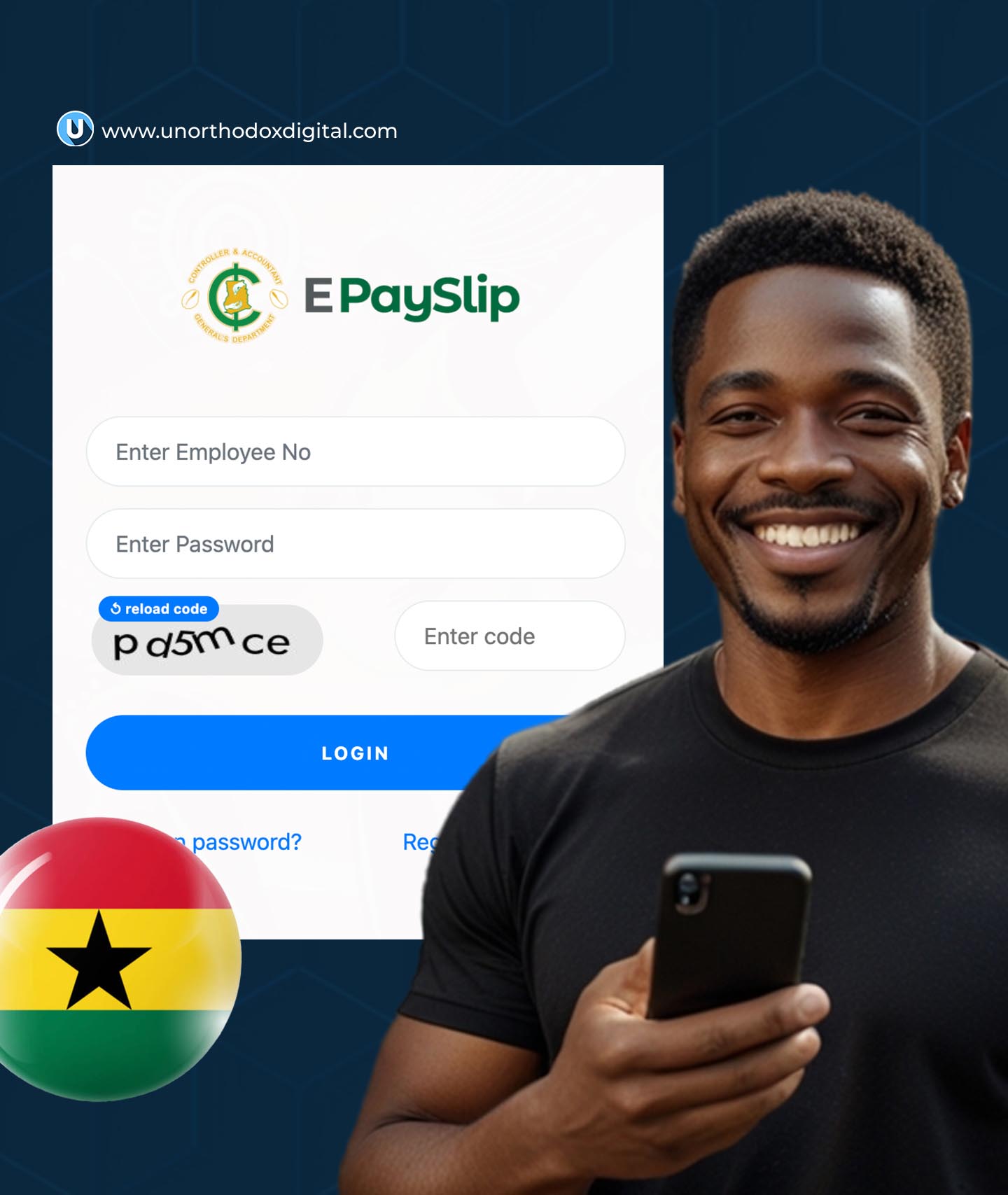
    2. Enter your Employee Number and Password
    3. Solve the CAPTCHA (this helps prevent automated attacks)
    4. Click ‘Sign In’
    5. Once logged in, select ‘View Payslip’
    6. Choose the month you want to check
    7. Your payslip will be displayed on the screen

    How to Download and Print Your Payslip

    If you need a hard copy, follow these steps:

    1. After viewing your payslip, click ‘Download’ (usually in PDF format).
    2. To print, open the downloaded file and press Ctrl + P (on Windows) or Command + P (on Mac).
    3. Select your printer and click ‘Print’.

    Troubleshooting Common Login Issues

    Sometimes, users face challenges accessing their payslips. Here are some common problems and how to fix them:

    IssueSolution
    Forgot PasswordClick ‘Forgot Password’ on the login page and follow the instructions to reset it.
    Incorrect Employee NumberDouble-check your employee number with HR.
    Website Not LoadingEnsure you have a stable internet connection and try refreshing the page.
    Account LockedIf you enter the wrong password multiple times, your account may be locked. Contact HR for assistance.
    How to Check GOG Payslip, ePayslip in Ghana

    Why Choose ePayslip Over Traditional Payslips?

    FeatureePayslipPaper Payslip
    AccessibilityAvailable anytime, anywhereMust wait for distribution
    SecurityPassword-protectedCan be lost or stolen
    Environmental ImpactPaperless, eco-friendlyContributes to deforestation
    SpeedInstant accessDelayed by manual processing
    StorageStored online for future referenceNeeds physical storage space

    The GOG ePayslip system makes salary access easier, faster, and more secure for government employees in Ghana. Whether you need to check your salary, download past payslips, or print a copy for record-keeping, the online system simplifies the process.

    By following the steps in this guide, you should have no trouble accessing your GOG Payslip anytime you need it. If you experience issues, don’t hesitate to contact your HR department for assistance. Keep your login details safe and enjoy the convenience of digital payslips!

  • Nigeria’s 10 Best Universities You Should Know

    Nigeria’s 10 Best Universities You Should Know

    Choosing the right university is a big deal. Whether you’re planning for your future or just curious about Nigeria’s top schools, this guide will break things down in a way that’s easy to understand. Think of this as a friendly chat where we explore what makes these universities special. Let’s get started!

    1. Covenant University (CU)

    Located in Ota, Ogun State, Covenant University is often ranked as the best university in Nigeria. It’s a private Christian university known for discipline, academic excellence, and strong industry connections.

    • Student Population: 8,940
    • Male-to-Female Ratio: 63:37
    • Research Strength: 37% of its work involves interdisciplinary science
    • Student-to-Staff Ratio: 17.5 (meaning smaller class sizes)

    Why It Stands Out

    Covenant University focuses on entrepreneurship and leadership, ensuring that graduates are job-ready. It also has a strong tech program, which is a huge plus in today’s digital world.

    2. University of Ibadan (UI)

    As Nigeria’s first university, the University of Ibadan is rich in history and academic excellence. Located in Ibadan, Oyo State, it has produced many notable graduates in politics, science, and the arts.

    • Student Population: 41,269
    • Gender Ratio: 50:50
    • Research Strength: 19% of studies involve interdisciplinary science
    • Student-to-Staff Ratio: 19.7

    Why It Stands Out

    UI has a strong reputation for medical and agricultural sciences, making it a top choice for students in those fields.

    3. University of Lagos (UNILAG)

    Situated in Nigeria’s commercial capital, UNILAG is known for its vibrant student life and academic achievements.

    • Student Population: 41,048
    • Gender Ratio: 51% female, 49% male
    • Research Strength: 25%
    • Student-to-Staff Ratio: 27.5

    Why It Stands Out

    Being in Lagos, students get more networking and internship opportunities. It’s a great choice for those interested in business, media, and technology.

    4. University of Nigeria, Nsukka (UNN)

    UNN is one of Nigeria’s oldest and most respected universities. Founded in 1960, it has a strong focus on research and innovation.

    • Student Population: 43,108
    • Gender Ratio: 46% female, 54% male
    • Research Strength: 25%
    • Student-to-Staff Ratio: 11.7

    Why It Stands Out

    UNN is known for its high-quality engineering, medical, and law programs, attracting top students from across Nigeria.

    Nigeria’s 10 Best Universities You Should Know

    5. University of Ilorin (UNILORIN)

    This university has a reputation for being highly disciplined and maintaining an uninterrupted academic calendar.

    • Student Population: 52,921
    • Gender Ratio: 51% female, 49% male
    • Research Strength: 28%
    • Student-to-Staff Ratio: 39.2

    Why It Stands Out

    If you want to graduate on time without worrying about strikes, UNILORIN is a great choice. It also has strong programs in law and engineering.

    6. Federal University of Technology, Akure (FUTA)

    FUTA is one of Nigeria’s best universities for science and technology-related courses.

    • Student Population: 19,711
    • Gender Ratio: 26% female, 74% male
    • Research Strength: 35%
    • Student-to-Staff Ratio: 24.5

    Why It Stands Out

    FUTA is the go-to place for engineering and technology courses, making it a great choice for students interested in tech careers.

    7. Afe Babalola University (ABUAD)

    This is a fast-rising private university located in Ado-Ekiti, known for its academic excellence and top-tier facilities.

    • Student Population: 9,660
    • Gender Ratio: 57% female, 43% male
    • Research Strength: 30%
    • Student-to-Staff Ratio: 10.7

    Why It Stands Out

    ABUAD offers one of the best learning environments in Nigeria, with modern classrooms and a strong focus on entrepreneurship.

    8. University of Benin (UNIBEN)

    UNIBEN is a well-established federal university known for its research output and strong academic programs.

    • Student Population: 47,837
    • Gender Ratio: 49% female, 51% male
    • Research Strength: 25%
    • Student-to-Staff Ratio: 25.8

    Why It Stands Out

    It has a strong engineering faculty and a medical school that produces top doctors and researchers.

    9. Federal University of Agriculture, Abeokuta (FUNAAB)

    If you’re interested in agricultural sciences, FUNAAB is Nigeria’s top university in that field.

    • Student Population: 17,433
    • Gender Ratio: 52% female, 48% male
    • Research Strength: 30%
    • Student-to-Staff Ratio: 26.5

    Why It Stands Out

    FUNAAB focuses on agricultural research and innovations that help boost Nigeria’s farming sector.

    10. Bayero University, Kano (BUK)

    Located in Kano, Bayero University is a top university in Northern Nigeria with a strong emphasis on research and academic excellence.

    • Student Population: 43,027
    • Gender Ratio: 35% female, 65% male
    • Research Strength: 27%

    Why It Stands Out

    BUK has strong law and medical programs and is one of the most respected universities in Northern Nigeria.

    Summary Table

    UniversityLocationStudent PopulationGender RatioResearch Strength
    Covenant UniversityOta, Ogun8,94037% female, 63% male37%
    University of IbadanIbadan, Oyo41,26950% female, 50% male19%
    University of LagosLagos41,04851% female, 49% male25%
    UNNNsukka, Enugu43,10846% female, 54% male25%
    UNILORINIlorin, Kwara52,92151% female, 49% male28%
    FUTAAkure, Ondo19,71126% female, 74% male35%
    ABUADAdo-Ekiti9,66057% female, 43% male30%
    UNIBENBenin City, Edo47,83749% female, 51% male25%
    FUNAABAbeokuta, Ogun17,43352% female, 48% male30%
    BUKKano43,02735% female, 65% male27%

    Each of these universities has something unique to offer. Whether you value academic excellence, research opportunities, or a vibrant student life, there’s a perfect fit for you. Now that you know the best universities in Nigeria, which one interests you the most?

  • How to Send Money from Ghana to Nigeria and Neighboring Countries With MTN MoMo

    How to Send Money from Ghana to Nigeria and Neighboring Countries With MTN MoMo

    Sending money across borders used to be a complicated process, but with MTN MoMo, it’s now quick, easy, and seamless. This service allows you to send money from Ghana to Nigeria, Cameroon, Benin, and Ivory Coast in just a few steps. Whether you’re supporting family, paying for services, or handling business transactions, MTN MoMo’s Cross-Border Payment feature ensures that your money gets where it needs to go securely and without hassle.

    Step-by-Step Guide to Sending Money from Ghana to Nigeria (and Other Countries)

    If you have an MTN MoMo account and need to send money to someone in Nigeria, Cameroon, Benin, or Ivory Coast, follow these simple steps:

    1. Dial *170# on your MTN phone.
    2. Select Option 1 (Transfer Money).
    3. Choose Option 7 (Cross Border Payment).
    4. Select Option 1 (Transfer to Wallet).
    5. Choose the country you want to send money to (Nigeria, Cameroon, Benin, or Ivory Coast).
    6. Enter the receiver’s phone number. For Nigeria, it should be in this format: 234XXXXXXXXXX.
    7. Enter the amount you want to send.
    8. Confirm the transaction details.
    9. Enter your MoMo PIN to authorize the payment.
    10. You will receive a confirmation message once the transfer is successful.

    It’s that simple! No need for bank accounts or long queues—just your phone and an MTN MoMo wallet.

    Requirements for Sending Money Across Borders

    Before you start sending money internationally with MTN MoMo, ensure you meet these requirements:

    RequirementDetails
    Active MTN MoMo AccountYou must have an MTN Mobile Money wallet with sufficient funds.
    Valid Receiver NumberThe recipient’s number should be registered with MTN in the receiving country.
    Transaction FeesMTN MoMo may charge a small fee for the transaction, depending on the amount sent.
    Transaction LimitsThere are daily and monthly limits on how much you can send. Check with MTN for specific limits.
    Correct Country CodeMake sure to use the right country code when entering the recipient’s phone number.

    Benefits of Using MTN MoMo for Cross-Border Transfers

    MTN MoMo is one of the most convenient ways to send money across African countries. Here’s why:

    1. Fast and Reliable

    Money transfers happen almost instantly, so your recipient doesn’t have to wait long to access the funds.

    2. Affordable

    Compared to traditional money transfer services, MTN MoMo offers lower transaction fees, making it cost-effective.

    3. Safe and Secure

    With PIN authentication and transaction confirmations, your money is always protected.

    4. No Bank Account Required

    Your recipient doesn’t need a bank account—just an active MTN mobile wallet.

    5. Widely Available

    MTN MoMo is accessible in multiple African countries, making it a great option for international payments within the region.

    With MTN MoMo’s Cross-Border Transfer feature, sending money from Ghana to Nigeria, Cameroon, Benin, or Ivory Coast is incredibly simple and efficient. No long processes, no unnecessary paperwork—just a few taps on your phone, and your money is sent securely. If you haven’t tried it yet, give it a go and enjoy hassle-free international payments with MTN MoMo.

    FAQs

    Can I send MTN MoMo from Ghana to Nigeria?

    Yes! You can send money from Ghana to Nigeria using MTN MoMo’s Cross-Border Transfer feature by following the steps outlined above.

    Can Ghanaians receive money from Nigeria with MTN MoMo?

    Yes. Ghanaians can send and receive money via MTN MoMo from Nigeria, Cameroon, Benin, and Ivory Coast.

    Can I send MTN MoMo from Ghana to Cameroon?

    Yes, MTN MoMo allows you to send and receive money from Ghana to Cameroon using the Cross-Border Payment option.

    Can I send MTN MoMo from Ghana to Benin?

    Yes, you can transfer and receive money from Ghana to Benin with MTN MoMo by selecting Benin as the destination country during the transaction process.

    Can I send MTN MoMo from Ghana to Ivory Coast?

    Yes, Ivory Coast is one of the supported countries for MTN MoMo’s Cross-Border Transfers, making it easy to send money there.

    With MTN MoMo, sending money internationally within Africa has never been easier. Try it today and experience the convenience firsthand!

  • How to Contact MTN Customer Care in Nigeria

    How to Contact MTN Customer Care in Nigeria

    If you’ve ever had an issue with your MTN line—maybe your data stopped working out of nowhere or you were overcharged for a call—you know how frustrating it can be. The good news? MTN has several ways for you to get help, whether you prefer calling, texting, or even chatting online. In this guide, we’ll break down all the ways you can contact MTN customer care in Nigeria, making it easy for you to get support whenever you need it.

    1. Call MTN Customer Care Directly

    The fastest and most direct way to reach MTN customer service is by calling their official support numbers. Here’s how:

    MethodNumber to DialWho Can Use It?
    MTN Customer Care Number180MTN users in Nigeria
    Alternative Number300MTN users in Nigeria
    International Support+23480310180Customers outside Nigeria
    • Dial 180: If you’re an MTN user in Nigeria, just dial 180 on your phone. You’ll be connected to an MTN support agent who can assist you.
    • Dial 300: This is another support number available to MTN users in Nigeria.
    • For International Users: If you’re outside Nigeria and need to reach MTN, dial +23480310180.

    When calling, be ready to provide your MTN phone number, details of the issue, and any relevant information to speed up the process.

    2. Contact MTN via WhatsApp

    Not a fan of phone calls? You can chat with MTN customer care on WhatsApp. This is a great option if you prefer texting or if your issue isn’t urgent. Simply send a message to +234 903 300 0001, and an MTN representative will respond to assist you.

    3. Reach MTN Customer Care via Email

    If you need detailed assistance or have a complex issue, sending an email is a good option. MTN’s official customer care email is [email protected]. When sending an email, be sure to include:

    • Your MTN phone number
    • A clear description of your issue
    • Screenshots (if applicable)
    • Your contact details for follow-up

    This method is ideal for issues that require written documentation, such as billing disputes or service complaints.

    4. Contact MTN via Social Media

    MTN is active on several social media platforms, where you can send direct messages or leave comments to get support. Here’s where you can reach them:

    PlatformHandle/Link
    Twitter (X)@MTNNG
    FacebookMTN Nigeria
    Instagram@mtnng

    If you reach out on social media, avoid sharing sensitive personal details publicly. Instead, send a direct message for privacy.

    5. Use the MyMTN App

    MTN offers a self-service mobile app called MyMTN App, which allows you to:

    • Check your balance
    • Buy data and airtime
    • Manage your subscriptions
    • Chat with customer care

    You can download the app from the Google Play Store or Apple App Store.

    6. Visit an MTN Service Center

    If your issue requires in-person support, you can visit an MTN service center near you. Common reasons to visit a physical MTN office include:

    • SIM card replacement
    • Biometric registration updates
    • Device troubleshooting

    To find the closest service center, visit the MTN Nigeria website and use their store locator.

    7. Use MTN’s USSD Code for Quick Help

    Sometimes, you don’t even need to speak to a representative—MTN has USSD codes that help with common issues. Here are some useful ones:

    ServiceUSSD Code
    Check Balance*310#
    Buy Data*131#
    MTN Customer Care Menu*123#
    Borrow Airtime*606#

    If your issue isn’t listed above, dial *123# and follow the prompts to get assistance.

    How to Contact MTN Customer Care in Nigeria

    MTN provides multiple ways to contact customer care, so you can choose the method that suits you best. Whether you prefer calling, texting, or reaching out on social media, help is always available. Next time you have an issue, just use one of these methods and get the support you need—quick and easy!

    FAQs

    1. What is MTN’s official customer care number?

    MTN’s main customer care number is 180, but you can also dial 300 or +23480310180 if calling from outside Nigeria.

    2. How do I chat with MTN on WhatsApp?

    Send a message to +234 903 300 0001 on WhatsApp, and an MTN representative will assist you.

    3. Can I contact MTN through social media?

    Yes! MTN is active on Twitter (@MTNNG), Facebook (MTN Nigeria), and Instagram (@mtnng).

    4. What’s the best way to get a quick response?

    Calling 180 is the fastest, but WhatsApp and social media are great alternatives if you prefer texting.

    5. Can I visit an MTN office for help?

    Yes, MTN has service centers across Nigeria where you can get in-person assistance.

  • How to Check Your MTN Number in Nigeria

    How to Check Your MTN Number in Nigeria

    Check your MTN number in Nigeria by dialing *123*1*1# or *663#. You can also call a friend or check phone settings.

    Have you ever needed your MTN number but couldn’t remember it? Maybe you just got a new SIM card, or you rarely use the number. Don’t worry—you’re not alone! Many people forget their phone numbers, especially if they don’t use them often. Luckily, MTN provides several easy ways to check your number in seconds. Whether you prefer dialing a quick code, checking your phone settings, or using the MTN mobile app, we’ve got you covered.

    Let’s break it down in a way that’s super easy to follow, even if you’re not a tech expert.

    Method 1: Dial a USSD Code (Fastest Method)

    USSD codes are like secret shortcuts to access information quickly. To check your MTN number using a USSD code, follow these simple steps:

    1. Open your phone’s dialer (where you usually type phone numbers to call someone).
    2. Dial one of these codes:
      • *123*1*1#
      • *663#
      • *156#
      • *1#
    3. Press the call button.
    4. Your MTN number will appear on the screen.

    Why use this method?

    • It’s free and instant.
    • No need for an internet connection.
    • Works on any type of phone (Android, iPhone, keypad phones).

    If one code doesn’t work, simply try another. Make sure your MTN SIM is active before dialing.

    Method 2: Call or Text a Friend

    Another quick way to find out your number is by calling or texting someone nearby. Here’s what to do:

    1. Open your phone’s messaging app or dialer.
    2. Send a short text or make a call to a friend or family member.
    3. Ask them to read out or send back your number.

    When is this method useful?

    • If you have airtime or a free call/text plan.
    • When you’re with someone who can help you instantly.

    Method 3: Check Your Phone’s Settings

    Your phone stores your SIM card information, including your phone number. Here’s how to find it:

    For Android Users:

    1. Open Settings.
    2. Scroll down and tap About Phone.
    3. Select Status or SIM Status.
    4. Look for My Phone Number—your MTN number should be displayed there.

    For iPhone Users:

    1. Go to Settings.
    2. Tap Phone.
    3. Your number will be displayed next to My Number.

    Why use this method?

    • No need for internet, codes, or a second phone.
    • Works even if you don’t have airtime.

    Method 4: Use the MTN Mobile App or Website

    If you’re comfortable using apps, the MTN mobile app is a great option. It not only shows your number but also helps you manage your account, check your data balance, and more.

    How to use the MTN mobile app to check your number:

    1. Download MyMTN App from the Google Play Store or Apple App Store.
    2. Open the app and log in (or register if you haven’t already).
    3. Navigate to your Profile or Account Details.
    4. Your MTN number will be displayed on the screen.

    Alternatively, you can visit the MTN Nigeria website, log in, and check your profile.

    Why use this method?

    • Ideal if you regularly use the app for managing your MTN account.
    • Works as a backup if other methods fail.

    Comparison of Methods

    MethodRequires Airtime?Requires Internet?Works on Any Phone?Speed
    USSD CodeNoNoYesFast
    Call/Text a FriendYesNoYesFast
    Phone SettingsNoNoNo (smartphones only)Medium
    MTN App/WebsiteNoYesNo (smartphones only)Medium

    Extra Tips to Remember Your Number

    Once you’ve found your number, here are some smart ways to make sure you don’t forget it again:

    • Save it in Your Contacts: Store your number under “My MTN Number” in your phone.
    • Write it Down: Jot it in a notebook or save it in a notes app.
    • Use a Sticky Note: Place a small sticky note in your wallet or on your phone case.
    • Label Your SIM Card: If you use multiple SIMs, write your number on the SIM card case.
    How to Check Your MTN Number in Nigeria

    FAQs

    Can I check my MTN number online?

    Yes! You can check your number using the MTN mobile app or the MTN website under your account profile.

    What if none of these methods work?

    If you’ve tried all the methods and still can’t find your number, contact MTN customer support by dialing 180 from an MTN line.

    How do I check my MTN number on a dual SIM phone?

    Go to your phone’s SIM settings and find the section labeled SIM Card Information or SIM Management. Your number should be listed under your MTN SIM slot.

    I changed my SIM recently. How do I check my new MTN number?

    Use the USSD method (*123*1*1#, *663#, or *156#) to retrieve your new number instantly.

    There you have it! No more guessing or asking around for your own phone number. Whether you prefer a quick USSD code, checking your phone settings, or using the MTN app, you now have multiple ways to find your MTN number anytime. Just pick the method that works best for you and save your number to avoid future trouble!

    Now, go ahead and check your MTN number—it’s easier than you thought!

  • How to Save Money with MTN Yello Save in Ghana

    How to Save Money with MTN Yello Save in Ghana

    Saving money is one of the smartest things you can do for your future, and MTN Yello Save makes it easy for anyone with an MTN MoMo account in Ghana. Whether you’re setting aside money for emergencies, a big purchase, or just for peace of mind, Yello Save gives you a hassle-free way to save and earn interest at the same time. Let’s break it down in a simple and engaging way.

    What is MTN Yello Save?

    MTN Yello Save is a savings service created by MTN Ghana in partnership with Fidelity Bank. It works just like a regular savings account, except it’s entirely digital and linked to your MTN MoMo wallet. This means you can save money directly from your phone and even earn interest on your savings.

    The best part? You don’t need to visit a bank to open an account. You can do everything from registration to withdrawals using your mobile phone. Plus, your savings earn interest every month!

    Interest Rates for MTN Yello Save

    The interest you earn depends on how much money you save. Here’s a quick breakdown:

    Account Balance (GHS)Interest Rate (%)
    1 – 1,0005%
    1,001 – 5,0006%
    5,001 – 15,0007%
    Above 15,0008%

    One important thing to note: If you withdraw money more than three times in a month, your interest rate drops to a flat 3% per year.

    How to Save Money with MTN Yello Save in Ghana

    How to Register for MTN Yello Save

    Setting up your Yello Save account is easy and takes just a few minutes. Here’s how to do it:

    1. Dial *170# on your MTN line.
    2. Select Financial Services.
    3. Choose Savings.
    4. Select Yello Save.
    5. Choose Register.
    6. Read and accept the Terms & Conditions.
    7. Set a 4-digit PIN (different from your MoMo PIN for extra security).
    8. Confirm with your MoMo PIN and make an initial deposit of at least GHS 2.
    9. You will receive a confirmation SMS.

    That’s it! You’re now officially a Yello Save user and can start saving immediately.

    How to Deposit Money into Your Yello Save Account

    Once your account is set up, adding money is straightforward:

    1. Dial *170#.
    2. Select Financial Services.
    3. Choose Savings.
    4. Select Yello Save.
    5. Choose Deposit.
    6. Enter the amount you want to save.
    7. Confirm with your MoMo PIN.
    8. Receive an SMS confirmation of your deposit.

    If you want to make saving easier, you can set up an automatic savings plan. This allows you to schedule daily, weekly, or monthly deposits directly from your MoMo wallet. To do this, follow the steps above and select Savings Plan instead of Deposit.

    How to Withdraw Money from MTN Yello Save

    Although the idea is to keep saving, life happens, and you might need to withdraw your money. Here’s how:

    1. Dial *170#.
    2. Select Financial Services.
    3. Choose Savings.
    4. Select Yello Save.
    5. Choose Withdraw.
    6. Enter the amount you want to withdraw.
    7. Confirm with your Yello Save PIN.
    8. Wait for the SMS confirmation and check your MoMo wallet.

    Remember, making more than three withdrawals in a month will lower your interest rate, so try to keep your savings intact unless necessary.

    Benefits of Using MTN Yello Save

    Still wondering why you should use Yello Save? Here are some solid reasons:

    • Convenient: Save money anytime, anywhere using your phone.
    • Interest Earnings: Get up to 8% annual interest on your savings.
    • Security: Your money is safe with Fidelity Bank.
    • No Bank Visits: Everything is done from your MoMo wallet.
    • Flexible Withdrawals: Access your money whenever you need it.

    Important Terms You Should Know

    Before you start using Yello Save, here are a few things to keep in mind:

    • Withdrawing money more than 3 times a month lowers your interest rate to 3% per year.
    • If you decide to close your account, you must give one month’s written notice.
    • Fidelity Bank can change the interest rates based on market conditions.
    • Your savings are protected, but Fidelity Bank can terminate accounts in cases of fraud or impersonation.

    Other MTN MoMo Savings Options

    Aside from Yello Save, MTN Ghana also offers other savings plans like:

    • MTN MoMo Savings – Earn interest on your MoMo wallet balance every quarter.
    • SIKA Save & Pesewa Susu – These services are expected to launch soon.
    How to Save Money with MTN Yello Save in Ghana

    FAQs

    1. Should I set up a savings plan on Yello Save?

    Yes! Automating your savings helps you build discipline and reach your financial goals faster.

    2. How do I check my Yello Save balance?

    Dial *170#, go to Financial Services → Savings → Yello Save, then select Check Balance.

    3. Is there a limit on how much I can save?

    No, there is no limit on MTN Yello Save. You can save as much as you want!

    MTN Yello Save is an excellent way to build your savings effortlessly. It’s simple, secure, and rewarding—perfect for anyone in Ghana looking to grow their money without the stress of traditional banking.

    So why wait? Dial *170# and start saving today!

  • MTN Turbonet vs MTN Fibre Broadband: Which One Is Right for You?

    MTN Turbonet vs MTN Fibre Broadband: Which One Is Right for You?

    If you’re looking for fast and reliable internet in Ghana, you’ve probably come across two major options from MTN: MTN Turbonet and MTN Fibre Broadband. But which one should you go for? Well, it depends on what you need!

    Think of it like this: One is like a fast, portable Wi-Fi hotspot (Turbonet), while the other is like a powerful underground internet pipeline connected directly to your home or office (Fibre Broadband). Still confused? Don’t worry! We’ll break it all down in a simple, friendly way so you can make the best choice.

    What’s the Difference Between MTN Turbonet and MTN Fibre Broadband?

    At their core, both options provide internet, but they work in very different ways:

    FeatureMTN TurbonetMTN Fibre Broadband
    How it WorksUses a 4G or 5G router to connect wirelesslyUses underground fibre optic cables
    PortabilityPortable – you can take it anywhere with MTN coverageFixed – installed in one location
    SpeedUp to 150Mbps (depends on 4G/5G signal strength)Up to 60Mbps (but more stable)
    PriceGH₵1,500 – GH₵2,500 (router cost)GH₵150 (installation fee)
    Best ForPeople who move around or don’t have fibre accessHomes and offices that need stable internet

    Now, let’s dive deeper into each category so you can decide which one is best for you.

    MTN Turbonet vs MTN Fibre Broadband

    Speed & Reliability: Which One is Faster?

    If all you care about is speed, Turbonet seems like the winner with its potential to hit 150Mbps. But here’s the catch:

    • MTN Turbonet speeds depend on your location. If you’re in an area with weak 4G or 5G coverage, you might get speeds as low as 30Mbps.
    • MTN Fibre Broadband has lower max speeds (60Mbps), but it’s stable. Because fibre cables are not affected by things like bad weather or network congestion, you’ll get consistent speeds no matter what.

    So, if you live in a place with strong 4G/5G signals, Turbonet can be super fast. But if you prefer a steady, no-surprises connection, Fibre Broadband is the way to go.

    Portability: Can You Take It Anywhere?

    This one is easy!

    • MTN Turbonet is portable. It’s like a Wi-Fi box that you can move around, as long as you stay within MTN’s network.
    • MTN Fibre Broadband is fixed. Once installed, it stays in one place—just like your water or electricity connection.

    If you need internet in different locations (e.g., home and office), Turbonet is your best bet.

    Cost: Which One is More Affordable?

    Let’s talk money.

    • MTN Turbonet costs between GH₵1,500 and GH₵2,500 (depending on the model you choose). You only pay this once, but then you’ll need to buy data regularly.
    • MTN Fibre Broadband has a low installation fee of GH₵150. After that, you just pay for your data, which is generally cheaper per GB than Turbonet.

    If you don’t want to spend too much upfront, Fibre Broadband is more affordable. But if you want flexibility, Turbonet is worth the higher initial cost.

    Data Packages: Which One Gives You More for Less?

    Let’s compare the data plans:

    Price (GHS)MTN Turbonet (GB)MTN Fibre Broadband (GB)
    252.41GB4.17GB
    878.69GB14.54GB
    25391.82GB158.02GB
    516350.54GB522.74GB

    Fibre Broadband clearly gives you more data for your money. It also has unlimited data plans, which Turbonet doesn’t offer. So, if you download a lot of movies, work from home, or run a business, Fibre Broadband is the better deal.

    Power Supply: Will It Work During a Blackout?

    Ghana’s power supply can be unpredictable, so what happens when the lights go out?

    • MTN Turbonet comes with a backup battery that lasts about 10-12 hours.
    • MTN Fibre Broadband needs a direct power source—so when there’s no electricity, there’s no internet.

    If power cuts are common in your area and you need internet at all times, Turbonet is the safer option.

    MTN Turbonet vs MTN Fibre Broadband

    Which One Should You Choose?

    Still unsure? Here’s a simple way to decide:

    • Choose MTN Turbonet if:
      • You move around a lot or need internet in multiple places.
      • You live in an area with strong 4G/5G coverage.
      • You want a backup internet option in case of power outages.
    • Choose MTN Fibre Broadband if:
      • You need a stable, reliable connection with unlimited data options.
      • You don’t plan on moving the connection around.
      • You want cheaper data packages in the long run.

    FAQs

    1. Can I use MTN Turbonet anywhere in Ghana?

    Yes! As long as you are within MTN’s 4G/5G coverage area, Turbonet will work.

    2. How do I check if MTN Fibre Broadband is available in my area?

    You can check on the MTN Ghana website or visit an MTN store near you.

    3. Can I use normal MTN data bundles on Turbonet?

    No, Turbonet requires special Turbonet data bundles.

    4. What happens if I move houses with Fibre Broadband?

    Since Fibre Broadband is fixed, you’ll need to check if your new home has fibre coverage. If not, you might have to switch to Turbonet or a different internet service provider.

    At the end of the day, both MTN Turbonet and MTN Fibre Broadband are great internet options—it just depends on what you need.

    • If you want portability and potential high speeds, go for Turbonet.
    • If you want stable, reliable internet with cheaper data, pick Fibre Broadband.

  • MTN Ghana Customer Care: How to Contact Them for Support

    MTN Ghana Customer Care: How to Contact Them for Support

    Need to reach MTN Ghana’s customer care? Whether it’s a missing data bundle, a Mobile Money (MoMo) issue, or a general inquiry, MTN provides multiple ways to get support. Here’s a quick guide to help you connect with them easily.

    1. Call MTN Ghana’s Customer Care Number

    For instant support, calling MTN is the fastest option:

    • Dial 100 from an MTN number (free of charge).
    • Dial +233 244 300 000 if calling from another network or abroad.

    Follow the voice prompts to speak to an agent or get self-service assistance.

    Tip: To reach an agent quickly, select your preferred language and listen for the option to talk to customer care.

    2. Contact MTN Ghana via Email

    Prefer to send a message? Reach them at:

    For a faster response, include your MTN number, issue details, and relevant screenshots. Replies typically take 24-48 hours.

    3. Use the myMTN Ghana App

    The myMTN Ghana app allows you to chat with support, check your balance, or resolve common issues. To contact customer care:

    1. Open the myMTN Ghana app (download from Play Store or App Store if needed).
    2. Tap More > Contact Us.
    3. Choose Live Chat, Email, or Call.

    You can also chat with Zigi, MTN’s virtual assistant, in the app.

    4. Reach MTN on Social Media

    MTN Ghana is responsive on social media platforms:

    Tip: Twitter (X) and Facebook often get faster responses.

    MTN Ghana Customer Care- How to Contact Them for Support

    5. Use the MTN Ghana Website Contact Form

    You can also send an inquiry via MTN’s website:

    1. Visit MTN Ghana’s website.
    2. Click Contact Us.
    3. Fill in the form and submit it.

    Responses usually arrive within 24 hours.

    6. Chat with Zigi, MTN’s Virtual Assistant

    Zigi, MTN’s chatbot, can help with basic queries like checking your balance, troubleshooting network issues, or explaining services. Find Zigi on:

    • The myMTN App
    • MTN Ghana’s website (chat icon at the bottom right corner)
    • WhatsApp: +233 554 300 000

    Tip: If Zigi can’t help, request to speak with a live agent.

    7. Visit an MTN Ghana Service Center

    For in-person support, find an MTN service center near you for SIM replacements, device repairs, and other complex issues.

    Locate a service center:

    1. Visit the MTN Ghana website.
    2. Use the Store Locator to find the nearest branch.

    Tip: Avoid peak hours (lunchtime) for shorter wait times.

    8. Browse the MTN Ghana Help Centre

    Before contacting support, check the MTN Ghana Help Centre for answers to common questions about:

    • MoMo (Mobile Money)
    • SIM-related issues
    • Network settings
    • Data bundles

    Frequently Asked Questions (FAQs):

    Q: How do I speak directly to an MTN Ghana customer service agent?

    A: Dial 100 from an MTN number or +233 244 300 000 from another network, then follow the prompts.

    Q: How long does it take for MTN to respond to emails?

    A: Typically 24-48 hours, depending on request volume.

    Q: Can I chat with MTN customer care on WhatsApp?

    A: Yes, try +233 554 300 000, but responses are mostly automated.

    MTN Ghana Customer Care- How to Contact Them for Support

    MTN Ghana offers multiple ways to get help—calling 100 is best for urgent issues, while email, social media, and the myMTN app work well for less urgent matters. And if all else fails, a visit to an MTN service center should resolve things.

  • How to Link NIN to Airtel With USSD Code in Nigeria

    How to Link NIN to Airtel With USSD Code in Nigeria

    If you use an Airtel line in Nigeria, you’ve probably heard about the need to link your National Identification Number (NIN) to your SIM card. Sounds complicated? It’s actually pretty simple! Think of it like registering your phone number so it’s officially tied to you—just like writing your name inside your favorite book to show it’s yours.

    Why Do You Need to Link Your NIN to Your Airtel Line?

    Imagine you had a bunch of SIM cards and no one knew who owned which one. That’s a problem! The Nigerian Communications Commission (NCC) wants to make sure every active mobile number is connected to a real person. This helps reduce fraud, identity theft, and even crime. Plus, if you don’t link your NIN, Airtel might block your line. That means no calls, no texts, and no internet. Yikes!

    So, let’s get this done the easy way—with a simple USSD code.

    What is a NIN?

    Your National Identification Number (NIN) is an 11-digit number assigned to you when you register with the National Identity Management Commission (NIMC). It’s like a digital fingerprint that helps confirm your identity. Just like how your house has a unique address, your NIN is your unique ID in Nigeria’s system.

    If you don’t have a NIN yet, don’t worry! You can get one by visiting a NIMC registration center, filling out a form, and getting your biometric data (fingerprints, photo, etc.) captured. After a few weeks, you’ll receive your NIN.

    How to Link Your NIN to Your Airtel Line Using USSD

    The easiest way to link your NIN is by using a USSD code. No internet needed—just your phone! Follow these steps:

    1. Make sure you have your NIN number.
    2. Dial *346*3*NIN*121097# to generate your Virtual NIN (VNIN).
    3. Dial *996# and follow the prompts to confirm linkage using the VNIN.
    4. Once your NIN is validated, Airtel will send you a final confirmation message.

    That’s it! You’ve successfully linked your NIN to your Airtel line. If everything is correct, you won’t have to worry about your line being blocked.

    How to Link NIN to an Airtel Line with USSD Code

    Other Ways to Link Your NIN to Your Airtel Line

    While the USSD method is the easiest, there are two other ways to do it: online and via the NIMC mobile app.

    1. Link NIN to Airtel Online

    If you have internet access, you can link your NIN online:

    • Visit the Airtel NIN portal.
    • Enter your Airtel phone number.
    • Click “Send OTP” (One-Time Password) and check your phone for the code.
    • Enter the OTP and confirm.
    • Type in your 11-digit NIN and submit.
    • You’ll receive a confirmation message once it’s linked successfully.

    2. Link NIN via the NIMC Mobile App

    • Download the NIMC Mobile ID app from Google Play Store or Apple Store.
    • Open the app and enter your NIN.
    • Verify using an OTP sent to your phone.
    • Go to “My Devices” and enter your Airtel number.
    • Complete the process and get confirmation.

    Common Issues and Fixes

    If you followed the steps and your NIN still isn’t linking, here’s what you can do:

    • Incorrect details? Double-check your NIN and SIM registration details. If your SIM is registered under a different name, update your details at an Airtel store.
    • Delayed confirmation? Sometimes, it takes a while for the system to update. Wait a few hours and try again.
    • SIM registration issues? If you have an old SIM card, it might need a registration update. Visit an Airtel store for assistance.

    FAQs

    1. Is linking my NIN to Airtel free?

    Yes! Airtel won’t charge you for linking your NIN.

    2. How long does it take to link?

    Most times, it happens instantly. If not, you’ll get a confirmation SMS within a few hours.

    3. What happens if I don’t link my NIN?

    Airtel may block your line, and you won’t be able to make calls, send texts, or browse the internet.

    Linking your NIN to your Airtel line is a quick and necessary process. Using the USSD method takes less than a minute, and if you ever run into issues, Airtel support is there to help.

  • How to Activate the AirtelTigo 30 GB Data Bundle

    How to Activate the AirtelTigo 30 GB Data Bundle

    So, you’re looking to grab the AirtelTigo 30 GB data bundle, right? You’ve heard that it’s a fantastic deal, and you want to know exactly how to get it. Well, here’s the thing: the 30 GB bundle is no longer available, but don’t worry—there’s still a way to get lots of data with AirtelTigo. In this article, I’ll walk you through the details of how you can check if you’re eligible for AirtelTigo’s exclusive offers, how to buy the best available data bundles, and how to make sure you’re getting the most out of your internet.

    Understanding the AirtelTigo Data Bundles

    Before we dive into the steps for getting your data, let’s quickly go over the data packages AirtelTigo currently offers. That way, you’ll know exactly what’s available.

    AirtelTigo Data Packages Available Right Now

    • 15 GB for GHS 30 – Valid for 10 days
    • 10 GB for GHS 20 – Valid for 5 days
    • 5 GB for GHS 10 – Valid for 3 days

    These options are perfect if you’re someone who loves to stream, game, or simply browse the internet. And while the 30 GB bundle isn’t available anymore, these packages still offer great value for your money.

    Is the 30 GB Bundle Gone Forever?

    Yep, the AirtelTigo 30 GB data offer is no longer available. But don’t panic! The good news is that you can still get a 15 GB bundle, which can be purchased twice if you want a total of 30 GB (though the 30 GB won’t be valid for 30 days like before). So, if you’re someone who loves streaming or downloading, these new packages should have you covered.

    Step-by-Step: How to Check Your Eligibility for the 15 GB Data Bundle

    Now, let’s talk about how to get started. The first thing you’ll need to do is check if you’re eligible for the 15 GB data bundle. AirtelTigo offers this bundle to selected customers, so it’s not available to everyone—yet! Here’s how you can check:

    1. Dial *499#

    This is the magic number. Dial it, and the system will tell you if you’re eligible for the bundle. Don’t worry, you won’t be charged for dialing this number.

    2. Wait for a Text Message

    Once you’ve dialed *499#, you’ll receive a text message. This text will confirm whether you’re eligible to get the bundle. If you’re eligible, you’ll be good to go. If not, don’t stress—it might just be a matter of time until you become eligible.

    3. What if You’re Not Eligible?

    If you’re not eligible for the bundle yet, don’t give up! The eligibility is decided randomly by AirtelTigo’s system. To increase your chances, just keep using your AirtelTigo number regularly, and stay connected. Over time, you may get selected for the bundle.

    4. Check for Other Offers

    If you’re not eligible for the 15 GB bundle, there might be other offers available to you. AirtelTigo sometimes has different promotions running, so it’s a good idea to keep an eye on their website or dial *499# from time to time to see if something new pops up.

    AirtelTigo 30 GB Data Bundle

    How to Buy the AirtelTigo 15 GB Data Bundle

    If you get that “You’re eligible!” message, congratulations! You can now go ahead and purchase the 15 GB bundle. Here’s how to do it:

    1. Dial *499# Again

    Dial *499# once more, and this time, you’ll see options on your screen. It’s as simple as following the prompts to get your data.

    2. Select Option 1 for the 15 GB Data Bundle

    Once you’ve dialed *499# and seen the options, choose Option 1 to select the 15 GB data bundle.

    3. Choose Your Payment Method

    AirtelTigo gives you a couple of ways to pay for your data bundle. You can either use your airtime balance or pay through AirtelTigo Money (if you have an account set up). Pick whichever option is easiest for you.

    4. Confirm Your Purchase

    Once you’ve selected your payment method, you’ll be asked to confirm your purchase. Double-check everything, and once you confirm, the data will be added to your account.

    5. Start Enjoying Your Data!

    That’s it! You’ll receive a confirmation SMS saying your data is ready to use. Enjoy surfing the web, streaming videos, or whatever else you do with your data.

    What if You Want More Than 15 GB?

    So, let’s say you’re really craving 30 GB of data. If you’re eligible for the 15 GB offer, you can actually purchase it twice! By doing so, you’ll have 30 GB of data, though the validity period won’t extend. It’s still a pretty good option if you really need a lot of data.

    However, if you don’t want to deal with buying multiple bundles, there’s an alternative. AirtelTigo offers a 30 GB BigTime bundle for GHS 200. This bundle lasts for 30 days, so it might be the perfect option if you need lots of data without the worry of buying smaller bundles.

    Keep an Eye on Your AirtelTigo Offers

    The AirtelTigo 30 GB data bundle is no longer available, but don’t worry! There are still great options out there for getting plenty of data, like the 15 GB bundle. Whether you’re eligible or not, the most important thing is to stay connected, keep using your AirtelTigo number, and check for offers regularly.

    Remember, these bundles are perfect for people who need a lot of data for things like streaming movies, playing games, or working from home. By following the steps above, you’ll be able to get the best AirtelTigo data package that suits your needs.

    So, go ahead and dial *499# to see what’s available to you today. And hey, if you’re not eligible yet, don’t worry—your time will come! Keep enjoying your AirtelTigo services, and soon, you’ll be surfing the web with ease.

  • The Ultimate myMTN Ghana App Guide

    The Ultimate myMTN Ghana App Guide

    Welcome to the Ultimate myMTN Ghana App Guide, where we’ll walk you through everything you need to know about using this handy app.

    Whether you’re looking to buy data, manage your MoMo transactions, or find out how to get the best deals, this guide has got you covered. So, let’s dive in and make your mobile experience with MTN a breeze!

    What is the myMTN Ghana App?

    Think of the myMTN Ghana app as your personal MTN assistant right in your pocket. It’s a super helpful app for both Android and iOS devices that gives you access to all of MTN Ghana’s products and services. Whether you want to top up your airtime, check your data balance, manage your Mobile Money (MoMo), or even enjoy some cool entertainment, this app makes it all easy. Plus, it’s free to download and use!


    myMTN Ghana App 1

    How to Get Started: Install and Log In

    Getting started with the myMTN Ghana app is quick and simple. Here’s what you need to do:

    1. Download the App
    2. Log In
      • Open the app after it’s installed and tap on “Get Started”.
      • Enter your MTN mobile number.
      • You’ll receive a verification code (also known as OTP) via SMS. Enter that code into the app.
      • That’s it! You’re now logged in and ready to explore all the cool features.

    What Can You Do with the myMTN Ghana App?

    Now that you’re logged in, let’s talk about all the things you can do with the app. Whether you need more data for streaming or want to send money through MoMo, everything is at your fingertips!

    1. Buy Data Bundles

    If you’re always running out of data or looking for a specific package, the myMTN app makes it super easy to buy data. You can choose from:

    • Regular Data Bundles: For everyday internet use.
    • Mashup: The MTN Mashup Bundle is a flexible bundle that gives you both talk time and data.
    • Just4U: Just as the name implies, the Just4U bundle provides subscribers with specially customized offers just for you, based on your usage.
    • Social Media Data: If you love scrolling through social media apps like Instagram, Twitter, or Facebook, these bundles are perfect for you.
    • Midnight Data: Use data during the night when it’s cheaper and enjoy unlimited browsing.
    myMTN Ghana App 2

    2. Voice and Airtime Offers

    Need to make a call or send airtime to a friend? The app has you covered with:

    • Voice Bundles: You can easily buy bundles for local or international calls.
    • Call Abroad Offers: Stay connected with family and friends around the world! Whether it’s Canada, the USA, or India, there are special deals just for international calls.
    • Airtime Transfers: Send airtime to anyone, anytime—whether it’s another MTN number or a different network.

    3. Mobile Money (MoMo) Services

    Even though MTN has a dedicated MoMo app, the myMTN app lets you manage your MoMo account too. Here’s what you can do:

    • Check Your MoMo Balance: Keep track of how much money you have in your MoMo wallet.
    • Send Money: Transfer money to other MTN MoMo accounts, different mobile networks, or directly to a bank.
    • Withdraw Money: You can easily cash out your MoMo balance at an MTN service center.
    • Get Your Transaction History: Review your past transactions and even get detailed statements sent to your email.

    4. Business Services

    Running a business or thinking of starting one? The myMTN Ghana app also offers special services for businesses:

    • SME Plus: This is designed for small and medium businesses. It includes special voice, data, and SMS bundles, as well as free calls during certain hours.
    • Business Hub: Access useful tools for businesses, like Webwiz for website management or Business Messenger for easy communication.
    myMTN Ghana App 3

    5. Entertainment

    The app isn’t just about work—it’s about fun too! You can enjoy entertainment services like:

    • Vuclip Videos: Watch movies and TV shows directly from the app.
    • Socca Chat: Stay updated with soccer news and chat with fellow fans.
    • Bookmate: Read eBooks from a huge library of titles.

    6. Help and Support

    Got a question or need help? The app’s Help and Support section makes it easy to reach out to MTN:

    • Contact Us: Get in touch with customer support via phone, email, or social media.
    • Find a Store: Need to visit an MTN office? The app shows you the nearest MTN stores, complete with their locations and contact details.

    7. Other Cool Features

    The app also offers a few more features that make it even better:

    • Request Broadband: Need fast internet at home? Request MTN fibre broadband and check if it’s available in your area.
    • Get an e-SIM: No physical SIM card needed—just request an e-SIM if your phone supports it.
    • Manage Subscriptions: View and manage all your subscriptions, like Caller Tunez, Data, or any MTN service.
    myMTN Ghana App 4

    Managing Your Account: Keeping Things in Check

    One of the best things about the myMTN Ghana app is how easy it is to manage your account. You can check your data balance, voice minutes, and airtime right from the homepage. And if you ever run low on something, you can top up quickly or buy new bundles.

    You can also view your usage history to see how much data you’ve used over the past week or month. This helps you stay on track and avoid surprises when it’s time to renew your bundles.

    Troubleshooting: When Things Don’t Go as Planned

    Sometimes, things don’t go smoothly—no app is perfect, right? If you ever run into trouble, here are a few things you can try:

    1. Restart Your Device: A simple restart can sometimes fix minor issues.
    2. Update the App: Check for updates in the app store. MTN often releases bug fixes or improvements.
    3. Reinstall the App: If the app isn’t opening, try deleting it and installing it again.
    4. Free Up Space: Make sure your phone has enough storage to run the app properly.

    If these steps don’t solve the problem, you can always reach out to MTN customer support via the app.

    myMTN Ghana App 5

    Why You Should Use the myMTN Ghana App

    The myMTN Ghana app is an easy way to stay in control of your MTN services. It helps you:

    • Save Time: Instead of calling customer service or going to a store, you can handle everything right from your phone.
    • Access Exclusive Deals: From special data bundles to business offers, there’s always something just for you.
    • Stay Updated: You can quickly check your balance, track your usage, and manage your services with ease.

    And that’s it! With the myMTN Ghana app, you have everything you need to manage your MTN services in one place. It’s easy to use, packed with features, and designed to make your life simpler. Whether you’re a regular user, a business owner, or just someone who wants to save time, this app is your one-stop-shop for all things MTN.

    So, next time you need to check your balance, buy a data bundle, or make a MoMo transfer, just pull up the myMTN Ghana app and get it done in seconds. It’s like having a mini MTN store in your pocket—how cool is that?

    myMTN Ghana App Guide