Category: Telecel

Stay informed about Telecel’s services across Africa, featuring mobile bundles, network improvements, customer care, and exciting new offers.

  • Telecel Broadband Coverage, Prices and Packages in Ghana

    Telecel Broadband Coverage, Prices and Packages in Ghana

    Quick Summary

    Plan TypePrice Range (GHS)Data (GB)ValidityBest For
    Flexi Offers100+Depends on inputNo expiry or 30 daysLight/budget users
    One Family Packages180 – 104547 – 103530 daysHouseholds, up to 4 users
    Standard Data Plans120 – 68026 – 62130–45 daysRegular consistent usage
    Add-On Bundles6 – 2601 GB – UnlimitedVariesTopping up or heavy usage

    What Is Telecel Broadband?

    Let’s start simple: Telecel Broadband is like giving your house or office a super-fast internet pipe. Instead of relying on mobile data like your phone does, it uses fibre-optic cables—which are like glass highways for data that travel much faster than regular wires.

    That means smoother streaming, quicker downloads, better video calls, and fewer “ugh, this is taking forever” moments.

    It can reach speeds up to 300 Mbps. Just to compare, MTN’s broadband maxes out at about 60 Mbps. That’s like comparing a motorbike to a sports car.

    Real-Life Speed Example

    At one location in East Legon, a speed test on Wi-Fi showed:

    • Download: 25.72 Mbps
    • Upload: 17.51 Mbps
    • Ping: 6 ms (good for gaming or Zoom calls)

    That’s good, especially over Wi-Fi. If you plug your laptop in with a cable, it can go even faster.

    Is Telecel Broadband Available in My Area?

    Good question! Before you get excited about the plans, you need to check if Telecel covers your location.

    Here’s How:

    1. Go to the Telecel Broadband page
    2. Turn on your phone or computer’s location
    3. Click “Check Availability”

    If that doesn’t work:

    • Click “Click here to find your location” and enter it manually.
    • If it says “Available,” you’re good to go.
    • Hit Proceed, then choose the type of broadband you want:
      • Residential: for homes
      • One Business: for small/medium offices
      • FTTB (Fibre To The Building): for large businesses

    How to Apply for Telecel Broadband

    Once you confirm availability, you have two options:

    Option 1: Online

    1. Choose the plan (residential, business, etc.)
    2. Fill out the online form
    3. Click Next and follow the instructions
    4. Telecel will call you to schedule an installation appointment

    Option 2: Walk-In

    • Visit any Telecel office
    • Take your Ghana Card and GPS address
    • Installation is currently free (as of October 2024)

    Telecel Broadband Coverage, Prices and Packages in Ghana

    Telecel Broadband Packages

    Let’s break them into groups so it’s easier to understand.

    1. Flexi Offers

    Think of this like pay-as-you-go broadband.

    TypeMinimum Price (GHS)Validity
    Non-Expiry100Doesn’t expire
    30-Day Offer10030 days

    You choose how much you want to spend. Great if you’re on a budget or don’t use the internet often.

    2. One Family Packages

    This is for homes where multiple people use the internet. It supports up to 4 mobile devices and includes bonus voice and SMS too.

    PackagePrice (GHS)Data (GB)
    One Family Small18047 GB
    One Family Medium330210 GB
    One Family Large550475 GB
    One Family Extra Large10451035 GB

    If you have Netflix binge-watchers, gamers, or work-from-home folks, this is your best bet.

    3. Standard Data Plans

    These are your regular monthly internet bundles. If you renew before it expires, your unused data rolls over and stays valid for 45 days. Sweet deal!

    PackagePrice (GHS)Data (GB)
    Browser12026 GB
    Streamer22080 GB
    Webmaster270104 GB
    Downloader410290 GB
    Office680621 GB

    Use these if your usage is pretty consistent every month.

    4. Add-On Bundles

    Already used up your main bundle? These are like mini top-ups.

    PackagePrice (GHS)Data
    Mini Basic255 GB
    Mini Pro5011 GB
    Pay As You Go61 GB
    Bolt-on Lite8030 GB
    Bolt-on Extra150135 GB
    Bolt-on Super260300 GB
    Unlimited Weekend30Unlimited (Weekend only)
    Unlimited Daily40Unlimited (1 day)
    Unlimited Holiday20Unlimited (1 holiday)

    Bonus Tip: The Too Moorch deal gives you 100% bonus data when you spend GHS 150/month. That’s double the value.

    How to Buy Telecel Broadband Data

    You have two main options:

    Option 1: Using USSD

    This is super fast and doesn’t need internet.

    1. Dial *900#
    2. Select Broadband Account
    3. Choose Fixed Broadband
    4. Tap Buy Bundle
    5. Select your package and confirm

    You’ll get a message once the data is added.

    Option 2: Using the Telecel Play App

    1. Open the Telecel Play app
    2. Tap on Telecel > Broadband
    3. Pick Fixed Broadband Packages
    4. Choose the one you want (for Flexi, enter the amount)
    5. Follow the steps to pay and confirm

    Easy and convenient if you already use the app for other things.

    How to Check Your Data Balance

    It’s always good to know how much data you’ve got left.

    1. Dial *900#
    2. Select Broadband Account
    3. Tap Check Balance

    Done!

    FAQs

    Q: How do I log into my Telecel router?

    Connect to Wi-Fi, open your browser, and type the IP address (it’s usually on a sticker on the router). Enter the default username and password.

    Q: What’s my broadband Wi-Fi name and password?

    Check the back of your router or the manual.

    Q: Do these bundles expire?

    Yes, most last 30 days. Flexi’s non-expiry ones don’t expire.

    Q: Can I move my broadband to a new house?

    Yes, as long as the new place has Telecel coverage.

    Telecel Broadband gives you solid internet options whether you’re a light user, a big family, or a business. The plans are flexible, the speeds are solid, and the pricing is fair. Just make sure it’s available in your area before you jump in.

    And once you’ve picked your plan, buying data and checking balance is just a few taps or dial codes away. Simple, fast, and reliable—just how internet should be.

  • Telecel Ghana Internet Settings for Android & iOS Devices

    Telecel Ghana Internet Settings for Android & iOS Devices

    If you’ve just switched to Telecel Ghana or are having trouble connecting to the internet on your Android or iOS device, don’t worry! Getting your internet working smoothly is just a few steps away. In this guide, we’ll break down exactly how to set up the internet settings on your device—whether you’re using an Android phone or an iPhone—so you can start browsing, streaming, or chatting without any hiccups.

    What Are APN Settings?

    Before we dive into the setup process, let’s talk about APN settings. APN stands for Access Point Name. It’s basically the way your phone connects to the mobile internet network. Imagine you’re trying to enter a building, and the APN settings are like the security guard at the door. Without the right credentials (the correct APN), you won’t be able to get in and use the internet.

    Each mobile network has its own APN settings, and Telecel Ghana has specific settings that need to be entered for your phone to connect properly to the internet. So, let’s get started!

    Why Are APN Settings Important?

    When you get the APN settings right, your phone can easily access the internet, send and receive MMS (Multimedia Messaging Service) messages (like photos and videos), and stay connected without issues. Without the correct settings, your phone might struggle to connect to mobile data, or you might face slow speeds.

    But don’t worry, it’s easy to get this right, and we’re going to show you how.

    Telecel Ghana Internet Settings for Android & iOS

    How to Get Telecel Ghana Internet Settings

    There are two simple ways to get your internet settings on Telecel Ghana:

    1. Automatic Setup via Customer Care
    2. Manual Setup (for those who prefer to do it themselves)

    Let’s look at both.

    1. Automatic Setup

    This method is super easy and quick. All you have to do is call Telecel’s customer care service. Here’s how:

    1. Dial 100 on your phone (this is the Telecel customer care number).
    2. Choose your preferred language.
    3. Select Option 1 for Mobile Services.
    4. Select Option 4 for Internet Problems.
    5. Then, choose Option 2 for Internet Settings.

    Once you do this, Telecel will send the correct settings to your phone. After you receive the settings, restart your phone, and you should be good to go. However, if your internet still isn’t working, let’s move on to setting things up manually.

    2. Manual Setup

    If you prefer to manually enter the APN settings, follow the steps below based on whether you’re using an Android phone or an iPhone.

    For Android Users

    Let’s go through how to set up the internet for Android devices. We’ll use a Samsung phone as an example, but the steps are similar for other Android devices.

    Steps to Set Up Telecel Internet on Android:

    1. Open Settings: Go to the Settings app on your phone.
    2. Network & Internet: Select Connections or Network & Internet (the exact wording may vary depending on your phone).
    3. Mobile Networks: Tap on Mobile Networks.
    4. Access Point Names: Tap Access Point Names (this is where you enter the APN settings).
    5. Add New APN: Tap on Add to create a new APN profile.

    Now, enter the following details exactly as shown:

    FieldValue
    NameTelecel
    APNinternet
    MCC620
    MNC02
    APN Typedefault,supl,email
    APN ProtocolIPv4
    APN Roaming ProtocolIPv4
    BearerUnspecified
    Mobile Virtual Network TypeNone
    1. Save the Settings: Tap the three dots in the top-right corner and select Save.
    2. Select the New APN: After saving, tap the new APN profile to select it.
    3. Restart Your Device: Restart your phone to apply the settings.

    That’s it! Your Android device should now be able to connect to the internet using Telecel Ghana.

    For iOS Users (iPhone)

    Setting up internet on your iPhone with Telecel Ghana is also easy. Follow these steps:

    Steps to Set Up Telecel Internet on iPhone:

    1. Open Settings: Go to Settings on your iPhone.
    2. Mobile Data: Tap Mobile Data or Cellular (the wording may vary based on your iOS version).
    3. Mobile Data Network: Tap on Mobile Data Network (or Cellular Data Network).
    4. Enter APN Settings: In the APN field, type internet.
    5. Leave Username and Password Blank: Leave the Username and Password fields empty.
    6. Save and Exit: Exit the settings, and your iPhone will save the changes automatically.
    7. Restart Your Device: Restart your iPhone to activate the new settings.

    Once you restart your device, you should have full access to the internet with Telecel.

    How to Set Up Telecel Ghana MMS Settings

    MMS (Multimedia Messaging Service) allows you to send and receive multimedia messages like photos, videos, and audio. If you’re having trouble sending or receiving MMS messages on Telecel, you’ll need to set up the MMS settings on your phone. Here’s how you can do that for both Android and iPhone.

    For Android Users (Samsung Example)

    1. Open Settings: Go to Settings on your phone.
    2. Connections: Select Connections or Network & Internet.
    3. Mobile Networks: Tap Mobile Networks.
    4. Access Point Names: Tap Access Point Names.
    5. Add New MMS APN: Tap Add to create a new MMS profile.

    Now, enter these details:

    FieldValue
    NameTelecel Ghana MMS
    APNmms
    MMSChttp://mms.onetouch.com.gh/mmsc
    MMS Proxy172.24.97.1
    MMS Port8080
    MCC620
    MNC02
    APN Typemms
    APN ProtocolIPv4
    APN Roaming ProtocolIPv4
    BearerUnspecified
    Mobile Virtual Network TypeNone
    1. Save Settings: Tap the three dots in the top-right corner and select Save.
    2. Select the MMS Profile: Select the new MMS APN profile.
    3. Restart Your Device: Restart your phone to apply the MMS settings.

    For iPhone Users

    1. Open Settings: Go to Settings on your iPhone.
    2. Messages: Scroll down and tap Messages.
    3. MMS Messaging: Make sure MMS Messaging is turned on.
    4. Exit Settings: The settings will automatically save, but you may need to restart your device for everything to work perfectly.

    What to Do If Telecel Ghana Internet Isn’t Working

    If you’ve followed the steps, but your internet still isn’t working, don’t panic! Here are a few things you can try to fix the issue:

    1. Double-Check the APN Settings: Make sure you’ve entered the APN settings correctly. A small mistake in one of the fields can stop your internet from working.
    2. Restart Your Device: Sometimes, a simple restart can fix the issue.
    3. Check Your Coverage Area: Make sure you’re in an area with good network coverage. If you’re in a low-coverage area, your internet speed may be slow.
    4. Switch to 4G/LTE: If your phone supports 4G or LTE, make sure it’s enabled in your settings to get the fastest internet speed.
    5. Contact Telecel Support: If all else fails, reach out to Telecel customer care for assistance.

    Now you know exactly how to set up Telecel Ghana internet and MMS settings on both Android and iOS devices! It’s really not that complicated once you understand the steps. If you follow the instructions carefully, you’ll be browsing, messaging, and enjoying your phone in no time.

    If you’re still having issues, don’t hesitate to contact Telecel support—they’ll help get everything working smoothly.

    Happy browsing!

  • How to Quickly Borrow Telecel Airtime in Ghana

    How to Quickly Borrow Telecel Airtime in Ghana

    Quick Summary

    Here’s everything at a glance:

    FeatureDetails
    Code to borrow airtime*505# or *700*8#
    App methodTelecel Play app > Airtime Topup > SOS
    Who can borrowUsers active for 3+ months with regular recharges
    RepaymentAutomatic on next recharge
    Service fee10% of borrowed amount
    Can you buy data?Yes, with borrowed airtime
    Borrowing limitBased on usage & repayment history

    How to Quickly Borrow Telecel Airtime in Ghana

    You’re in the middle of an important phone call—maybe you’re ordering food, chatting with your mum, or about to send mobile money—and suddenly, your airtime runs out. Frustrating, right?

    But guess what? If you’re using Telecel in Ghana, there’s a simple way to fix that problem in seconds. It’s called the SOS Credit service, and I’m going to walk you through it like you’re my younger cousin who just got their first phone. It’s that easy.

    Let’s dive in, step by step, and by the end, you’ll be a pro at borrowing airtime on Telecel—even if you’ve never done it before.

    What’s SOS Credit?

    First things first. SOS Credit is Telecel’s way of saying, “Hey, we’ve got your back when your airtime finishes.” It lets you borrow airtime now and pay it back later when you recharge.

    Think of it like when your friend lends you GHS 5 to buy Fan Ice because you forgot your wallet. You still get the Fan Ice today, but you’ll return the money tomorrow.

    Who Can Use SOS Credit?

    Now, before you try to borrow airtime, there are a few things Telecel checks to make sure you qualify. It’s a bit like needing to pass the ball to someone you trust on your football team.

    Here’s what you need:

    RequirementWhat it means
    Active for 3+ monthsYou’ve been using your Telecel SIM for at least 90 days
    Recharge regularlyYou top up now and then, not once in a blue moon
    No unpaid SOS loansYou’ve paid back any airtime you borrowed before

    So if you just got your SIM card last week, you might need to chill for a bit before you can use SOS Credit.

    How to Borrow Telecel Airtime in Ghana

    Two Easy Ways to Borrow Airtime from Telecel

    Alright, now let’s get to the fun part. There are two ways to borrow airtime: using a USSD code or the Telecel Play app. We’ll go over both, step by step.

    Option 1: Using USSD Code (*505# or *700*8#)

    This is the fastest way—especially if your data is off or your phone is acting slow.

    Steps:

    1. Open your dialer (where you usually type phone numbers).
    2. Dial *505# and press the call button.
    3. You’ll see a menu with airtime amounts to borrow. Pick the one you want.
    4. You’ll get a message confirming the airtime was added.

    Done! You can now make that call, send that text, or buy data.

    Bonus Option: You can also dial *700#, choose option 8, and follow similar steps.

    Option 2: Using the Telecel Play App

    If you like using apps or you’ve already downloaded Telecel Play, this is another simple way.

    Steps:

    1. Open the Telecel Play app.
    2. Scroll and tap on Airtime Topup.
    3. Choose SOS.
    4. Pick how much airtime you want to borrow.
    5. Tap Confirm Payment.

    You’ll instantly see the borrowed airtime in your balance. The app also keeps track of how much you owe if you forget.

    Tip: If the app says something like “We can’t process your request right now”, just use the USSD method instead. It almost always works.

    How Much Airtime Can You Borrow?

    Now you might be wondering, “Can I borrow any amount I want?” Not exactly.

    Your SOS Credit Limit is like an allowance. It depends on how much you usually spend and how good you are at paying back what you borrow.

    Here’s a rough idea of how it works:

    Your BehaviorYour Borrowing Power
    You recharge often and pay back fastYou can borrow more airtime
    You recharge rarely or don’t repayYour limit will be low (or zero)

    So, if you normally top up GHS 10 every few days and you pay back on time, Telecel might let you borrow GHS 5, GHS 10, or more. But if you ghost them after borrowing, your limit will shrink.

    How Do You Pay Back SOS Credit?

    Good news—you don’t need to do anything extra to repay. Telecel does it automatically.

    Here’s how it works:

    Let’s say you borrow GHS 5. When you recharge again, Telecel will take back:

    • The GHS 5 you borrowed
    • Plus 10% service fee, which is GHS 0.50

    So your next top-up will look like this:

    You RechargeWhat Telecel TakesWhat’s Left for You
    GHS 10GHS 5 + GHS 0.50GHS 4.50
    GHS 8GHS 5 + GHS 0.50GHS 2.50

    You see? It’s automatic and clear. But remember, if you recharge less than what you owe, Telecel might keep all of it and wait until your balance fully clears.

    What Can You Do with Borrowed Airtime?

    Once you borrow, you can use the airtime like any regular top-up. That means:

    • Making calls
    • Sending SMS
    • Buying data bundles
    • Paying for shortcodes (like TV subscriptions, if they use airtime)

    And yes, you can buy data with borrowed airtime. That’s a common question, and the answer is a solid YES.

    Helpful Tips to Stay Eligible

    Now, if you want to keep using SOS Credit smoothly, here are some friendly tips:

    • Recharge at least once every two weeks—even if it’s small
    • Pay back your borrowed airtime quickly
    • Don’t borrow and disappear; Telecel remembers!

    Think of it like being in good standing with a trusted shop. If you borrow and pay back on time, they’ll trust you with more next time.

    Why This Feature Is a Life Saver

    Imagine you’re stranded somewhere with no airtime and you need to call a friend, or your mobile money app needs a little airtime to work. Instead of panicking or begging someone to send you credit, just dial *505# and boom—you’re back online.

    It’s especially useful at night, during holidays, or in places where buying airtime physically isn’t possible. And the fact that repayment is automatic makes life even easier.

    Borrowing airtime on Telecel is one of the simplest things you can do on your phone once you get the hang of it. Whether you use *505#, *700#, or the Telecel Play app, it only takes a few taps to reconnect.

    So next time you run out of airtime, do not panic. Just borrow some SOS credit, handle your business, and pay it back later.

  • How to Use the Telecel Play App in Ghana

    How to Use the Telecel Play App in Ghana

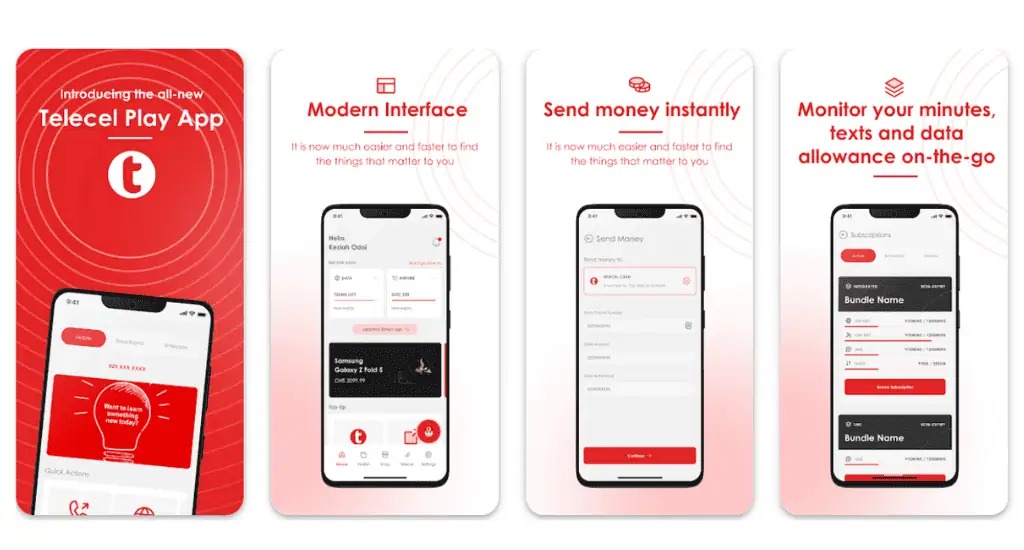
    The Telecel Play app is like your personal control center for everything Telecel.

    You can buy data, check your balance, send money, or even book a ride with ease. If you’ve ever wondered, “How do I manage my Telecel account without stress?”—this guide is for you!

    What Is the Telecel Play App?

    Think of the Telecel Play app as a remote control for your Telecel mobile services. Instead of dialing codes or visiting an agent, you can do everything right from your phone. Here’s what it helps you with:

    • Buy data and voice bundles
    • Send and receive money with Telecel Cash
    • Pay utility bills (electricity, water, DStv, GOtv, etc.)
    • Manage subscriptions and track usage
    • Book a Yango ride
    • Access special deals and loyalty rewards

    There’s also a web version of the app, but it’s mainly for broadband users and businesses.

    How to Use the Telecel Play App in Ghana

    How to Download the Telecel Play App

    Getting the app is as easy as downloading any other app. Just follow these steps:

    1. Open the Google Play Store (for Android users) or the Apple App Store (for iPhone users).
    2. Type Telecel Play Ghana in the search bar.
    3. Look for the official app and tap Install (on Android) or Get (on iPhone).
    4. Wait a few moments for the installation to complete.

    That’s it! You’re ready to set up your account.

    How to Sign Up on the Telecel Play App

    Once the app is installed, follow these steps to create an account:

    1. Open the app.
    2. Tap I don’t have an account (if you’re new) or I already have an account (if you’ve signed up before).
    3. Select your account type:
      • Mobile (for regular phone users)
      • Broadband (for fixed internet users)
    4. Enter your Telecel mobile number or broadband user ID.
    5. You’ll receive a one-time password (OTP) via SMS. Enter the code and tap Next.
    6. Create a secure password or set up biometric login (fingerprint or Face ID).
    7. Log in with your new details.

    And that’s it—you’re in! Now, let’s explore what you can do with the app.

    How to Use the Telecel Play App in Ghana

    What Can You Do on the Telecel Play App?

    The app is packed with features that make managing your mobile account super convenient. Here’s a breakdown:

    1. Buy Voice and Data Bundles

    Running out of airtime or data? No problem. The app lets you buy bundles in just a few taps.

    Bundle TypeDescription
    FlexiChoose exactly how much airtime or data you need.
    No ExpiryYour data or airtime won’t expire. Use it whenever you want.
    Special OffersExclusive promotions available only on the app.
    Roaming BundlesStay connected when traveling outside Ghana.
    Made4MePersonalized data and voice deals based on your usage.

    You can also track your remaining balance from the homepage.

    2. Send and Receive Money with Telecel Cash

    Telecel Cash is built into the app, so you can:

    • Send money to friends and family.
    • Withdraw cash from an agent.
    • Pay bills (electricity, water, DStv, GOtv, etc.).
    • Buy airtime and data directly from your wallet.
    • Check your transaction history.

    It’s like having a mobile bank in your pocket!

    3. Manage Your Account and Settings

    Want to personalize your experience? The settings menu lets you:

    • Turn notifications on/off so you’re only alerted about what matters.
    • Switch app themes to light or dark mode.
    • Change language preferences to use the app in a language you’re comfortable with.
    • Enhance security with PINs or biometrics.
    • Contact customer support directly from the app.

    4. Pay Bills and Access Extra Services

    Forget long queues! You can pay utility bills with just a few taps. The app also provides access to:

    • Yango Ride – Book a ride directly from the app.
    • Betway – Access sports betting services.
    • Red Loyalty Rewards – Earn and redeem points for using Telecel services.
    • SOS Airtime – Borrow airtime when you run low.

    Need Help? Use TERi, the Virtual Assistant

    At the bottom right of the app, you’ll see TERi, a chatbot that can answer your questions instantly. Whether you need help buying a bundle or checking your balance, TERi has you covered.

    How to Use the Telecel Play App in Ghana

    The Telecel Play app makes managing your mobile account effortless. Whether you’re buying data, sending money, or booking a ride, everything is in one place. If you haven’t downloaded it yet, now’s the time to do it. Once you start using it, you’ll wonder how you ever managed without it!

    Got questions? Open the app and give TERi a try!

  • How to Cancel a Wrong Telecel Cash Payment in Ghana

    How to Cancel a Wrong Telecel Cash Payment in Ghana

    Quick Summary

    • USSD Code (*110#): Fastest method; go to Self-Service, select reversal, enter details, and confirm.
    • Telecel Play App: Use the TERi chatbot to request a reversal.
    • Customer Care (100): Call and provide transaction details for assistance.
    • Contact the Recipient: If possible, ask the recipient for a refund.
    • Reversal Time: Telecel-to-Telecel transactions take 24 hours; other networks may take up to 5 working days.
    • Important Notes: Minimum reversal amount is GHS 20; only one request per day; act within 24-72 hours.

    Sending money to the wrong person or entering the wrong amount on Telecel Cash can be frustrating. But don’t worry—there’s a way to fix it! Whether you sent money to the wrong number, overpaid, or simply made a mistake, this guide will walk you through the steps to cancel or reverse the transaction.

    Let’s break it down step by step in the simplest way possible, so you can get your money back without stress.

    Quick Overview of Telecel Cash Reversal Options

    MethodBest ForSpeed
    USSD Code (*110#)Quick and easy self-service reversalsFastest
    Telecel Play AppTech-savvy users who prefer appsModerate
    Customer Care (100)If USSD and app failCan take longer
    Contacting the RecipientIf the recipient is cooperativeVaries

    Now, let’s dive into each method in detail.

    Method 1: Using the USSD Code (*110#)

    This is the fastest and easiest way to reverse a wrong Telecel Cash transaction. Here’s how:

    1. Dial *110# on your phone.
    2. Select “Self-Service.”
    3. Choose the type of reversal:
      • Select Self-Reversal for transactions between Telecel Cash accounts or voucher transactions.
      • Select Request Reversal if the money was sent to a different network.
    4. Enter your T-Cash PIN.
    5. Provide the transaction details:
      • Enter the transaction ID (found in your Telecel Cash confirmation SMS). Ignore any leading zeros.
    6. Confirm the details. A pop-up will show the transaction amount, date, and time.
    7. Submit your request. You’ll get an SMS from Telecel confirming that they’re working on your request.

    Heads up: Telecel might call you for more details before approving the reversal. If you don’t respond or provide unclear answers, your request may be denied.

    Method 2: Using the Telecel Play App

    If you prefer using an app, the Telecel Play app offers a chatbot named “TERi” that can help with reversals.

    1. Open the Telecel Play app and log in.
    2. Tap on TERi (Chatbot) at the bottom right corner.
    3. Select Telecel Cash Self-Reversal.
    4. Choose the type of transaction you want to reverse.
    5. Enter the Telecel number used for the transaction.
    6. Enter the OTP (One-Time Password) sent to your phone.
    7. Select the transaction ID you wish to reverse. If it doesn’t appear, enter it manually.
    8. Confirm the transaction details and submit.

    You’ll receive an SMS once Telecel has received your request. If you experience errors, try using the USSD method or contact customer care.

    Method 3: Calling Telecel Customer Care

    If the USSD and app methods don’t work, you can speak directly to a Telecel customer care representative.

    1. Dial 100 on your Telecel line.
    2. Choose your preferred language.
    3. Press 5 for Telecel Cash services.
    4. Press 4 to speak to an agent.
    5. Provide these details:
      • Your Ghana Card (for identity verification)
      • The mobile number used for the transaction
      • The transaction details (ID, amount, recipient’s number)

    The agent will process your request and send you an SMS confirmation. If the case requires further investigation, it may take some time to resolve.

    Method 4: Contacting the Recipient

    Sometimes, the simplest way to fix a wrong transaction is by reaching out to the recipient directly. If you accidentally sent money to the wrong person, call or text them and politely explain the mistake.

    This method is entirely dependent on the recipient’s willingness to return the money. If they refuse or ignore your request, you’ll have to rely on Telecel’s official reversal process.

    How to Cancel a Wrong Telecel Cash Payment in Ghana

    How Long Does a Telecel Cash Reversal Take?

    Transaction TypeReversal Time
    Telecel to Telecel24 hours
    Telecel to other networksUp to 5 working days

    What If Your Reversal Request Is Denied?

    If your request is denied, try these steps:

    1. Double-check your details (transaction ID, recipient’s number, amount) and submit the request again.
    2. Call Telecel customer care at 100 and escalate the issue.
    3. Visit a Telecel office if the problem isn’t resolved over the phone.

    Important Notes:

    • You cannot reverse transactions below GHS 20.
    • You can only request one reversal per day.
    • Requests should be made within 24 to 72 hours for the best chances of success.

    Mistakes happen, but Telecel gives you multiple ways to correct them. If you act fast and follow the right steps, you have a good chance of getting your money back. Start with the USSD method for a quick fix, and if that doesn’t work, try the app or call customer service.

    Got your money back? Great! If not, stay persistent and make sure to double-check your transaction details next time. Also, explore our list of other useful Telecel short codes for quick solutions.

  • How to Buy ECG Prepaid with Mobile Money in Ghana

    How to Buy ECG Prepaid with Mobile Money in Ghana

    You can easily buy ECG prepaid with MoMo by dialing *226#, using the ECG PowerApp, or through MTN, Telecel, and AT Ghana services.

    Keeping your electricity prepaid meter topped up shouldn’t feel like a chore. Thanks to mobile money (MoMo), you don’t have to stand in long queues or scramble for a vendor late at night when the lights go off. Whether you’re using the ECG Power App, a USSD code, or your mobile network provider’s MoMo service, this guide will walk you through the process in the simplest way possible.

    By the end of this article, you’ll know exactly how to buy ECG prepaid with MoMo, troubleshoot common issues, and keep your electricity running smoothly. Let’s dive in!

    Buying ECG Prepaid Using the ECG Power App

    The ECG Power App is a straightforward way to purchase prepaid electricity. Here’s how to use it:

    1. Download and Install the ECG Power App
      • If you haven’t already, download the ECG Power App from the Google Play Store or Apple App Store.
      • Open the app and register or log in with your details.
    2. Add Your Meter (If Not Already Added)
      • Tap on the Meters tab at the bottom of the screen.
      • Swipe through and select Add Prepaid Meter.
      • Enter your meter number and follow the prompts to register it.
    3. Buy Prepaid Credit
      • In the Meters section, select the meter you want to top up.
      • Tap Buy Credit.
      • Enter the amount you want to purchase.
      • Select Top Up.
    4. Choose a Payment Method
      • Select your preferred MoMo wallet (MTN, AirtelTigo, or Telecel).
      • If you haven’t added a wallet, tap the + icon to link one.
    5. Confirm and Complete Payment
      • Review your transaction details and tap This Is Correct.
      • Wait for the MoMo prompt and enter your PIN.
      • Tap I Have Paid to confirm.
    6. Receive Your Token
      • After payment, tap Check Status to view your token number.
      • ECG will also send a confirmation SMS with the token.
      • If your credit doesn’t load automatically, enter the token manually into your meter.
    How to Buy ECG Prepaid with Mobile Money in Ghana

    Buying ECG Prepaid Using the ECG USSD Code (*226#)

    If you don’t have access to the app, you can use ECG’s USSD code to buy prepaid. First, ensure your MoMo wallet is linked by logging into the ECG Power App and adding it. Then, follow these steps:

    1. Dial *226# on your phone.
    2. Select Pay Prepaid/Postpaid.
    3. Choose your meter or select Add Meter to register a new one.
    4. Enter the amount you want to purchase.
    5. Select your MoMo wallet.
    6. Enter 1 to confirm transaction details.
    7. Enter your MoMo PIN.
    8. Select 1 to approve the payment.
    9. Wait for an SMS confirmation and the token from ECG.

    Buying ECG Prepaid Through Mobile Network Providers

    Each mobile network in Ghana (MTN, Telecel, and AT Ghana) allows you to buy ECG prepaid directly through their MoMo platforms. Here’s how:

    Buying ECG Prepaid with MTN MoMo

    1. Dial *170# on your phone.
    2. Select MoMoPay & Pay Bills.
    3. Choose Pay Bill.
    4. Select Utilities.
    5. Choose ECG.
    6. Select Pay ECG Bill.
      • If your meter is not linked, select ECG Link Meter to add it.
    7. Choose your meter.
    8. Enter the amount you want to buy.
    9. Enter your MoMo PIN to confirm.
    10. Wait for ECG’s SMS with your token.

    Buying ECG Prepaid with Telecel T-Cash

    1. Dial *110#.
    2. Select Make Payments.
    3. Choose Pay Bill.
    4. Select Utilities.
    5. Choose ECG.
    6. Select Make Payment.
      • If your meter is not linked, select Add Meter first.
    7. Choose your meter.
    8. Enter the amount to buy.
    9. Enter your PIN to confirm.
    10. Wait for the SMS confirmation and ECG token.

    Buying ECG Prepaid with ATMoney

    1. Dial *110#.
    2. Select Pay Bill.
    3. Choose Pay Bill again.
    4. Select Utilities.
    5. Choose ECG.
    6. Select Prepaid.
    7. Choose Pay Bill.
      • If your meter is not linked, select Add a Meter first.
    8. Choose your meter.
    9. Enter the amount.
    10. Enter your PIN to confirm.

    Note: Some users experience failed transactions with ATMoney. If this happens, try using ECG’s direct payment options.

    How to Buy ECG Prepaid with Mobile Money in Ghana

    Troubleshooting Common Issues

    IssueSolution
    No token received after paymentCheck the ECG app or dial *226# to retrieve your token. If still missing, contact ECG support.
    Payment deducted but no credit addedWait a few minutes and check again. If unresolved, call ECG customer service with your transaction details.
    Token not loading onto the meterEnsure you’re entering the correct token. If it still doesn’t work, restart the meter or contact ECG.

    Tips to Manage Your Electricity Usage

    • Track your balance: Use the ECG Power App to check your remaining credit.
    • Set usage limits: The app’s Daily Consumption Calculator helps identify power-hungry appliances.
    • Unplug devices: Leaving appliances on standby mode still uses electricity.
    • Use energy-efficient appliances: LED bulbs and inverter air conditioners save power.

    Safety and Security Tips

    • Always double-check your meter number before making a payment.
    • Never share your MoMo PIN with anyone.
    • Beware of fraud: ECG will never ask for your MoMo PIN via SMS or call.
    • Save receipts: Keep transaction records for reference in case of issues.

    Retrieving Lost ECG Prepaid Tokens After Payment

    You can retrieve your ECG prepaid token through the ECG PowerApp, customer service, or by visiting an ECG district office. Have your meter number, MoMo transaction ID, and purchase amount ready. You can also reach ECG for assistance via phone call at (+233 302 611 611), email, or social media.

    Frequently Asked Questions (FAQs)

    Does MoMo charge a transaction fee for ECG prepaid purchases?

    No, ECG does not charge a transaction fee for prepaid purchases via MoMo.

    How long does it take for my purchase to show up?

    Purchases usually reflect immediately. In rare cases, it may take a few minutes due to network delays.

    What should I do if my ECG prepaid payment doesn’t go through?

    If your payment goes through but you don’t receive credit, contact ECG at +233 302 611 611 with your transaction ID and meter details.

    Now that you know how to buy ECG prepaid with mobile money, keeping your electricity running is easier than ever. Whether you prefer using the ECG app, USSD codes, or your network provider’s MoMo service, you have multiple hassle-free options. Try it out and say goodbye to last-minute power cut panic!

  • How to Buy Telecel’s Unlimited Voice Bundle in Ghana

    How to Buy Telecel’s Unlimited Voice Bundle in Ghana

    Dial *200# to buy Telecel’s Unlimited Voice Bundle in Ghana and enjoy unlimited calls on Telecel for GHS 1.5 daily, GHS 10 biweekly, or GHS 15 monthly.

    Imagine you have a magic phone that lets you talk to your friends and family as much as you want without worrying about running out of airtime. Sounds great, right? That’s exactly what Telecel’s Unlimited Voice Bundle does for its users in Ghana. If you love chatting and hate interruptions, this bundle is for you!

    In this guide, I’ll show you how to buy the Unlimited Voice Bundle easily, whether you’re paying with airtime or Telecel Cash. By the end, you’ll be able to subscribe like a pro!

    What is Telecel’s Unlimited Voice Bundle?

    Telecel’s Unlimited Voice Bundle lets you make unlimited calls to other Telecel users in Ghana at a super affordable price. Whether you need it for a day, two weeks, or a whole month, there’s an option for you.

    Here are the available bundles:

    Bundle DurationPrice (GHS)Calls to Telecel Numbers
    1 Day1.5Unlimited
    14 Days10Unlimited
    30 Days15Unlimited

    Now that you know what you get, let’s talk about how to buy it.

    How to Buy Telecel’s Unlimited Voice Bundle with Airtime

    If you have airtime loaded on your Telecel line, follow these simple steps to subscribe:

    1. Dial *200# on your phone.
    2. Select Option 5 for “Unlimited Voice/Supreme.”
    3. Choose the bundle you want:
      • Option 1 for GHS 1.5 (1-day unlimited calls)
      • Option 2 for GHS 10 (14-day unlimited calls)
      • Option 3 for GHS 15 (30-day unlimited calls)
    4. Press 1 to Confirm your selection.
    5. Choose Airtime as your payment option.
    6. You’re all set! Start making unlimited calls immediately.

    Why Use Airtime?

    • Quick and easy if you already have airtime.
    • No need to enter any extra details.
    • Works even if you don’t have Telecel Cash.

    How to Buy Telecel’s Unlimited Voice Bundle with Telecel Cash

    If you prefer to pay using Telecel Cash, here’s how to do it:

    1. Dial *110# on your phone.
    2. Select Option 3 (Airtime and Bundles).
    3. Choose Option 4 (Voice Offers).
    4. If buying for yourself, select Option 1 (Self). To buy for someone else, select Option 2.
    5. Choose Option 5 for “Unlimited Voice/Supreme.”
    6. Pick your preferred bundle:
      • Option 1 for GHS 1.5 (1-day unlimited calls)
      • Option 2 for GHS 10 (14-day unlimited calls)
      • Option 3 for GHS 15 (30-day unlimited calls)
    7. Enter your T-Cash PIN to complete the purchase.
    8. Done! Your unlimited calls are activated.

    Why Use Telecel Cash?

    • Saves your airtime for other things like data bundles.
    • Safer if you don’t like keeping too much airtime on your phone.
    • You can easily buy for yourself or someone else.

    Which Payment Method is Best for You?

    Payment MethodProsCons
    AirtimeFast and straightforwardRequires enough airtime balance
    Telecel CashSafer and flexibleNeeds a Telecel Cash account and PIN

    Tips to Get the Most Out of Your Unlimited Calls

    1. Check Your Balance: Dial *200# to confirm your active bundle.
    2. Set a Reminder: If you use the 1-day or 14-day bundle, mark your calendar so you remember to renew it.
    3. Use It Wisely: The bundle only works for calls to other Telecel numbers, so make sure your friends and family are also on Telecel!
    4. Buy in Advance: If you know you’ll need the bundle for a long time, the 30-day option is the best value for money.
    How to Buy Telecel’s Unlimited Voice Bundle in Ghana

    Frequently Asked Questions (FAQs)

    1. Can I use this bundle to call numbers on other networks?

    No, the unlimited calls only apply to Telecel-to-Telecel numbers.

    2. What happens if I run out of airtime before confirming the purchase?

    Your transaction won’t go through. Make sure you have enough airtime or use Telecel Cash instead.

    3. Can I buy the bundle for someone else?

    Yes! If using Telecel Cash, select Option 2 when asked who the bundle is for.

    Telecel’s Unlimited Voice Bundle is a great deal if you make a lot of calls to other Telecel users. Whether you pay with airtime or Telecel Cash, subscribing is simple and takes less than a minute. Now that you know how to get it, go ahead and talk as much as you want without worrying about extra charges!

  • How to Buy Data on Telecel Ghana Without Hassle

    How to Buy Data on Telecel Ghana Without Hassle

    Buy affordable Telecel Ghana data bundles with *700#. Check your balance with *126#. Enjoy fast, reliable internet for seamless browsing.

    Buying data on Telecel Ghana is quick and easy—if you know the right steps. Whether you’re a first-time user or just looking for the simplest way to top up, this guide will walk you through the process in a way that makes sense. Think of it like ordering your favorite snack—you pick what you want, choose how to pay, and within seconds, it’s yours. Let’s dive in.

    Three Easy Ways to Buy Data on Telecel Ghana

    Telecel gives you three main options to buy data:

    1. USSD Code – A simple dial-and-select method.
    2. Telecel Play App – A smartphone-friendly way to purchase data.
    3. T-Cash – A mobile money option for seamless transactions.

    Let’s break each method down step by step.

    Method 1: Buying Data Using the USSD Code

    This is the fastest and most straightforward method. If you can dial a number, you can buy data. Here’s how:

    1. Dial *700# on your phone.
    2. Select “Buy Data” from the menu.
    3. Choose the type of data bundle you want.
    4. Enter the amount of data you wish to buy (for Flexi bundles).
    5. Pick a package that suits your needs.
    6. Select a payment method: Airtime or Telecel Cash.
    7. Confirm your purchase and wait for a confirmation message.

    That’s it! Your data is ready to use. If you paid via Telecel Cash, you may need to enter your PIN to confirm the payment.

    Method 2: Buying Data Using the Telecel Play App

    If you love apps and want a more visual experience, the Telecel Play App is for you. Follow these simple steps:

    1. Open the Telecel Play App on your phone.
    2. Tap “Telecel” at the bottom-right corner.
    3. Go to “Data Offers” under the “Offers” section.
    4. Select your preferred data package.
    5. Tap “Proceed to Payment”.
    6. Choose the recipient (your number or another Telecel number).
    7. Select a payment method and enter the required details.
    8. Input the OTP (One-Time Password) sent to your number.
    9. Tap “Confirm” to finalize your purchase.

    You’ll receive a notification confirming your transaction. Done!

    How to Buy Data on Telecel Ghana Without Hassle

    Method 3: Buying Data Using T-Cash

    T-Cash is Telecel’s mobile money service, and it lets you buy data quickly without needing airtime. Here’s how:

    1. Dial *110# on your phone.
    2. Select “Airtime and Bundles”.
    3. Choose “Data Bundles”.
    4. Select “Buy for Self” if you’re purchasing for your own number.
    5. Pick a data package that fits your budget.
    6. Choose T-Cash as your payment method.
    7. Enter your T-Cash PIN to confirm.
    8. Wait for an SMS confirming your purchase.

    That’s all! Your data is now active.

    Telecel Data Packages at a Glance

    Telecel offers various data bundles based on different needs. Whether you want a one-time plan, a no-expiry plan, or a night bundle, there’s something for you.

    Flexi Bundles

    These bundles let you buy as much or as little data as you want, from GHS 0.02 to GHS 999.99.

    Night Bundles

    These are ideal for late-night browsing (12:00 AM – 5:00 AM). They never expire.

    Data SizePrice (GHS)
    3.5 GB2
    9 GB3

    Non-Expiry Bundles

    If you don’t want your data to expire, check out these bundles:

    Data SizePrice (GHS)
    20 MB0.5
    45 MB1
    100 MB2
    500 MB5
    800 MB10
    1.5 GB20
    4 GB50
    9 GB100
    30 GB200
    90 GB300
    190 GB400

    Special Offers

    Telecel also provides exclusive one-day deals that are available on the Telecel Play App or via T-Cash.

    Data SizePrice (GHS)
    450 MB2.5
    800 MB3.5
    1.3 GB4.5

    Smart Tips to Make Your Data Last Longer

    Buying data is great, but saving it is even better! Here are some tricks to stretch your data usage:

    • Use Wi-Fi when possible – Connect to free Wi-Fi at home, school, or work to save mobile data.
    • Limit background data usage – Stop apps from consuming data in the background by adjusting settings.
    • Reduce video streaming quality – Lower the resolution when watching videos on YouTube or Netflix.
    • Enable data-saving mode – Many apps (like Chrome) have settings to reduce data usage.

    FAQs About Buying Data on Telecel Ghana

    1. How do I check my data balance?

    Dial *126#, and your current data balance will appear on your screen.

    2. Can I share my data with another Telecel user?

    No, but you can buy a new data bundle for them using USSD, the Telecel Play App, or T-Cash.

    3. Does Telecel offer free data?

    Yes! Telecel runs promotions from time to time. For example, downloading the Telecel Play App rewards new users with 1 GB of free data.

    Now that you know how to buy data on Telecel Ghana, staying connected should be effortless. Whether you prefer the quick USSD method, the feature-rich Telecel Play App, or the seamless T-Cash option, there’s a method that works for you. Here’s a list of essential Telecel short codes you might find useful.

    So, go ahead—buy your data, browse, stream, and stay in touch without hassle!

  • How to Claim Telecel’s Special Offer in Ghana

    How to Claim Telecel’s Special Offer in Ghana

    Get Telecel’s special offer for affordable data and call bundles. Dial *110# or use the Telecel Play app to buy now.

    If you’re in Ghana and looking for an affordable way to stay connected, Telecel’s Special Offer is just what you need! Whether you want budget-friendly data or voice bundles, this offer has got you covered. But how do you claim it? Don’t worry—I’ll walk you through the process step by step, in a way that’s easy to understand and follow.

    What is Telecel’s Special Offer?

    Think of the Telecel Special Offer as a discount deal that gives you more for less. With just a few cedis, you can grab data or call bundles that are perfect for your daily or weekly needs. Here’s a breakdown of what’s available:

    Price (GHS)PackageValidity Period
    2.50450MB Data1 Day
    3.50800MB Data1 Day
    4.501.3GB Data1 Day
    5.00200 Minutes (All Networks)7 Days

    How to Claim Telecel’s Special Offer

    There are two main ways to get the Telecel Special Offer:

    1. Using T-CASH (Telecel Mobile Money)
    2. Through the Telecel Play App

    Let’s go through each method in detail.

    Method 1: Claiming the Special Offer via T-CASH

    T-CASH is Telecel’s mobile money service, and it makes purchasing bundles super easy. Just follow these steps:

    1. Dial *110# on your phone (this is the T-CASH menu code).
    2. Select Airtime and Bundles from the options.
    3. Choose Special Offers from the menu.
    4. Select Special Offers again (this confirms you want one of the discounted packages).
    5. Decide whether you’re buying for yourself (Self) or someone else (Other).
    6. Pick your preferred bundle from the list.
    7. Enter your T-CASH PIN to confirm the purchase.
    8. You’ll receive a confirmation SMS once the transaction is successful.

    That’s it! You now have your Telecel Special Offer bundle activated.

    Method 2: Claiming the Special Offer via the Telecel Play App

    If you prefer using an app instead of USSD codes, the Telecel Play app is your go-to option. Here’s how to do it:

    1. Open the Telecel Play App on your phone (download it if you haven’t already).
    2. Log in and go to the Airtime & Bundles section.
    3. Select Mobile Bundles.
    4. Tap on Data (for internet bundles) or Voice and Data Combo (for the 200-minute bundle).
    5. Choose Special Offers from the options.
    6. Select the bundle you want.
    7. Tap Proceed to Payment.
    8. Enter your payment details and tap Next.
    9. You’ll receive a one-time password (OTP) via SMS. Enter it to confirm.
    10. If paying with T-CASH, enter your PIN and confirm the transaction.
    11. Once done, you’ll get an SMS confirming that your bundle is active.

    Simple, right? Now you can enjoy your data or voice bundle without hassle!

    How to Claim Telecel's Special Offer in Ghana

    FAQs

    How long do these special bundles last?

    • The data bundles are valid for one day.
    • The voice bundle (200 minutes) is valid for seven days.

    Can I buy multiple special offers at once?

    Yes! If one bundle isn’t enough, you can purchase multiple offers and stack them up.

    What if my purchase doesn’t go through?

    • First, check if you have enough balance in your T-CASH wallet.
    • If you’re using the Telecel Play App, ensure you have a stable internet connection.
    • If the issue persists, contact Telecel customer support for assistance.

    Telecel’s Special Offer is one of the best ways to save money while staying connected in Ghana. Whether you prefer dialing a short code or using an app, claiming your bundle is quick and easy. Now that you know how to do it, go ahead and grab yours today!

  • How to Activate Telecel SMS Bundle in Ghana

    How to Activate Telecel SMS Bundle in Ghana

    Dial *700# to get Telecel Ghana SMS bundles—30 SMS for 0.5 GHS to 800 SMS for 5 GHS, all valid for 30 days.

    If you love texting but hate running out of SMS, Telecel has you covered! Whether you want to send quick updates to friends or chat all day without worrying about airtime, Telecel’s SMS bundles are a budget-friendly way to stay connected.

    In this guide, I’ll show you exactly how to activate a Telecel SMS bundle in Ghana—step by step, with no confusing jargon. By the end, you’ll be able to buy an SMS bundle in less than a minute, just like a pro!

    What Is a Telecel SMS Bundle?

    An SMS bundle is a special package that lets you send a set number of text messages at a discounted price instead of paying per SMS. It’s like buying snacks in bulk—you get more for less!

    Telecel’s SMS bundles are affordable and last for 30 days, meaning you don’t have to rush to use them all at once.

    Here’s a quick look at the available packages:

    SMS BundlePrice (GHS)Validity
    30 SMS0.5030 days
    80 SMS1.0030 days
    200 SMS2.0030 days
    800 SMS5.0030 days

    Now, let’s get into how you can buy one.

    How to Activate a Telecel SMS Bundle

    To activate an SMS bundle, make sure you have enough airtime loaded on your phone. If not, you can top up using mobile money, scratch cards, or any other recharge method you prefer.

    Once you have airtime, follow these simple steps:

    Step 1: Dial the USSD Code

    • Open your phone’s dialer (where you usually type phone numbers).
    • Dial *700# and press the call button.

    Step 2: Select SMS Packs

    • A menu will pop up with different options.
    • Look for SMS Packs in the list (usually listed under data, voice, and other services).
    • Enter the number corresponding to SMS Packs and press send.

    Step 3: Choose Your Preferred SMS Bundle

    • Another menu will appear showing the available SMS bundles.
    • Type the number that matches the bundle you want. (For example, if 30 SMS for GHS 0.50 is option 1, enter 1.)
    • Press send.

    Step 4: Confirm Activation

    • The system will ask you to confirm your purchase.
    • Enter 1 to confirm.
    • If your purchase is successful, you’ll receive a confirmation SMS, and the cost will be deducted from your airtime.

    That’s it! You can now start sending SMS messages using your bundle.

    How to Check Your SMS Balance

    Wondering how many SMS you have left? It’s super easy to check:

    1. Dial *126# on your phone.
    2. A message will appear showing your remaining SMS, data, and call bundles.

    Make it a habit to check your balance so you know when it’s time to renew your bundle.

    How to Buy Telecel SMS Bundle in Ghana

    Frequently Asked Questions (FAQs)

    1. Can I share my SMS bundle with another Telecel user?

    No, Telecel SMS bundles cannot be transferred or shared with another user. Each bundle is linked to the phone number that purchased it.

    2. What happens if I use all my SMS before the 30 days?

    If you run out of SMS before the 30-day period ends, you can buy another bundle anytime using the same steps above.

    3. Will my unused SMS roll over if I buy a new bundle before the old one expires?

    No, any unused SMS from your current bundle will not carry over when you buy a new one. To avoid losing messages, try to use them up before purchasing a new bundle.

    4. Can I activate an SMS bundle without airtime?

    No, you need enough airtime to cover the cost of your chosen bundle before activating it.

    Why Use a Telecel SMS Bundle?

    Still wondering if an SMS bundle is worth it? Here’s why you should consider getting one:

    • Saves Money: Buying a bundle is cheaper than paying per SMS.
    • Lasts Longer: Your SMS doesn’t expire daily, so you have a whole month to use them.
    • Simple Activation: You can buy a bundle in seconds using *700#.
    • No Data Needed: Unlike messaging apps that require internet, SMS bundles work even without data.

    Now that you know how to activate a Telecel SMS bundle, you’ll never have to worry about running out of texts again. Whether you need just a few messages or enough to last all month, Telecel’s SMS bundles offer a convenient and cost-effective way to stay in touch.

    So go ahead, dial *700#, grab your SMS bundle on Telecel, and start texting!

  • All Telecel Ghana Short Codes You Need

    All Telecel Ghana Short Codes You Need

    If you use Telecel Ghana, you probably rely on shortcodes every day without even thinking about it. Need to check your balance? Dial a shortcode. Want to buy data? Another shortcode. These quick number sequences make life easier, but keeping track of them all can be tricky.

    That’s why we’ve created this easy-to-follow guide, so you never have to guess which Telecel shortcode to use. Think of this as your cheat sheet for everything from customer care to mobile money.

    General Telecel Short Codes

    These are the essential shortcodes you need for managing your Telecel account and services:

    Service DescriptionShortcode
    Customer Care100
    Know Your Number*127#
    Check Balance*124#
    SIM Registration Status*400#
    Check Numbers Linked to Your Ghana Card*402*1#
    Reseller Code*484#
    Manage Subscriptions*463#
    Telecel Information Services*151#
    Check eSIM Status*700*6#
    MeBanbo Insurance*269#
    Redeem Loyalty Points*533#
    Number for Life*565#
    Manage Value-Added Services (VAS)*463#
    Telecel Registrations*145#

    Telecel Data Short Codes

    Buying data or checking your balance is easy with these codes:

    Service DescriptionShortcode
    Buy Data*700# or *5959#
    Flexi*700# →1→ 1
    Fibre Broadband (FBB)*900#
    Bossu Data*700# → 1 → 8 or *5588#
    Check Bundle Balance*126# or *700# → 2
    Bundle for Someone Else*700# → 4
    Stop Auto-Renewal*700# → 3
    Pay As You Go Browsing (PAYG)*700# → 7
    Hourly Bundle*700# → 1 → 6
    Data Roaming*700# → 1 → 9
    Weekly Bundle*700# → 1 → 4
    2 Moorch*700# → 1 → 2
    Night Bundle*700# → 1 → 7

    Telecel Call and Voice Short Codes

    Need to borrow credit or subscribe to a voice bundle? Here’s how:

    Service DescriptionShortcode
    Borrow Credit*505# or *200# → 8
    Transfer Credit*516#
    Unlimited Voice Bundle*200# → 5
    Caller Tunes Service*585#
    Telecel IDD Packages*150# → 1
    Roaming Voice*150# → 2 → 1
    Check IDD & Roaming Balance*150# → 3
    Stop Auto-Renewal (IDD & Roaming)*150# → 4

    Telecel Cash Short Codes

    For mobile money transactions, use these shortcodes:

    Service DescriptionShortcode
    Telecel Cash*110#
    Send Money*110# → 1
    T-Cash Self-Service (PIN Reset, Reversals, Support)*110# → 7
    Make Payments*110# → 4
    Buy Airtime or Data*110# → 3
    Withdraw Money*110# → 2
    Telecel Cash Self-Registration*558#
    Telecel Merchant/Agent Registration*578#
    Agent Helpline*591#
    Access Financial Services*110# → 5
    Manage T-Cash Account*110# → 6
    List of All Telecel Ghana Short Codes You Need

    Promotions & Special Offers

    Telecel often runs exciting promotions. Here’s how to access them:

    Service DescriptionShortcode
    Telecel Red Offers*200# or *7070#
    Telecel Made4Me*530# or *543#
    SMS Pack*700# → 5
    Unlimited Voice Offer*480#
    Vim Offer*556#
    Telecel Xtreme*5888#
    Welcome Service (News, SIM Registration, Customer Support)*127*11#
    Telecel Device Micropayment*474#

    FAQs

    How do I contact Telecel Ghana customer care?

    You can reach Telecel Ghana’s customer support team through these channels:

    What should I do if a shortcode isn’t working?

    First, make sure you’ve entered it correctly. If it still doesn’t work:

    1. Check your network signal.
    2. Restart your phone.
    3. Contact Telecel customer care for help.

    Can I use these shortcodes outside Ghana?

    Some shortcodes, like balance checks and roaming services, work internationally, but local services (e.g., buying bundles) may not. Always confirm with Telecel before traveling.

    Shortcodes make using Telecel simple and fast. Whether you need data, airtime, mobile money, or customer support, there’s a shortcode for that! Bookmark this guide or take a screenshot so you always have it handy.

    Got a friend who keeps asking for Telecel codes? Share this with them, and you’ll be their hero!

  • How to Buy Telecel Ghana’s Made4Me Bundle

    How to Buy Telecel Ghana’s Made4Me Bundle

    Use *530# for Telecel Made4Me bundle and get personalised voice, data, and combo plans. Also available on the Telecel Play app!

    If you’re a Telecel Ghana user looking for a bundle that truly fits your needs, the Made4Me offer is exactly what you need. Think of it like a custom meal at your favorite restaurant—instead of getting a one-size-fits-all package, Telecel gives you options based on how you use your phone. Whether you need more data, more minutes, or a mix of both, Made4Me ensures you get the best deal tailored to your usage.

    Now, let’s walk through exactly how to buy this bundle. It’s easy, and by the end of this guide, you’ll be able to do it with your eyes closed (okay, maybe not literally, but you get the point!).

    What is the Telecel Ghana Made4Me Bundle?

    The Made4Me bundle is a special offer available only to Telecel Ghana prepaid subscribers. It provides personalized voice minutes, data, or combo packages based on your phone usage habits. The best part? It’s unique to you! Your offers may be different from someone else’s because Telecel designs them specifically for your needs.

    Key Features of Made4Me:

    • Custom Bundles: Offers are tailored based on your usage patterns.
    • Flexible Payment: Pay with airtime or Telecel Cash.
    • Stackable Offers: You can buy multiple Made4Me bundles at a time.
    • Non-Auto Renewal: The bundles do not renew automatically, so you have full control.

    Now, let’s get into how you can buy this bundle.

    How to Buy Telecel Ghana’s Made4Me Bundle

    There are two simple ways to purchase your Made4Me bundle:

    1. Using a USSD Code (quick and works on any phone)
    2. Through the Telecel Play App (ideal if you prefer an app experience)

    Let’s break them down step by step.

    Method 1: Buying with USSD Code (*530#)

    If you’re not a fan of apps, don’t worry! You can activate your Made4Me bundle with a simple code.

    Steps:

    1. Dial *530# on your phone.
    2. A menu will pop up with different Made4Me offers based on your usage.
    3. Choose the offer that best suits your needs.
    4. Select your payment method:
      • Airtime (your regular phone balance)
      • Telecel Cash (if you have money in your Telecel mobile wallet)
    5. If you choose Telecel Cash, a prompt will ask you to enter your PIN to confirm.
    6. Wait for an SMS confirmation, and you’re done!

    This method is super quick and works even if you don’t have an internet connection.

    Method 2: Buying via the Telecel Play App

    If you prefer a more visual and interactive experience, the Telecel Play App makes it just as easy to buy your Made4Me bundle.

    Steps:

    1. Open the Telecel Play App on your phone. (If you don’t have it yet, download it from the Google Play Store or Apple App Store.)
    2. Navigate to Airtime & Bundles and select Mobile Bundles.
    3. Tap on Made4Me to see your personalized bundle offers.
    4. Select the offer you want.
    5. Click Proceed to Payment.
    6. Enter your payment details (Airtime or Telecel Cash) and click Next.
    7. A confirmation OTP (One-Time Password) will be sent to your phone.
    8. Enter the OTP and tap Confirm.
    9. If you’re using Telecel Cash, enter your PIN to finalize the purchase.

    And that’s it! Your Made4Me bundle is now active.

    How to Buy Telecel Ghana’s Made4Me Bundle

    How to Check Your Made4Me Balance

    Once you’ve bought a bundle, you’ll want to keep track of your usage. Here’s how to check your balance:

    MethodSteps
    USSD CodeDial *126# and wait for a message with your remaining data and minutes.
    Telecel Play AppOpen the app, go to the Data section, and view your active bundle balance.

    Frequently Asked Questions (FAQs)

    1. Can my Made4Me offers change?

    Yes! The offers you get are dynamic and may change from time to time based on your usage habits. If you call a lot, you may see more voice bundles; if you stream videos often, you may get bigger data offers.

    2. Why can’t I subscribe to the Telecel Made4Me offer?

    There are a few reasons why you might not be able to buy a Made4Me bundle:

    • Your available buckets are full (meaning you have the maximum number of active bundles).
    • You have an insufficient balance (check your airtime or Telecel Cash balance).
    • You’re not a Telecel prepaid customer (only prepaid users can access this offer).

    3. Can I purchase multiple Made4Me offers at once?

    Yes! You can buy multiple Made4Me bundles, and they will be stacked together.

    Buying a Telecel Ghana Made4Me bundle is simple, whether you use the USSD code (*530#) or the Telecel Play App. It’s a flexible and personalized way to get exactly what you need without paying for extras you won’t use. Now that you know how to do it, go ahead and grab a bundle that suits you best!

    If you found this guide helpful, share it with a friend who might need it too!

  • How to Register Your Telecel SIM in Ghana

    How to Register Your Telecel SIM in Ghana

    Dial *404# to start your Telecel SIM registration in Ghana with a Ghana Card, GPS address, and biometric verification.

    If you just got a Telecel SIM in Ghana, you’ll need to register it before you can make calls, send texts, or use mobile data. This isn’t just a formality—it’s required by the National Communications Authority (NCA) to help prevent fraud and ensure security. Don’t worry, though! The process is simple, and I’ll walk you through it step by step.

    Why Do You Need to Register Your Telecel SIM?

    Think of SIM registration like setting up a new bank account. The company needs to know it’s really you to prevent someone else from using your number for illegal activities. Registering your Telecel SIM ensures:

    • Your number is securely linked to you.
    • You can use all Telecel services without interruptions.
    • Authorities can track down fraudsters using unregistered SIMs.

    Now, let’s get into how you can get your Telecel SIM registered.

    What You Need to Register Your Telecel SIM

    Before you start, make sure you have everything required. Here’s a quick checklist:

    RequirementDetails
    Telecel Ghana SIMMust be an unregistered SIM from Telecel.
    Ghana CardYour national ID is mandatory.
    Ghana Post AddressYour digital address for verification.

    Without these, you won’t be able to complete your registration.

    Where to Register Your Telecel SIM

    You have two main options to register your SIM:

    1. Through an Authorized Telecel Agent
    2. By Visiting a Telecel Office

    Both methods are simple, but let’s break them down.

    Option 1: Registering Through an Authorized Agent

    If you prefer convenience, visiting an authorized agent is your best bet. These agents are located in various spots around Ghana, making registration easy.

    Steps:

    1. Visit a Telecel agent near you.
    2. Provide your Ghana Card.
    3. Share your personal details, including your full name and date of birth.
    4. The agent will capture your biometric data (fingerprints, facial scan, etc.).
    5. Once verified, your SIM will be activated and ready to use.

    Option 2: Registering at a Telecel Office

    Prefer a more official process? You can register at any Telecel office.

    Steps:

    1. Locate the nearest Telecel office.
    2. Present your Ghana Card and Ghana Post Address.
    3. A Telecel staff member will take your details and biometric data.
    4. Once your registration is verified, your SIM will be fully activated.

    How to Re-register an Existing Telecel SIM

    If you’ve been using a Telecel SIM but haven’t re-registered it, you need to complete the new biometric registration process. Here’s how:

    1. Link Your Ghana Card to Your SIM:
      • Dial *404# on your Telecel number.
      • Enter your name, Ghana Card number, and date of birth.
      • You’ll receive a confirmation with a unique code.
    2. Complete Biometric Registration:
      • Visit a Telecel agent or office with your Ghana Card and unique code.
      • Provide your Ghana Post Address.
      • Get your biometrics captured.

    Tip: If you recently bought your SIM and already registered with a Ghana Card, you don’t need to re-register.

    How to Check If Your Telecel SIM Is Successfully Registered

    Want to confirm if everything is set? Here’s how:

    1. Dial *400# on your Telecel phone.
    2. A pop-up message will display:
      • Your name
      • ID type (Ghana Card)
      • Unique code
      • BCAP status (If it says “Yes,” your registration is successful!)

    If BCAP says “No,” you may need to complete the process again. (BCAP stands for Biometric Capture)

    How to Register Your Telecel SIM in Ghana

    Frequently Asked Questions (FAQs)

    How much does a Telecel SIM cost?

    A Telecel SIM costs GHC 10 when purchased from a Telecel office. Prices may be different if you buy from an agent or third-party seller.

    Is SIM registration free?

    Yes! Registering your Telecel SIM is completely free.

    How do I check which Ghana Card is linked to my Telecel SIM?

    Dial *400# to see the details linked to your SIM.

    Can I register my Telecel SIM online?

    No, Telecel SIM registration must be done in person at an agent location or Telecel office.

    Registering your Telecel SIM in Ghana is easy and necessary. Whether you’re setting up a new SIM or re-registering an existing one, following these steps will keep your number active and compliant with national regulations. Take a few minutes today to get it done—your future self will thank you!

  • How to Share or Transfer Airtime on Telecel Ghana

    How to Share or Transfer Airtime on Telecel Ghana

    Easily transfer airtime on Telecel Ghana by dialing *516# and following the prompts or using *516recipient’s numberamount*PIN# for instant credit.

    Ever needed to send airtime to a friend or family member in Ghana using Telecel? Maybe someone ran out of credit at the worst possible moment, and you’re their only hope. Good news—Telecel makes it easy to transfer airtime from one Telecel number to another! Whether you prefer using USSD codes or T-CASH, this guide will walk you through every step.

    What You Need to Know Before Transferring Airtime

    Before jumping in, here are a few things to keep in mind:

    • Transfers only work between Telecel numbers – You can’t send airtime to MTN, Vodafone, or other networks directly.
    • You need enough balance – Make sure you have enough airtime before attempting a transfer.
    • There’s a small fee – Each airtime transfer costs GHS 0.05.
    • You need a PIN – Telecel requires a transfer PIN for security. If you’ve never changed it, the default PIN is 1234.

    Now, let’s dive into the step-by-step process!

    Method 1: Using USSD Code to Transfer Airtime

    This is the quickest way to send airtime to another Telecel number. Just follow these simple steps:

    1. Dial *516# on your Telecel phone.
    2. Select Option 1: Transfer Credit.
    3. Enter the recipient’s Telecel number. (Example: 0201234567)
    4. Enter the amount you want to send. (Must be in Ghana cedis, no decimal values.)
    5. Enter your transfer PIN. (If you haven’t changed it, use the default: 1234)
    6. Confirm the transfer by selecting ‘1’.

    Once you complete these steps, you’ll receive a confirmation message, and the recipient will get their airtime instantly!

    Alternative USSD Code for Faster Transfers

    If you prefer a shortcut, you can transfer airtime in one step by dialing:

    *516*recipient’s number*amount*PIN#

    Example: To send GHS 2 to 0201234567, you would dial:

    *516*0201234567*2*1234#

    Press the call button, confirm the transaction, and you’re done!

    Method 2: Buying Airtime for Another Network Using T-CASH

    Even though Telecel doesn’t allow direct transfers to MTN, Vodafone, or AirtelTigo, you can still buy airtime for other networks using T-CASH. Here’s how:

    1. Dial *110# to access T-CASH.
    2. Select “Airtime and Bundles.”
    3. Choose “Buy Airtime.”
    4. Select “Other Networks.”
    5. Accept the terms by entering ‘1’.
    6. Enter the recipient’s phone number.
    7. Confirm the number.
    8. Enter the amount you want to buy.
    9. Enter your T-CASH PIN to complete the purchase.

    The recipient will receive the airtime within seconds!

    Changing Your Transfer PIN

    For security reasons, it’s a good idea to change the default 1234 PIN. To do this:

    1. Dial *516# and select “Change PIN” (Option 3).
    2. Enter your current PIN (1234 if unchanged).
    3. Enter a new 4-digit PIN.
    4. Confirm the new PIN.

    Once successful, your new PIN will be required for all future transfers.

    Quick Reference Table for Telecel Airtime Transfers

    ActionUSSD CodeSteps
    Transfer to another Telecel numberDial *516#Follow prompts to enter recipient, amount, and PIN
    Fast transfer (no menus)*516*recipient’s number*amount*PIN#Enter the command directly and confirm
    Change transfer PINDial *516#Select “Change PIN” and follow instructions
    Buy airtime for another networkDial *110#Use T-CASH to buy for any network
    How to Share or Transfer Airtime on Telecel Ghana

    Frequently Asked Questions (FAQs)

    1. Can I transfer airtime to a different network?

    No, Telecel does not allow direct transfers to other networks. However, you can buy airtime for other networks using T-CASH.

    2. What happens if I enter the wrong number?

    Airtime transfers are instant and cannot be reversed. Always double-check the recipient’s number before confirming the transfer.

    3. What is the minimum and maximum amount I can transfer?

    Telecel does not specify a minimum, but transfers must be in whole Ghana cedis (e.g., GHS 1, GHS 2, etc.). Check with Telecel for daily transfer limits.

    4. I forgot my transfer PIN. How do I reset it?

    If you forget your PIN, contact Telecel customer support by dialing 100 for assistance.

    Now you know everything about transferring airtime on Telecel Ghana! Whether you’re helping a friend in need or buying airtime for another network using T-CASH, the process is simple and quick.

    Next time someone asks, “Hey, how do I send airtime on Telecel?”—you’ll be the expert with all the answers!

    If you found this guide helpful, share it with friends who might need it!

  • How to Buy Telecel Weekend Bundle in Ghana

    How to Buy Telecel Weekend Bundle in Ghana

    What is the Telecel Bossu Weekend Bundle?

    Imagine you’ve got a weekend ahead, and you need enough data and talk time to stay connected without breaking the bank. That’s where Telecel’s Bossu Weekend Bundle comes in! It’s a special offer that gives you 4GB of data and 100 minutes of talk time to call any network in Ghana. The best part? It costs just GHS 6 and is valid from Saturday to Sunday.

    But there’s a small catch—you don’t get all the data and minutes at once. Telecel splits them between the two days:

    DayData AllowanceTalk Time
    Saturday2GB50 minutes
    Sunday2GB50 minutes

    So, if you’re planning to stream movies or chat with friends for hours, you’ll need to pace yourself!

    How to Buy the Telecel Bossu Weekend Bundle

    There are two easy ways to buy the Telecel Weekend Bundle:

    1. Using a USSD code (for those who prefer dialing codes)
    2. Through the Telecel Play App (for those who like apps)

    Method 1: Buying via USSD Code

    USSD codes are simple and don’t require internet access. Just follow these steps:

    1. Dial *5588# on your Telecel number.
    2. A menu will pop up—select “Bossu Weekend” from the list.
    3. Enter 1 to confirm your purchase.
    4. Choose your payment method:
      • Airtime (deducted from your phone credit)
      • Telecel Cash (Telecel’s mobile money service)
    5. If you select Telecel Cash, enter your PIN to authorize the payment.
    6. Decide whether you want:
      • Automatic Renewal – The bundle will renew every weekend, and any unused data or minutes will roll over.
      • One-Time Purchase – The bundle applies only to the current weekend, and leftover data won’t roll over.
    7. You’ll receive a confirmation SMS once the bundle is activated.

    Pro Tip: If you often run out of data on weekends, choose the Automatic Renewal option so you never miss out!

    Method 2: Buying via the Telecel Play App

    If you prefer using apps, the Telecel Play App makes purchasing your bundle super easy. Just follow these steps:

    1. Open the Telecel Play App on your smartphone.
    2. Tap “Telecel” at the bottom of the screen.
    3. Select “Data Offers” from the menu.
    4. Scroll through the offers until you find “Bossu Weekend” and tap on it.
    5. Tap “Proceed to Payment.”
    6. Enter your payment details and tap “Next.”
    7. You’ll receive a One-Time Password (OTP) via SMS—enter it and tap “Confirm.”
    8. If paying via Telecel Cash, enter your PIN to complete the transaction.
    9. You’ll get an SMS confirming your bundle purchase.

    Did You Know? The Telecel Play App also lets you track your data usage and explore other cool bundles!

    How to Check Your Telecel Bossu Weekend Balance

    Want to see how much data or talk time you have left? No problem! To check your data balance on Telecel, just dial *126#, and you’ll get a message showing all your available balances, including your Bossu Weekend bundle.

    How to Buy Telecel Weekend Bundle in Ghana

    FAQs About the Telecel Weekend Bundle

    1. Can I buy the Bossu Weekend bundle on Friday?

    No, the bundle is only available for purchase on Saturdays and Sundays.

    2. What happens if I don’t use all my data or minutes?

    • If you selected Automatic Renewal, your unused data and minutes will roll over to the next weekend.
    • If you chose One-Time Purchase, any leftover data and minutes expire on Sunday night.

    3. Can I buy the bundle more than once in a weekend?

    No, you can only activate the Bossu Weekend Bundle once per weekend.

    4. What if my purchase fails?

    • Make sure you have at least GHS 6 airtime or enough funds in your Telecel Cash account.
    • If the problem persists, restart your phone and try again.
    • Still not working? Call Telecel Customer Care at 100.

    If you love staying connected over the weekend without worrying about running out of data or call minutes, Telecel’s Bossu Weekend Bundle is a great deal. For just GHS 6, you get enough talk time and data to keep up with your friends, watch videos, or scroll through social media. Whether you use the USSD code or the Telecel Play App, buying the bundle is quick and hassle-free.

    Give it a try this weekend—you won’t regret it!

  • How to Check Your Telecel Data Balance in Ghana

    How to Check Your Telecel Data Balance in Ghana

    If you’ve ever been caught off guard by a “You have run out of data” message while streaming, scrolling, or chatting, you know how frustrating it can be. Keeping track of your data balance is crucial, and if you’re a Telecel Ghana subscriber, it’s easy to do.

    This guide will walk you through simple ways to check your data balance, whether you have internet access or not. Think of it as your go-to cheat sheet for staying on top of your data usage!

    Ways to Check Your Telecel Data Balance

    There are two main methods to check your Telecel data balance: using a USSD code or the Telecel Play app. Each option is simple, so choose the one that works best for you.

    1. Checking via USSD Code (No Internet Required)

    The quickest and most convenient way to check your data balance is through the USSD code. Here’s how:

    1. Open the dialer on your phone.
    2. Dial *126# and press the call button.
    3. A message will pop up displaying your remaining data balance.

    This method works on all types of phones—whether you have a smartphone or a basic feature phone. Plus, it’s free!

    2. Checking via the Telecel Play App (Internet Required)

    If you prefer a more detailed overview of your data balance and usage, the Telecel Play app is the way to go. Here’s how to check your balance through the app:

    1. Download and install the Telecel Play App from the Google Play Store or Apple App Store if you haven’t already.
    2. Open the app and log in with your Telecel number.
    3. Navigate to the Manage Services section.
    4. Tap on Data to view your data balance.

    The app gives you more control over your data, letting you manage subscriptions and even purchase new bundles with ease.

    How to Track Your Data Usage on Your Phone

    While Telecel doesn’t offer a built-in feature to track your data usage in real-time, your smartphone does. Here’s how you can monitor your data consumption:

    For Android Users

    1. Open Settings on your phone.
    2. Tap Connections (or Network & Internet on some devices).
    3. Select Data Usage > Mobile Data Usage.
    4. Choose your Telecel SIM (if you have dual SIMs).
    5. You’ll see a breakdown of your data usage, including a graph and app-specific consumption.

    For iPhone Users

    1. Open Settings.
    2. Tap Mobile Service.
    3. Scroll down to the Mobile Data section.
    4. Tap Show All to view data usage per app.

    Both Android and iOS devices allow you to set data limits and alerts to help you manage your usage and avoid unexpected data exhaustion.

    Comparison of Checking Methods

    MethodInternet Required?Details ProvidedBest For
    USSD Code (*126#)NoBasic data balanceQuick checks without internet
    Telecel Play AppYesDetailed data balance & subscription managementMore control over data usage
    How to Check Your Telecel Data Balance in Ghana

    Frequently Asked Questions (FAQs)

    1. Will my Telecel data balance expire?

    Yes, most Telecel data bundles have an expiration date. Be sure to use your data before it expires to avoid losing it.

    2. Can I check my Telecel data balance without internet access?

    Absolutely! Just dial *126# to check your balance without using any data.

    3. Does checking my data balance cost anything?

    No, using the USSD code is completely free. However, if you use the Telecel Play app, it may consume a small amount of data from your plan.

    4. Can I receive data balance alerts?

    Yes, Telecel may send SMS notifications when your data balance is low. You can also set up custom alerts through your smartphone settings.

    Keeping track of your Telecel data balance is easy, and doing so will help you avoid sudden disconnections. Whether you prefer the quick USSD method or the detailed Telecel Play app, you now have the tools to stay informed.

    Next time you wonder, “How much data do I have left?”—you’ll know exactly what to do!

  • How to Activate Telecel’s IDD Bundle in Ghana

    How to Activate Telecel’s IDD Bundle in Ghana

    Staying in touch with friends and family abroad can be expensive, but Telecel’s International Direct Dialing (IDD) bundles make it much more affordable. Whether you’re calling a sibling in Canada, a business partner in Nigeria, or a friend in France, these bundles help you keep the conversation going without draining your airtime.

    In this guide, we’ll break down everything you need to know about activating Telecel’s IDD bundle in Ghana. We’ll keep it simple but clear, so by the end, you’ll know exactly what to do. Let’s get started!

    What is an IDD Bundle?

    An IDD (International Direct Dialing) bundle is a special package that allows you to make international calls at a reduced rate. Instead of paying high per-minute charges, you buy a bundle with a set number of minutes for specific countries.

    Think of it like a prepaid food voucher. If you walk into a restaurant with GHS 20, you might only get a few dishes. But if you buy a meal combo with the same amount, you could get more value for your money. That’s exactly how IDD bundles work – more talk time for less money!

    How to Activate Telecel’s IDD Bundle

    You can activate Telecel’s IDD bundle using two simple methods:

    1. USSD Code (For those who prefer quick, keypad-based options)
    2. Telecel Play App (For users who like digital convenience)

    Let’s go through both step by step.

    Method 1: Using the USSD Code

    1. Dial *150# on your Telecel line.
    2. Select IDD Packages from the menu.
    3. Choose the region (e.g., USA & Canada, Africa, Asia, or Europe).
    4. Pick a package based on your calling needs.
    5. Enter 1 to confirm your selection.
    6. Choose your payment method (Airtime or T-Cash).
    7. If using T-Cash, enter your PIN when prompted.
    8. Select a subscription option (one-time or auto-renewal).
    9. Once successful, you’ll receive a confirmation message.

    Method 2: Using the Telecel Play App

    1. Open the Telecel Play App (Download it if you don’t have it yet!).
    2. Log in and go to Airtime & Bundles.
    3. Select Mobile Bundles.
    4. Choose IDD Bundles.
    5. Pick a region and select your preferred package.
    6. Tap Proceed to Payment.
    7. Enter your payment details and tap Next.
    8. Input the OTP code sent to your phone and confirm.
    9. If using T-Cash, enter your PIN to finalize the purchase.
    10. You’ll receive a confirmation message once the purchase is complete.

    Telecel IDD Bundle Options

    To help you choose the right bundle, here’s a breakdown of Telecel’s IDD packages:

    IDD Bundle Pricing and Minutes

    RegionPackagePrice (GHS)Voice Minutes
    USA & CanadaAmerica Daily230
    America Weekly580
    America Monthly 110170
    America Monthly 220360
    AfricaAfrica Monthly 1104
    Africa Monthly 2208
    Africa Monthly 33012
    AsiaAsia Lite Weekly515
    Asia Lite Monthly 11030
    Asia Lite Monthly 22065
    Asia Plus Monthly 11025
    Asia Plus Monthly 22060
    Asia Plus Monthly 340130
    EuropeEurope Lite 1104
    Europe Lite 2198
    Europe Lite 33013
    Europe Plus 1186
    Europe Plus 23412
    Europe Plus 35419
    How to Activate Telecel’s IDD Bundle in Ghana

    Countries Covered by Telecel IDD Bundles

    Here are the countries you can call with these bundles:

    RegionCountries Included
    USA & CanadaUSA, Canada
    AfricaNigeria, Togo, Burkina Faso, Benin, Mali, Ivory Coast, Niger, Liberia, Sierra Leone, Egypt, Kenya
    Asia LiteChina, India
    Asia PlusKorea, Singapore, Bangladesh, Switzerland, Australia, Malaysia
    Europe LiteItaly, France, Netherlands, Spain, Belgium
    Europe PlusUK, Germany, Italy, France, Netherlands, Spain, Belgium

    How to Check Your Balance or Unsubscribe

    If you need to check your remaining minutes or opt out of the bundle, here’s what to do:

    Check Balance

    • Dial *150# and select Check Balance.

    Unsubscribe

    • Dial *150#, select IDD Packages, and choose Unsubscribe.

    Now you know exactly how to activate Telecel’s IDD bundle, choose the best package for your needs, and manage your subscription. Whether you prefer using the quick USSD code or the Telecel Play app, staying connected with loved ones abroad is now easier and more affordable.

    So go ahead, activate your bundle, and start making those international calls without worrying about high costs!

    FAQs

    How do I activate an international call bundle on Telecel?

    To enjoy the lowest call rates to the UK, USA, and Germany with Telecel’s IDD bundles, dial *150# to subscribe.
    How do I activate a voice bundle on Telecel?

    Dial *200# to activate a voice bundle, which applies only to Telecel-to-Telecel calls.

    How can I buy a bundle on Telecel?

    To purchase a bundle, dial *110#, select option 3 (Airtime and Bundles), and follow the prompts.

    How do I check my Telecel IDD balance?

    Dial *150# and select “Check IDD & Roaming Balance.” Your remaining balance will be displayed in a pop-up message.

  • How to Activate Telecel’s Night King Bundle in Ghana

    How to Activate Telecel’s Night King Bundle in Ghana

    If you love browsing the internet at night without worrying about running out of data, Telecel‘s Night King bundle is perfect for you! It’s affordable, offers great value, and is easy to activate. In this guide, I’ll walk you through everything you need to know about getting and using the Telecel Night King bundle. By the end, you’ll be activating it like a pro!

    What is the Telecel Night King Bundle?

    Telecel’s Night King bundle is a special data plan designed for night owls who want to browse, stream, or download at cheaper rates between 12 AM and 5 AM. With as little as GHS 2 or GHS 3, you can get a generous amount of data to enjoy during late-night hours.

    Here’s a quick breakdown of the available packages:

    PackageCost
    9 GBGHS 3
    3.5 GBGHS 2

    This means if you’re someone who likes watching YouTube videos, downloading movies, or chatting with friends late at night, this bundle is a fantastic option for you!

    How to Subscribe to the Telecel Night King Bundle

    There are two simple ways to subscribe:

    1. Using a USSD code
    2. Via the Telecel Play app

    Let’s go through both options step by step.

    Option 1: Activating the Night King Bundle Using the USSD Code

    This is the quickest and easiest way to activate the Night King bundle. Follow these steps:

    1. Dial *700# on your Telecel line.
    2. Select Buy Data from the menu.
    3. Choose Night King from the options.
    4. Select your preferred package (9GB for GHS 3 or 3.5GB for GHS 2).
    5. Choose your payment method:
      • Airtime (if you have enough credit on your line)
      • Telecel Cash (if you prefer to pay from your T-Cash account)
    6. If paying with T-Cash, enter your PIN to confirm.
    7. Wait for a confirmation message that your bundle has been successfully activated.

    That’s it! You can now start browsing from 12 AM to 5 AM.

    Alternative Method: Using T-Cash USSD

    If you prefer, you can also buy the Night King bundle directly through T-Cash:

    1. Dial *110#.
    2. Select Airtime and Bundles.
    3. Follow the prompts to choose the Night King bundle.
    4. Complete the payment using your T-Cash balance.
    5. Receive a confirmation message.

    Option 2: Activating the Night King Bundle via the Telecel Play App

    If you have the Telecel Play app installed, you can buy the Night King bundle in just a few taps:

    1. Open the Telecel Play app and log in.
    2. Go to the Airtime & Bundles section.
    3. Select Mobile Bundles.
    4. Choose Data.
    5. Tap on Night to see the Night King options.
    6. Select your preferred package (9GB or 3.5GB).
    7. Tap Proceed to Payment.
    8. Enter your payment details and tap Next.
    9. A one-time password (OTP) will be sent to your number.
    10. Enter the OTP and tap Confirm.
    11. If paying with T-Cash, enter your PIN and tap Confirm again.
    12. You’ll receive an SMS confirmation that your bundle has been activated.

    How to Check Your Night King Bundle Balance

    After activating your bundle, you might want to check how much data you have left. Here’s how:

    1. Dial *126#.
    2. Wait for an SMS showing your remaining data balance.

    This way, you can manage your usage and make sure you don’t run out unexpectedly.

    How to Activate Telecel’s Night King Bundle in Ghana

    FAQs About the Telecel Night King Bundle

    1. What time is the Night King bundle valid?

    The Night King bundle is valid from 12 AM to 5 AM. If you try to use it outside these hours, it won’t work.

    2. Can I buy multiple Night King bundles in one night?

    Yes! If you finish your bundle before 5 AM, you can buy another one using the same steps.

    3. Does the Night King bundle roll over to the next day?

    No. Once 5 AM hits, any unused data expires. Make sure to use it before then!

    4. Can I use the Night King bundle for all apps and websites?

    Yes! Whether you want to stream videos, browse social media, or download files, the bundle works across all internet services.

    5. What happens if I run out of data before 5 AM?

    You will need to buy another Night King bundle or switch to a regular data bundle.

    6. Can I activate the Night King bundle if I have an active daily or monthly data plan?

    Yes! Your Night King bundle will only be used during the 12 AM – 5 AM window, while your regular data bundle remains untouched for daytime browsing.

    If you’re someone who stays up late watching movies, downloading large files, or just browsing the web, Telecel‘s Night King bundle is a fantastic deal. For just GHS 2 or GHS 3, you get a lot of data at a low cost. Plus, activating it is super easy, whether you use the USSD code or the Telecel Play app.

    Now that you know exactly how to activate the Night King bundle, why not give it a try tonight? Happy browsing!

  • How to Activate the Telecel Red Offer in Ghana

    How to Activate the Telecel Red Offer in Ghana

    If you love staying connected without worrying about running out of talk time or data, the Telecel Red Offer is perfect for you. It’s a bundle that gives you both voice minutes and data in one convenient package. Whether you make lots of calls, browse the internet, or do both, Telecel Red has something for you.

    In this guide, I’ll show you exactly how to activate the Telecel Red Offer, how to check your balance, and everything else you need to know. Let’s get started!

    What is the Telecel Red Offer?

    The Telecel Red Offer is a flexible voice and data combo package designed for prepaid customers. It comes in different variations, including daily, weekly, monthly, and even non-expiry bundles. Some packages even offer unlimited voice minutes!

    Telecel Red Package Breakdown

    Here’s a quick look at the available bundles:

    Package TypePrice Range (GHS)Data Bundle RangeVoice Minutes Range
    Flexi0.07 – 29.991 MB – 1.17 GB1 min – 720 mins
    No Expiry0.5 – 308 MB – 750 MB8 mins – 540 mins
    Daily/Weekly/Bossu0.5 – 615 MB – 4 GB55 mins – 375 mins
    Monthly20 – 100550 MB – 1 GB600 mins – 2200 mins
    Unlimited Voice/Supreme1.5 – 15Unlimited

    Bonus: Every bundle (except Unlimited Voice) comes with 50 free SMS messages.

    How to Activate the Telecel Red Offer

    You can activate the Telecel Red Offer using two simple methods:

    1. USSD Code (Quick and Easy)
    2. Telecel Play App (For app lovers)

    Method 1: Activating via USSD Code

    This is the fastest way to subscribe to a Telecel Red package. Just follow these steps:

    1. Dial *200# on your Telecel line.
    2. Select “Telecel Red Offers” from the menu.
    3. Choose the package type (Flexi, Daily, Weekly, Monthly, etc.).
    4. Pick the exact bundle you want based on your needs.
    5. Select Voice & Data combo or just Data/Voice if there are variations.
    6. Confirm your selection by pressing 1.
    7. Choose your payment method (Airtime or T-Cash).
    8. If paying with T-Cash, enter your PIN when prompted.
    9. You will receive a confirmation SMS once the purchase is successful.

    Done! You now have your Telecel Red bundle activated.

    Method 2: Activating via Telecel Play App

    If you prefer using an app, follow these steps:

    1. Log in to the Telecel Play app on your phone.
    2. Navigate to “Airtime & Bundles” and tap “Mobile Bundles”.
    3. Select “Voice and Data Combo”.
    4. Choose Telecel Red Offers from the list.
    5. Pick your preferred package.
    6. Tap Proceed to Payment.
    7. Enter your payment details and tap Next.
    8. Enter the OTP (One-Time Password) sent to your phone.
    9. Tap Confirm to complete the purchase.

    That’s it! You will receive an SMS confirming your successful activation.

    How to Check Your Telecel Red Balance

    To know how much data, voice minutes, or SMS you have left:

    Dial *126# on your phone. A pop-up will show your balance instantly.

    How to Activate the Telecel Red Offer in Ghana

    FAQs (Frequently Asked Questions)

    Does the Telecel Red Offer Expire?

    Yes and no. Some bundles have expiry dates (Daily, Weekly, Monthly), while others (No Expiry) last until you use them up.

    Can I Activate the Telecel Red Offer for Someone Else?

    Yes! To buy for another person:

    1. Dial *200#
    2. Choose “Bundle for Someone”
    3. Enter their phone number and select a package.
    4. Proceed with payment.

    Can I Subscribe to Multiple Telecel Red Offers at the Same Time?

    Yes! You can buy multiple bundles, and each will keep its separate validity period.

    Is Telecel Red the Same as Red Coins?

    No, they are different. Red Coins are a loyalty reward system, while Telecel Red Offers are voice and data combo packages.

    The Telecel Red Offer is a great way to enjoy affordable voice and data bundles in Ghana. Whether you need a quick daily pack or a long-term monthly plan, there’s an option for you. Activation is easy, and you can even buy for someone else.

    So go ahead—pick your preferred method, activate your bundle, and stay connected effortlessly!

    Tip: Always check your balance regularly to stay on top of your usage. Dial *126# anytime.

  • How to Redeem Telecel Points (Red Coins) in Ghana

    How to Redeem Telecel Points (Red Coins) in Ghana

    Telecel Ghana rewards its loyal customers with Red Coins, a special kind of loyalty point that you can use to get free airtime, data, and other discounts. But how exactly do you redeem these points? Don’t worry—I’ll walk you through everything step by step, making it super easy to understand. Let’s dive in!

    What Are Telecel Red Coins?

    Think of Telecel Red Coins as reward points you earn whenever you use Telecel services. Whether you’re buying airtime, subscribing to a data bundle, or using Telecel Cash, you’re earning these points without even thinking about it. The more you use Telecel, the more Red Coins you collect!

    How Do You Earn Telecel Red Coins?

    Here’s a simple breakdown of how you accumulate Red Coins:

    ActivityRed Coins Earned
    Recharge GHS 0.101 Red Coin
    Buy a bundleVaries
    Use Telecel CashVaries
    Transfer creditVaries

    The best part? You don’t need to sign up for anything! As long as you’re a prepaid or hybrid Telecel user, you’re automatically earning points.

    How to Check Your Red Coins Balance

    Before redeeming your points, it’s a good idea to check how many you have. Here’s how:

    1. Dial *533# on your Telecel line.
    2. Select Check Red Coins from the menu.
    3. You’ll receive a message with your current Red Coins balance.

    Simple, right? Now let’s get to the fun part—redeeming your points!

    How to Redeem Your Telecel Red Coins

    There are two easy ways to redeem your Telecel Red Coins:

    • Via USSD Code (Dialing a simple code on your phone)
    • Using the Telecel Play App (For those who prefer apps)

    Method 1: Redeeming Red Coins via USSD Code

    If you prefer dialing codes (which is quick and doesn’t require internet), follow these steps:

    1. Dial *533# on your Telecel phone.
    2. Select Redeem Red Coins from the menu.
    3. Choose a reward category (Airtime, Data Bundles, or Discounts).
    4. Pick your preferred package.
    5. Confirm your selection and wait for the confirmation SMS.

    And just like that, you’ve successfully redeemed your Red Coins!

    Method 2: Redeeming Red Coins via the Telecel Play App

    If you’re comfortable using apps, the Telecel Play App makes it even easier:

    1. Open the Telecel Play App on your phone.
    2. Scroll down and select Red Loyalty under Value Added Services.
    3. Choose the reward category you want (airtime, data, etc.).
    4. Select the specific package you want.
    5. Tap Redeem and wait for the confirmation SMS.

    Both methods work smoothly, so just pick the one that’s most convenient for you!

    Important Things to Know About Telecel Red Coins

    Here are some key points to keep in mind:

    QuestionAnswer
    Do Red Coins expire?Yes, they expire one year after they are earned. If you earned points in January 2024, they will expire in January 2025.
    Can I transfer my Red Coins?No, Red Coins cannot be transferred to another Telecel user.
    Do I have to sign up to earn Red Coins?No, you earn them automatically when using Telecel services.
    Can I use Red Coins for anything other than airtime and data?Right now, they are mainly for airtime, data, and Telecel service discounts.
    How to Redeem Telecel Points (Red Coins) in Ghana

    How to Make the Most of Your Telecel Red Coins

    Now that you know how to earn and redeem Red Coins, here are some pro tips to maximize your rewards:

    1. Use Telecel regularly – The more you recharge and buy bundles, the more points you earn.
    2. Keep track of your balance – Check your Red Coins often so you don’t let them expire.
    3. Redeem them early – Don’t wait too long to use your points. They expire after a year, so spend them before they disappear!
    4. Use the app for convenience – The Telecel Play App makes it easier to manage and redeem your rewards.

    Final Thoughts

    Telecel’s Red Coins are a great way to get free airtime, data, and discounts just by using your phone as you normally would. Whether you prefer dialing *533# or using the Telecel Play App, redeeming your points is quick and hassle-free.

    Now that you know how to check, earn, and redeem your Telecel Red Coins, why not go ahead and use your points today? You might just get some extra airtime or data for free!

  • How To Check Your MTN, Telecel, and AirtelTigo (AT) Number in Ghana

    How To Check Your MTN, Telecel, and AirtelTigo (AT) Number in Ghana

    In the digital era, your phone number is as crucial as your home address. It connects you to the world and vice versa. Whether you’re signing up for an app, accessing online banking, or coordinating a meetup, your phone number often plays a vital role. But let’s face it, remembering a phone number isn’t always our top priority, especially if you’re juggling multiple ones or have recently switched providers.

    In Ghana, where mobile connectivity is a lifeline for both personal and professional interactions, knowing how to quickly retrieve your number can save you both time and embarrassment. Whether you’re a subscriber to MTN, Telecel (formerly Vodafone), or AT (formerly known as AirtelTigo), each network offers a simple USSD (Unstructured Supplementary Service Data) code to help you identify your number in a snap. Let’s dive into how you can do this for each network.

    How To Check Your MTN Phone Number in Ghana

    Checking your MTN number:

    1. Open your phone’s dialer.
    2. Dial the USSD code *156#.
    3. Choose the option to view your number if prompted. Your MTN number will then be displayed on the screen.

    This service is straightforward and free, ensuring that MTN’s broad customer base can access their numbers without fuss.

    How To Check Your Telecel Phone Number In Ghana

    Checking your Telecel number:

    1. Open the dialer on your mobile phone.
    2. Dial *127#.
    3. Wait for a few seconds. Your Telecel number will appear on your screen.

    Telecel, rebranded from Vodafone, maintains its commitment to providing user-friendly services, and retrieving your number couldn’t be easier.

    How To Check Your AT (AirtelTigo) Phone Number in Ghana

    Checking your AirtelTigo number:

    1. Access the phone dialer.
    2. Input the USSD code *703#.
    3. Hit the call button. Your number will be promptly displayed.

    AirtelTigo offers a seamless blend of services from the former Airtel and Tigo networks, and their USSD service is a testament to their efficient customer service.

    Why USSD Codes are a Game Changer

    USSD codes are crucial in regions with diverse technological access and varying levels of tech savvy among users. These codes do not require internet access and can be used on the simplest of phones, making them widely accessible. They provide instant connections to numerous services, making everyday tasks simpler and ensuring that everyone can manage their connections with ease.

    Tips for Managing Your Phone Number

    While USSD codes offer a quick fix, managing your phone number efficiently involves a few more steps:

    • Save it in your phone: Store your own number in your contact list under “Me” or your name.
    • Keep a written or digital note: Sometimes, having a physical or digital backup can be handy, especially during travel or when switching devices.
    • Regularly update your contacts: Ensure your family and friends have your current number, especially if you change networks or numbers.

    Leveraging Your Phone Number in Today’s Digital Age

    Your phone number is increasingly becoming a tool for identity verification. It’s tied to social media, essential services, and more. With fraud on the rise, keeping your phone number secure and knowing how to access it quickly is more important than ever.

    Frequently Asked Questions (FAQs)

    Q1: Are there any charges associated with using these USSD codes to check my number?

    No, all three major networks—MTN, Telecel, and AirtelTigo—offer this service for free.

    Q2: Can I use these codes on any mobile device?

    Yes, these USSD codes can be used on any mobile device, from basic feature phones to advanced smartphones.

    Q3: What if I enter the USSD code incorrectly?

    If you enter the code incorrectly, the request will fail to process. Simply enter the correct USSD code again.

    Q4: Can I use these codes while roaming?

    Yes, these codes generally work while roaming, although it’s always good to check with your service provider about any potential fees or limitations while abroad.

    Q5: Why is it important to know my phone number in Ghana?

    Knowing your phone number is essential for connecting with others, using services that require phone verification, and managing your mobile account effectively.

    Remembering your phone number should be as effortless as dialing it. With the simple USSD codes provided by MTN, Telecel, and AirtelTigo, every customer in Ghana can access their mobile number swiftly and easily. Keep this guide handy, and never find yourself scrambling for your number again. Whether for personal use or professional needs, staying connected starts with knowing your number.

  • How To Check Your Telecel Number in Ghana

    How To Check Your Telecel Number in Ghana

    Dial *127# to check your Telecel number in Ghana. Use this USSD code to instantly retrieve your phone number.

    In today’s fast-paced world, keeping track of all the small details can be tricky—even something as simple as your phone number. For Telecel customers in Ghana (formerly known as Vodafone), there’s an easy way to check your phone number whenever you find yourself drawing a blank. This guide will walk you through how to quickly retrieve your Telecel number using a USSD code and provide additional useful tips about managing your Telecel account.

    Why It’s Important to Know Your Number

    Your mobile phone number is more than just a series of digits—it’s a key that unlocks a variety of services and connections. From setting up account recoveries to making transactions or simply staying in touch with loved ones, your phone number plays a crucial role. Not remembering it can be more than just inconvenient; it can sometimes mean missing out on important opportunities.

    Easy Steps to Retrieve Your Telecel Number

    Telecel Ghana has provided a straightforward solution for its customers to retrieve their phone numbers via a USSD code. This quick method ensures that even the newest subscriber can access their phone number anytime without hassle.

    Here’s how you can check your Telecel phone number:

    1. Open Your Phone’s Dialer: This is the app you use to dial phone numbers.
    2. Enter the USSD Code: Dial *127# and press the call button. This is the “code to check Telecel phone number.”
    3. Receive Your Number Instantly: Once you dial this code, your phone number will be displayed on your phone’s screen. You can note it down or simply remember it as needed.

    This USSD service is free of charge, making it accessible for all Telecel customers regardless of their subscription type.

    Benefits of USSD Codes in Telecommunications

    USSD (Unstructured Supplementary Service Data) codes are crucial in telecommunications, especially in regions with varied internet connectivity. These codes provide instant access to a host of services without needing an internet connection. They are easy to use and offer a direct line of communication between the customer and the service provider for services such as balance inquiries, special offers, data subscription activations, and more.

    Keeping Your Phone Number at Hand

    While checking your number through USSD is simple, keeping your number easily accessible can save you the trouble of having to check it repeatedly. Here are a few suggestions:

    • Save Your Number in Your Contacts: Store your own number under a contact name like “Me” or your full name. This way, you can quickly share it or view it when needed.
    • Keep a Note: Sometimes, the old-fashioned way works best. Write your number down in a personal planner or store it in a digital note-taking app on your phone.

    Technology and Your Telecel Number

    As technology evolves, so do the ways we use our phone numbers. Today, your Telecel number can be linked to various apps and services that enhance your digital lifestyle, from mobile banking to social media platforms. Ensuring you know your number and manage it securely is more important than ever.

    Frequently Asked Questions (FAQs)

    Q1: What is the code to check my Telecel number in Ghana?

    You can check your Telecel number by dialing the USSD code *127#.

    Q2: Does it cost anything to use the USSD service to check my number?

    No, checking your Telecel number using the USSD code *127# is completely free.

    Q3: Can I use this code on any phone model?

    Yes, the USSD code to check your Telecel number works on all phone models, including both feature phones and smartphones.

    Q4: What should I do if the USSD code doesn’t work?

    If the USSD code doesn’t work, first ensure you are entering it correctly. If the problem persists, consider contacting Telecel Customer Service for assistance.

    Q5: Why is it important to know my Telecel number?

    Knowing your Telecel number is essential for activating and using various services and for verification purposes across different platforms.

    Whether you’re a new Telecel user in Ghana or someone who just needs a quick reminder of your number, knowing how to retrieve your Telecel number is fundamental. It ensures that you stay connected and make the most of the services available to you. Keep this guide handy for any time you need to quickly access your Telecel phone number—it’s as easy as dialing *127#.

  • How to Set Up a Mobile Money Wallet for Easy Transactions in Ghana

    How to Set Up a Mobile Money Wallet for Easy Transactions in Ghana

    In today’s fast-paced digital world, mobile wallets have become an indispensable tool for managing personal finances efficiently. Ghana is at the forefront of this technology within Africa, with several providers offering robust mobile money services that make transactions simple, quick, and secure. Here’s a detailed guide on how to set up mobile wallets like MTN Mobile Money, Telecel Cash (formerly Vodafone Cash), and AirtelTigo Money in Ghana, along with tips on managing your transactions securely and the benefits of mobile banking.

    Step-by-Step Guide to Setting Up Your Mobile Wallet

    1. Choose Your Service Provider

    • MTN Mobile Money: Widely used across Ghana, known for its reliability and extensive agent network.
    • Telecel Cash: Offers competitive transaction fees and is widely accepted for payments.
    • AirtelTigo Money: Known for providing innovative services like interest on wallet balances and micro-loans.

    2. Register for an Account

    • Visit any authorized mobile money agent or the nearest branch of your service provider.
    • Provide a valid government-issued ID (Driver’s License, Passport, Voter ID).
    • The agent will set up your account and link it to your mobile number.

    3. Activate Your Mobile Wallet

    • You will receive an SMS from your service provider once your account is set up.
    • Follow the instructions to create your own secure PIN.
    • Change the default PIN sent to you immediately to secure your account.

    4. Loading Money into Your Wallet

    • Deposit cash with any authorized mobile money agent.
    • Transfer money from a bank account to your mobile wallet via internet banking.
    • Receive money from another mobile money user directly into your wallet.

    5. Accessing Your Funds

    • Withdraw cash at any mobile money agent.
    • Pay for goods and services at registered merchants using your mobile number.
    • Send money to other users instantly using the mobile money transfer feature.

    Managing Transactions Securely

    To ensure the security of your transactions, always keep the following in mind:

    • Never share your PIN with anyone. Your PIN is the key to your account.
    • Always confirm the recipient’s number twice before sending money. Transactions are instant and often irreversible.
    • Check SMS confirmations. Always check the confirmation SMS for the correctness of the transaction immediately after completing any operation.
    • Use trusted Wi-Fi networks for transactions. Avoid public Wi-Fi networks when accessing mobile banking or making transactions online.

    Benefits of Mobile Banking in Ghana

    • Convenience: Perform transactions from anywhere, anytime. No need to visit a bank or wait in queues.
    • Safety: Carrying less cash reduces the risk of theft.
    • Speed: Transactions are completed in seconds.
    • Accessibility: Extensive network of agents makes it easy to access your funds across the country.
    • Financial Inclusion: Brings banking services to the unbanked, increasing their access to financial services.

    Frequently Asked Questions (FAQs)

    Q: What do I need to set up a mobile wallet in Ghana?

    You need a valid government-issued ID and a mobile phone number. Registration must be done through an authorized agent or branch of the service provider.

    Q: How secure are mobile money services in Ghana?

    Mobile money services are very secure as long as you protect your PIN and verify transactions carefully. Providers use advanced security measures to protect user data and funds.

    Q: Can I link my mobile wallet to my bank account?

    Yes, most mobile wallets can be linked to a bank account for seamless transfers between your bank and mobile wallet.

    Q: Are there charges for using mobile wallets?

    Yes, transaction fees apply when sending money, withdrawing cash, and sometimes when making payments. Fees vary by provider and transaction type.

    Q: What should I do if I forget my mobile wallet PIN?

    Contact your service provider’s customer care immediately for assistance. Do not attempt to guess your PIN, as multiple incorrect attempts can lead to account suspension.

    Mobile wallets in Ghana offer a practical solution to daily financial transactions, providing speed, security, and convenience that traditional banking methods often fail to match. With the continued growth and improvement in mobile banking technology, more Ghanaians are embracing this modern approach to finance, making mobile wallets an essential part of economic life in Ghana.